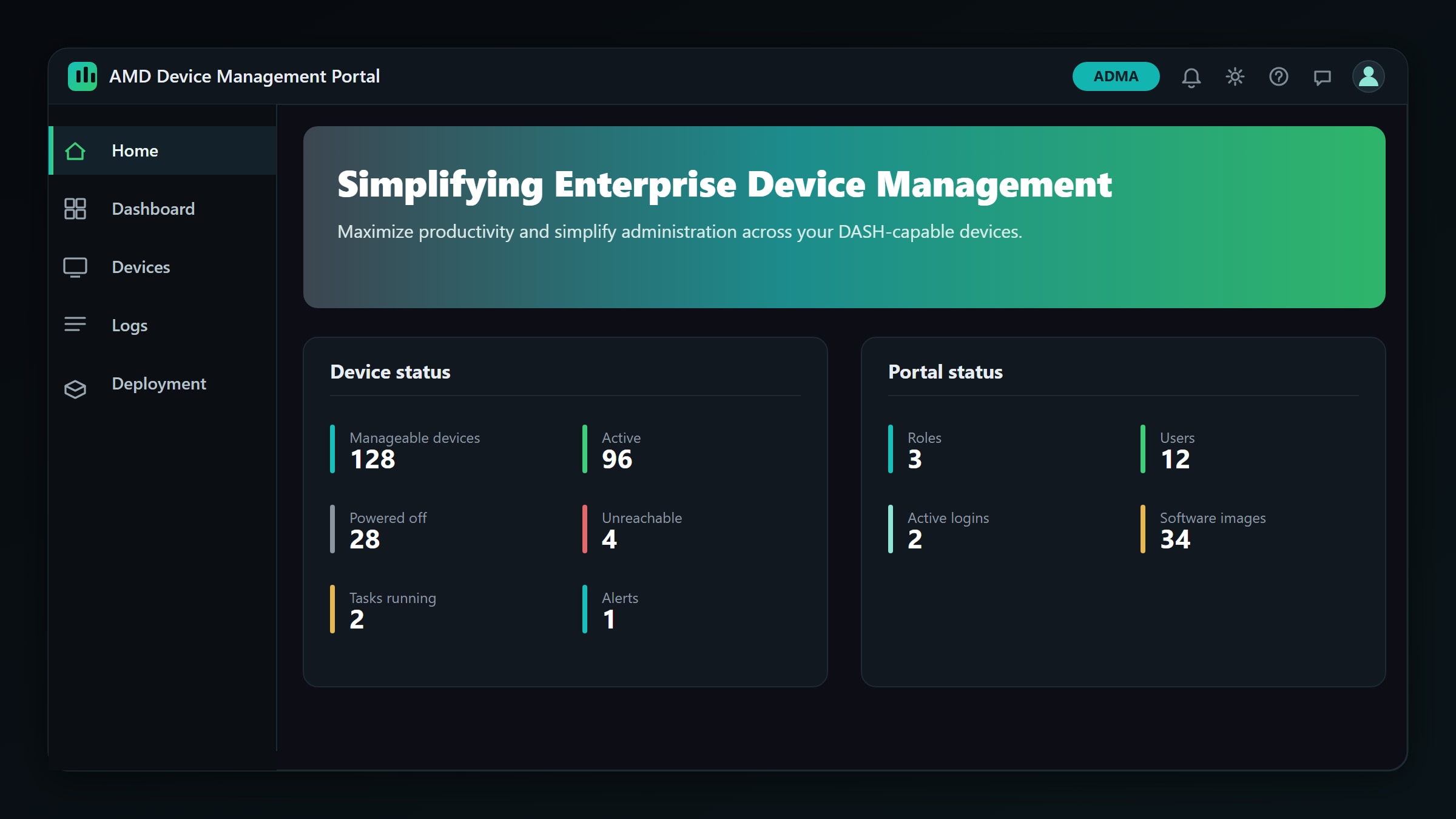
ADMA: When Device Management Meets AI
Oct 23, 2026
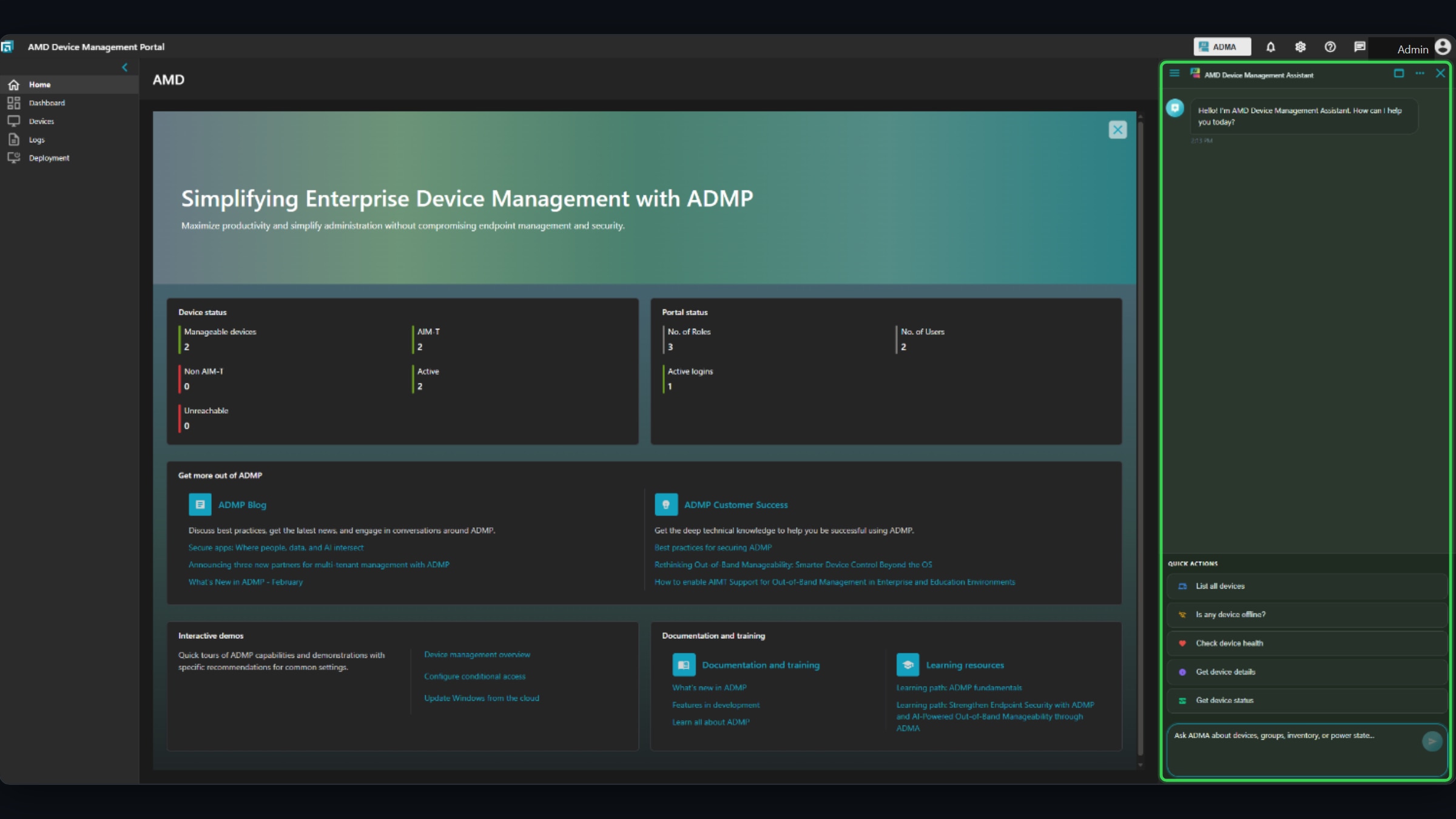
Every other feature in ADMP is something you click. ADMA is something you ask.
The AMD Device Management Assistant (ADMA) is an AI-powered enterprise chat and workflow-automation assistant built directly into ADMP. It lets IT administrators manage their organization's devices in plain natural language. Instead of navigating to a device, opening the Power task, reading the supported states, selecting one, and clicking Apply, you type what you want to happen, and ADMA works out the steps and runs them. Across one machine or hundreds.
This post is a tour of what ADMA can do, how it's built, the kinds of requests it handles, and how to configure it in ADMP 4.0.
ADMA lives in a panel on the right of the portal; open it from anywhere and start asking.
The One-Line Version
ADMA is an AI assistant that understands natural language, runs on top of ADMP, can act on one device or many at once, performs the sequence of operations needed to satisfy a request, and can pull specific facts out of a device's DASH profile.
The important word is automation. ADMA doesn't just look things up—it reasons about a request, breaks it into steps, and executes them, pausing for your confirmation where it matters.
Under the Hood: How ADMA is Built
A LangGraph-Based Architecture
ADMA uses LangGraph as its core orchestration framework, which lets it separate reasoning from execution. The Large Language Model (LLM) acts as the cognitive engine — it handles the high-level decision-making and reasoning. LangGraph is the backbone that structures everything around it: the execution flow, response generation, error handling, and automated retry logic.
Because LangGraph manages stateful, multi-actor workflows through a cyclical graph structure, ADMA can stay coherent across multi-step work and scale to orchestration tasks spanning thousands of devices — without you scripting any of the steps.
Chat History That Remembers
ADMA keeps per-user chat history. You can create, continue, rename, and delete chat sessions, and ADMA automatically supplies a summarized version of the conversation back to the LLM so follow-up questions stay in context. You can say "restart it" after a previous answer and ADMA knows what "it" refers to.
Live Workflow Streaming
Longer requests don't leave you staring at a spinner. ADMA streams workflow progress in real time, so you can see which stage it's currently working through—a clearer, more transparent view of what the assistant is doing on your behalf.
What You Can Ask It To Do: The Workflows
Behind the single chat box, ADMA routes each request to the workflow best suited to it. You don't pick the workflow; you just describe the goal. Here are the seven.
1. Filter — narrow a large inventory
Filter devices by hardware and software attributes: memory, CPU, manufacturer, sensor availability, BIOS properties, power state, and more.
"List all Dell devices with processor speed > 3 GHz and running Windows"
"Show all Dell devices" → "From these, how many have Windows OS?"
"List powered-off systems"
"Show systems with critical sensors or degraded fans"
"List HP devices that are powered off and running Windows"
2. Action — operate on a single device
Direct operations on one device: check or change power state, discover and add a device, remove a device, group operations, KVM, and ownership.
"Is server01 powered on?" → checks power status
"Restart server01" / "Reboot server01" → changes power state
"Add device 192.168.1.100" → discovers and adds it to the ADMP inventory
"Remove server01" → removes it from inventory
"Create a group called Test Servers" / "Move server01 to Production group"
"Start KVM on server01" → returns an amdkvm:// link to launch the session
"Boot to BIOS via KVM on server01"
"Unown server01" → removes provisioned ownership of the device
3. Bulk — operate on many devices at once
Run an operation across multiple devices together, referencing a stored Selection ID (see Selection management below) rather than re-listing them.
"Restart them all" → restarts every selected device
"Move them to Production" → moves the selected devices to the Production group
"Delete those systems" → removes all selected devices from the portal
Bulk operations have guardrails built in. ADMA asks for explicit confirmation when:
a power operation would affect more than 50 devices, or
a removal would affect more than 10 devices.
4. Enumerate — read a device's profile
Retrieve detailed hardware and software profile information for a specific device. ADMA supports 38 DASH enumeration profiles, covering everything from BIOS and processor to network ports and cache.
"What is the BIOS version on server01?"
"Show processor information for server01"
"What IP address does xyz have?" / "Is DHCP enabled on server01?"
"List recent log records on server01"
"Show battery status of xyz"
"What disk drives are installed in server01?" / "List users on server01"
"Show network ports on server01" / "What is the L1 cache size of server01?"
"Is the fan healthy?"
5. Freeform Agent (ReAct loop) — investigate and reason
For complex, investigative, comparative, or conditional requests, ADMA runs a reasoning loop that dynamically chains multiple tools and steps.
"If server01 is unhealthy, restart it" → a health check followed by a conditional restart
"Which device has more memory, server01 or server02?" → comparative analysis across enumerations
"Check health of all devices in Production" → a filter followed by a health enumeration
"Diagnose server01" / "Investigate why server01 is slow" → open-ended, multi-step analysis across several DASH profiles
6. Planning (meta layer) — plan first, then execute
When a request spans several workflows, ADMA builds an execution plan and shows it to you for confirmation before doing anything.
"Find all Windows 11 devices and move them to the Win11 group" Plan:
Filter Windows 11 devices
Create the Win11 group if it doesn't exist
Move all filtered devices into the group
"List Dell devices and restart them" Plan:
Filter Dell devices
Generate device selection
Restart selected devices
7. Greeting — just conversation
Simple conversational turns ("Hi", "Hello", "Good morning") get an appropriate reply — no tools, no API calls.
Behaviors Shared Across Every Workflow
Three behaviors apply no matter which workflow handles your request:
Validation and interrupt. If something mandatory is missing—a hostname, a device identifier, a group name — ADMA pauses and asks for it rather than guessing.
Retry and recovery. If a hostname doesn't match, ADMA attempts fuzzy matching and autocorrection. When several devices could match, it presents the candidates and lets you choose.
Selection management. Large filter results are persisted as Selection IDs (for example, SEL-xxx). Bulk operations then reference the stored selection instead of re-running the filter—which is what makes "restart them all" work after a "list" command.
Why It Matters
It collapses menu depth into a sentence. ADMP's capabilities are powerful but many—Power, Boot, Health, KVM, Alerts, Inventory, Software. ADMA means you don't have to remember which profile lives where. You state intent; it navigates.
It scales an admin's attention. A filter that produces a selection, a bulk action over that selection, a conditional health-then-restart—these are single sentences, not click-by-click procedures repeated per machine.
It lowers the skill floor. A newer technician who knows what needs to happen ("reboot the machines that didn't check in") can act without memorizing the exact sequence of profiles and buttons.
It keeps the guardrails. ADMA runs through ADMP—the same discovery, the same authentication, the same activity logging, and the same role model. Confirmation prompts gate large or destructive operations, plans are shown before they run, and every action ADMA performs is a real ADMP operation recorded in the same audit trail. It's a faster way to drive the portal, not a way around it.
Setting up ADMA in ADMP 4.0
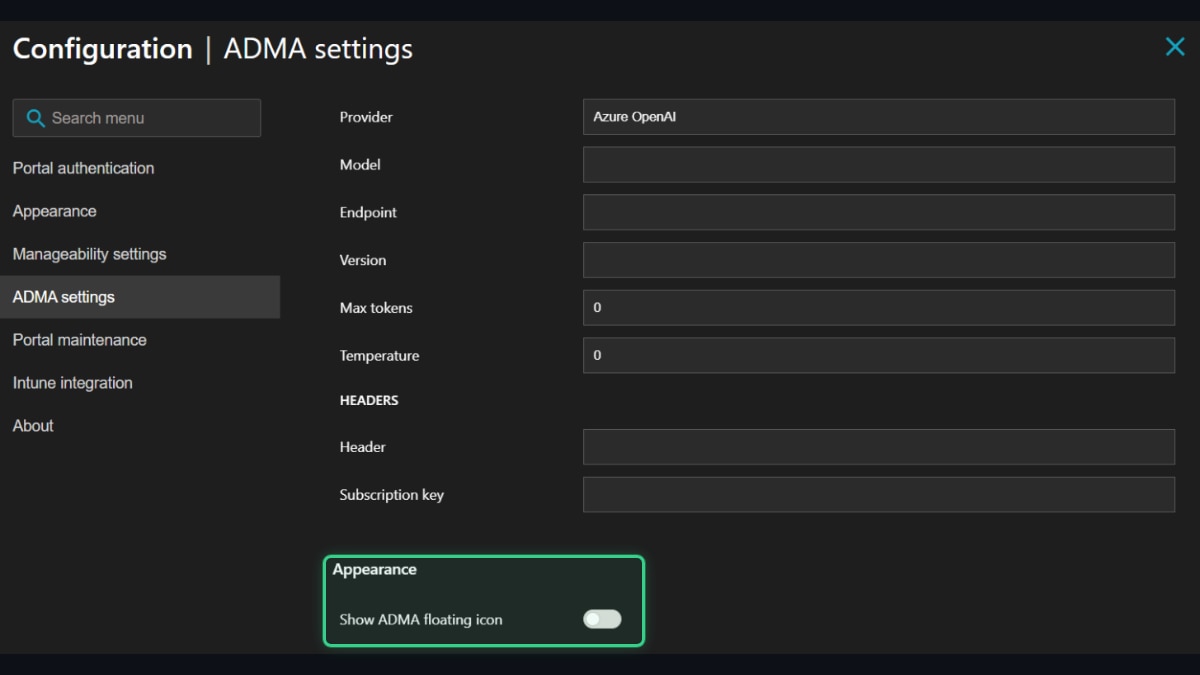
ADMA is configured from the ADMA settings page under Settings, which gives you full control of the language model behind the assistant. The model configuration itself—Models and Headers—carries over from 3.0; the one thing 4.0 adds here is the floating-icon toggle. Configure it in three parts.
1. Models
Point ADMA at the model you want to use:
Field | What it sets |
Provider | The AI provider backing ADMA |
Model | The specific model to use |
Endpoint | The API endpoint ADMA calls |
Version | The model/API version |
Max Tokens | The response length ceiling |
Temperature | How deterministic vs. creative the responses are |
Need your own model? Select Custom from the Provider or Model dropdown and enter a custom value, so ADMA can run against an in-house or preferred endpoint rather than only a built-in option.
2. Headers
Under Headers, provide the Header and Subscription key—the credentials your model endpoint requires for authenticated calls.
3. Appearance 🆕
Use the Show ADMA Floating Icon toggle to show or hide ADMA's floating icon. This toggle is the one new in 4.0 addition to the ADMA settings page. Leave it on and the assistant is reachable from anywhere in the portal with a single click; turn it off for a cleaner view.
Then click Apply to save (or Discard changes to revert). Once configured, start with something small—a single-device power-state query is a good first test—and work up to filters, selections, and bulk requests as you get a feel for how ADMA plans.
A tuning tip: because you control Max Tokens and Temperature, you can tune ADMA for your environment—a lower temperature for crisp, deterministic operational answers, and a token ceiling that suits your model's cost and latency. Start conservative and adjust.
The Takeaway
Most manageability tools make you translate an intent ("recover that machine") into a procedure. ADMA does that translation for you—reasoning about the request with an LLM, structuring and running the steps through LangGraph, remembering context across the conversation, streaming progress as it goes, and pausing for confirmation before anything large or irreversible.
ADMP 4.0 keeps that assistant one click away, and its ADMA settings page lets you bring your own model, authenticate it your way, and tune it to your environment. It's the difference between operating the portal and directing it—and it's built right in.
Footnotes
ADMA capabilities described in this blog are based on ADMP 4.0 at the time of publication. Available features, supported workflows, and AI responses may vary depending on user permissions, model configuration, deployment environment, and future software updates. Administrators should review and validate actions before execution in accordance with organizational policies.
Contributors

Related Blogs
-
ADMP_4_0_Roles_Explained_Admin_Standard_Read_Only
Learn how to assign Admin, Standard, and Read-Only roles in ADMP 4.0 and build a secure least-privilege deployment from day one.
November 25, 2026
-
Beyond Counters: Instruction-Level GPU Hotspot Profiling with PC Sampling in ROCprofiler-SDK — ROCm Blogs
A hands-on guide to PC Sampling in ROCprofiler-SDK: find GPU kernel hotspots, diagnose stalls, and validate a real GEMM optimization.
November 25, 2026
-
Introducing xDiT for ComfyUI — ROCm Blogs
Learn how to set up xDiT for ComfyUI and generate images and videos on AMD GPUs with tested presets and a visual multi-GPU workflow.
November 24, 2026
-
Introducing the AMD Global Physical AI Behavioral Safety Challenge
Discover the AMD Global Physical AI Behavioral Safety Challenge, inviting developers to build AI models that help robots interact safely with people.
November 23, 2026
-
Train a Walking Robot with Genesis on AMD GPUs — ROCm Blogs
Learn how to run a robotics training example using Genesis and Quadrants on an AMD GPU
November 22, 2026
-
Feeding the Matrix Cores: Assembly FP4 GEMM Kernel Design on AMD Instinct™ MI455X GPUs — ROCm Blogs
Learn how to keep AMD Instinct MI455X matrix cores fed in FP4 GEMM with the right tile, the Tensor Data Mover, pre-shuffled operands and pipelining.
November 22, 2026
-
FlashInfer on ROCm 10.1: The FlashInfer API with Automatic Kernel Routing — ROCm Blogs
Explore the new attention and fused ops in FlashInfer on ROCm: the upstream API, with each call routed to optimized AITER or in-tree HIP kernels.
November 19, 2026
-
From a Text Prompt to a Playable 3D World: World Models, LLM NPCs, and RL on AMD Radeon™ Graphics — ROCm Blogs
Turn a text prompt into a playable 3D world on one AMD Radeon graphics card with ROCm software: a video world model, Gaussian splats, LLM-driven NPCs and an RL agent.
November 19, 2026