

OVERVIEW
What Is AMD Ross™ Agentic AI Assistant
AMD Ross™ is an agentic AI assistant designed to help developers work with AMD Embedded tools using natural-language interaction. It helps developers address common development challenges, including decoding error messages, optimizing designs for performance, power and other characteristics and debugging designs in hardware.
AMD Ross searches trusted AMD knowledge, interacts with supported embedded tools and executes proven workflows to help developers design, debug and optimize systems toward desired quality-of-results (QoR) targets.
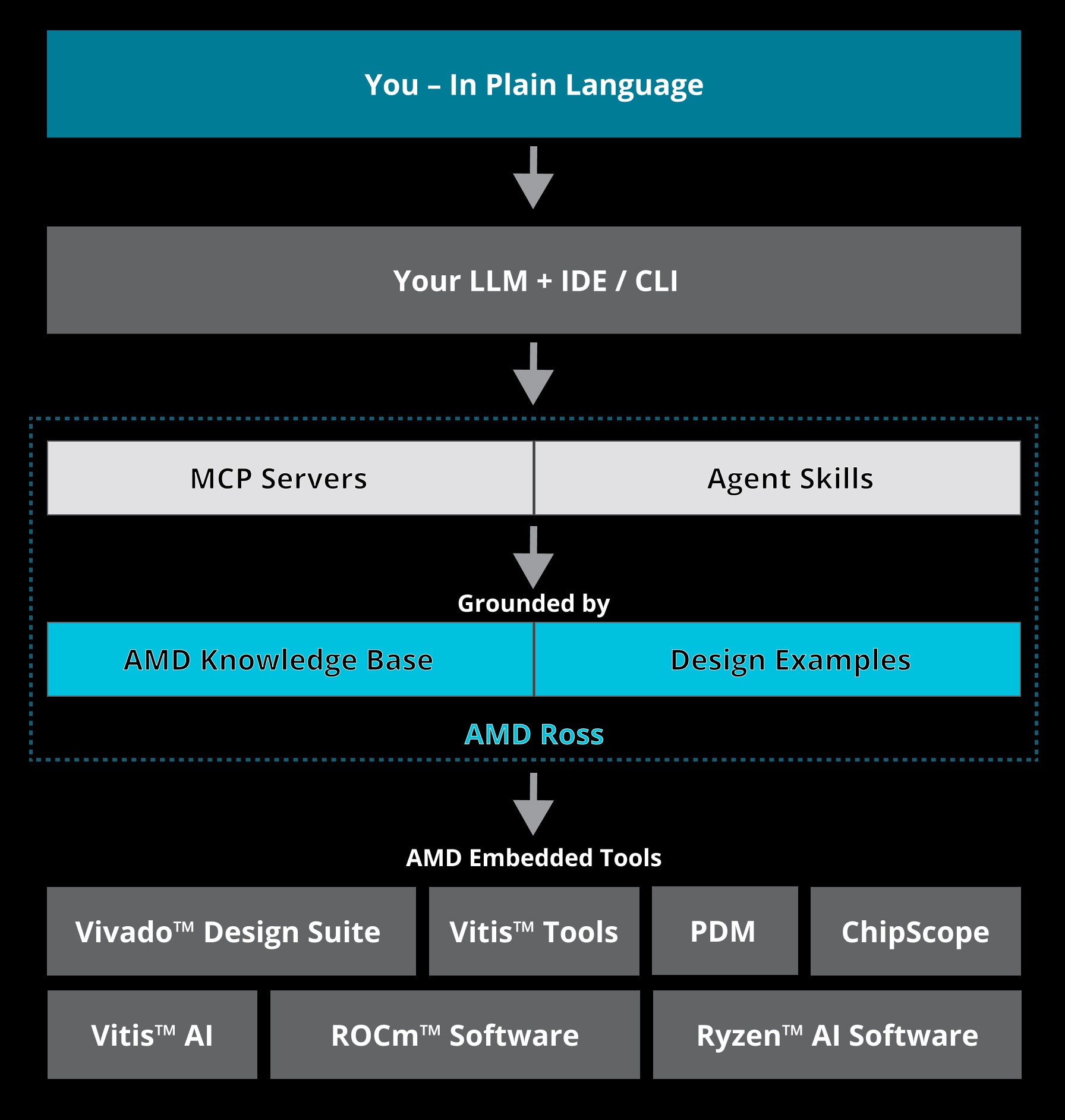
AMD Ross combines four components to support AI-assisted embedded development workflows:
MCP Servers for AMD Embedded Tools
MCP servers connect AMD Ross to supported AMD Embedded tools, enabling natural-language interaction with tool sessions and access to relevant documentation.
AMD Knowledge Base
The AMD knowledge base helps AMD Ross search supported public documentation using retrieval-augmented generation (RAG), with cloud or local access for supported environments.
Agent Skills
Agent skills are expert-authored structured and shareable workflows that guide LLMs through supported design, optimization and debugging tasks using AMD Embedded tools.
Design Examples
Design examples are ready-to-run, tested reference designs that demonstrate how agent skills can be applied to supported development use cases.
Benefits of AMD Ross
AMD Ross combines specialized tool expertise, AMD knowledge and expert-authored agent skills to help developers automate complex embedded development workflows. Reusable, guided workflows along with AMD knowledge help LLMs with the right context, increased accuracy and optimized token usage.
Accelerate Complex Engineering Workflows
Use ready-to-run examples, expert-authored agent skills and standardized MCP servers to automate repeatable tasks and move complex engineering workflows forward.
Scale Expertise Across the Team
Turn expert-authored procedures into reusable agent skills backed by AMD knowledge, helping teams apply proven workflows and development practices more consistently.
Enable End-to-End Development Workflows
Use natural-language interaction across supported stages of embedded development, from hardware design and edge AI implementation to software development and deployment.

See How It Works
Ask any questions. Start simple, go as deep as you want. Each layer builds on the last.
SELECT
Your Own IDE/CLI and Preferred LLM
Use the IDE / CLI of your choice and select the right LLM based on your requirements.
VS Code | Cursor | Devin | Claude Code | Copilot CLI | Codex CLI.
ASK
AMD Knowledge
Real questions. Expert answers. The agent searches across 1000s of authoritative documents and returns grounded, cited answers.
No tool installation needed. Just configure and ask.
EXECUTE
Drive AMD Embedded Tools
Connect to live tool sessions and run commands conversationally. Open projects, check utilization, and read reports without memorizing command syntax.
Access AMD embedded tools through natural language interactions.
AUTOMATE
Skills-Driven Workflows
Skills are expert-authored methodology files that encode the exact commands, parsing strategies, and fix patterns for complete design workflows.
Use skills to analyze, debug, and optimize your design.
Get Started
Get up and running in these simple steps
Before You Begin – Prerequisites:
- Download, install, and license the required AMD tools, including Vivado™ and Vitis™ tools.
- Install a compatible IDE/CLI client, such as VS Code, Cursor, Devin, Claude Code, GitHub Copilot CLI, or Codex CLI.
- Ensure access to your preferred LLM, whether it’s an open-weight or frontier model.
Step 1
Download the MCP servers of your choice.
Sign in with your AMD credentials, then download the MCP server executables for your operating system (Windows® or Linux®).
Step 2
Get agent skills and design examples.
The agent skills covering the different workflows are stored in a GitHub repository. Clone this GitHub repository or download the ZIP file to access agent skills, documentation, and design examples for supported embedded tools.
Step 3
Run Your First Workflow.
Follow the design example and start your agentic AI journey with AMD tools.
Setup Options
Alternative setup for VS code users only:
Download and configuration is a simplified one-step setup. Users can download and install the VS Code extension (.vsix) to access the Vivado MCP server and RAG-enabled AMD knowledge base.
Access AMD Knowledge Database
Air-gapped solution:
To run the agentic AI workflow with Ross and access the AMD knowledge base with no internet connection, deploy the database once with the embedding model, and MCP server, then use it with any answer-generation model that fits your hardware and network policy. Detailed setup guide and related resources available on GitHub.
Resources

Frequently Asked Questions
Supported versions vary by AMD tools:
- Vivado™: All versions
- Vitis™ HLS: Version 2025.2 and later
AMD Ross agentic AI assistant is client-agnostic. You can use any preferred IDE or CLI tool that is compatible with the MCP servers.
No, HLS skills work directly with your source code and HLS project files via standard command-line tools (v++, vitis-run), not MCP.
AMD Ross will have a monthly release cadence. Note that this Ross release will be independent of our usual AMD Vivado/Vitis tool releases.
No additional license is required. You only need the applicable licenses for the AMD tools you use.
A SKILL.md is a structured instruction file that teaches an AI agent how to perform a specific FPGA design task. It contains step-by-step workflows, interpretation guides, and fix recommendations. Agents read these files to gain domain expertise. These skills are located under .claude/skills/ in your workspace.
Skills follow the open Agent Skills standard. You can either extend the existing skills or create your own skills.
*** AI workflows are non-deterministic — results may vary between runs, models, and prompt phrasing.