Enabling AIM-T on Dell AMD PRO BIOS
May 15, 2026
AIM‑T (AMD Integrated Management Technology) is a PC manageability solution designed to enable secure, remote management of AMD PRO PCs. At its core, it brings together a dedicated management processor with tightly integrated hardware, firmware, and software to deliver reliable out‑of‑band control.
With AIM‑T, IT administrators gain the ability to monitor, diagnose, and manage systems remotely, even when the operating system is unavailable. Built on open standards, it ensures interoperability and flexibility, while seamless support across leading wired and wireless network solutions enables consistent, dependable manageability in diverse enterprise environments.
Dell Platforms supporting AIM-T
Dell devices featuring Ryzen™ PRO 8000 Series and 200 Series processors, as well as the latest Ryzen™ AI PRO processor-based models such as:
- Dell PRO 14/16 with Ryzen PRO 200 and Ryzen AI PRO 300 series
- Dell PRO Plus 13/14/16 with Ryzen PRO 200 and Ryzen AI PRO 300 series
- Dell PRO Max 14/16 with Ryzen AI PRO 300 series
- Dell PRO Micro/Slim/Tower Desktop with Ryzen PRO 8000 series
Update to the latest BIOS for your AMD PRO-based Dell notebook/desktop.
To download the latest Dell BIOS updates, visit the official Dell Support website and search using your system's product model.
Alternatively, use Dell Command | Update or Dell SupportAssist to update the BIOS.
Step-by-Step: Enabling AIM-T in the BIOS
1. Enter the BIOS Menu: Use one of the following methods
a) Type "UEFI" in the Windows search bar, then select "Change advanced startup options" and click "Restart now"
b) On Windows, open Command Prompt as Administrator and run the following command:
shutdown /r /fw /t 0
This instructs Windows to reboot directly into UEFI/BIOS setup on the next restart.
c) Start with the system powered down. As you power the device on, repeatedly press the F2 key when the Dell logo appears.
This interrupts the standard boot sequence and opens the Dell BIOS Setup.
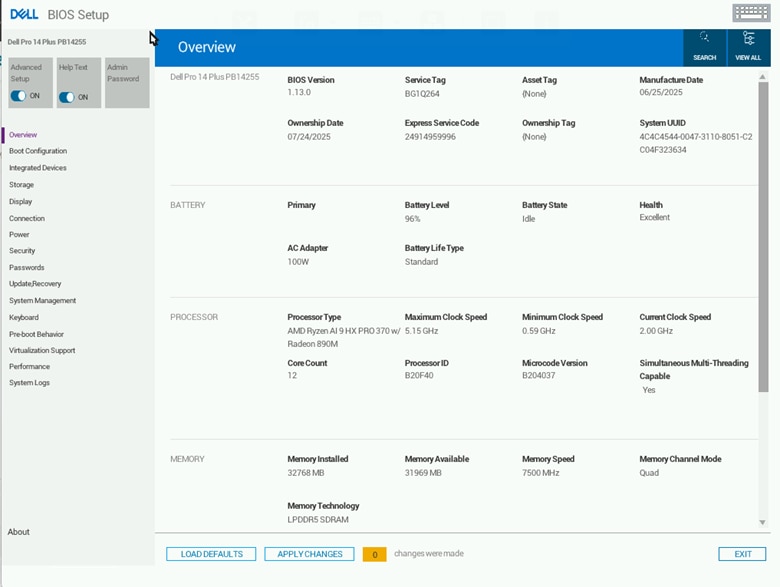
2. In the BIOS Setup screen, Scroll down to select the System Management option.
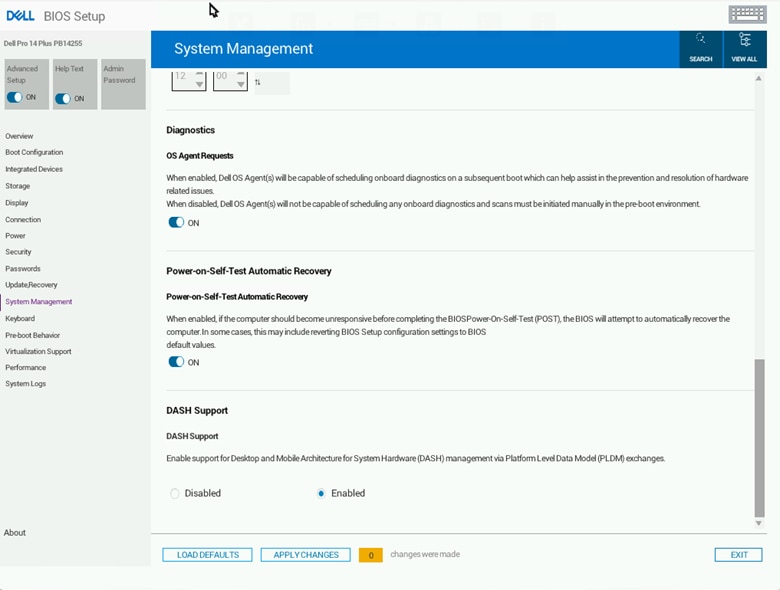
3. Scroll down to see the DASH Support option.
Set DASH Support to Enabled.
4. Click Apply Changes and then Exit. The system will reboot to apply the configuration.
Troubleshooting: If these AMD management options don't appear in the BIOS, verify the device has a "PRO" series processor.
To verify that your device has a "PRO" series processor, check the product label on your Dell device for the model name.
In Windows, you can also use one of these options to confirm the processor name includes 'PRO' (e.g., AMD Ryzen 7 PRO 7840U)
- System Information - check 'Processor'
- Device Manager - expand 'Processors'
Verification
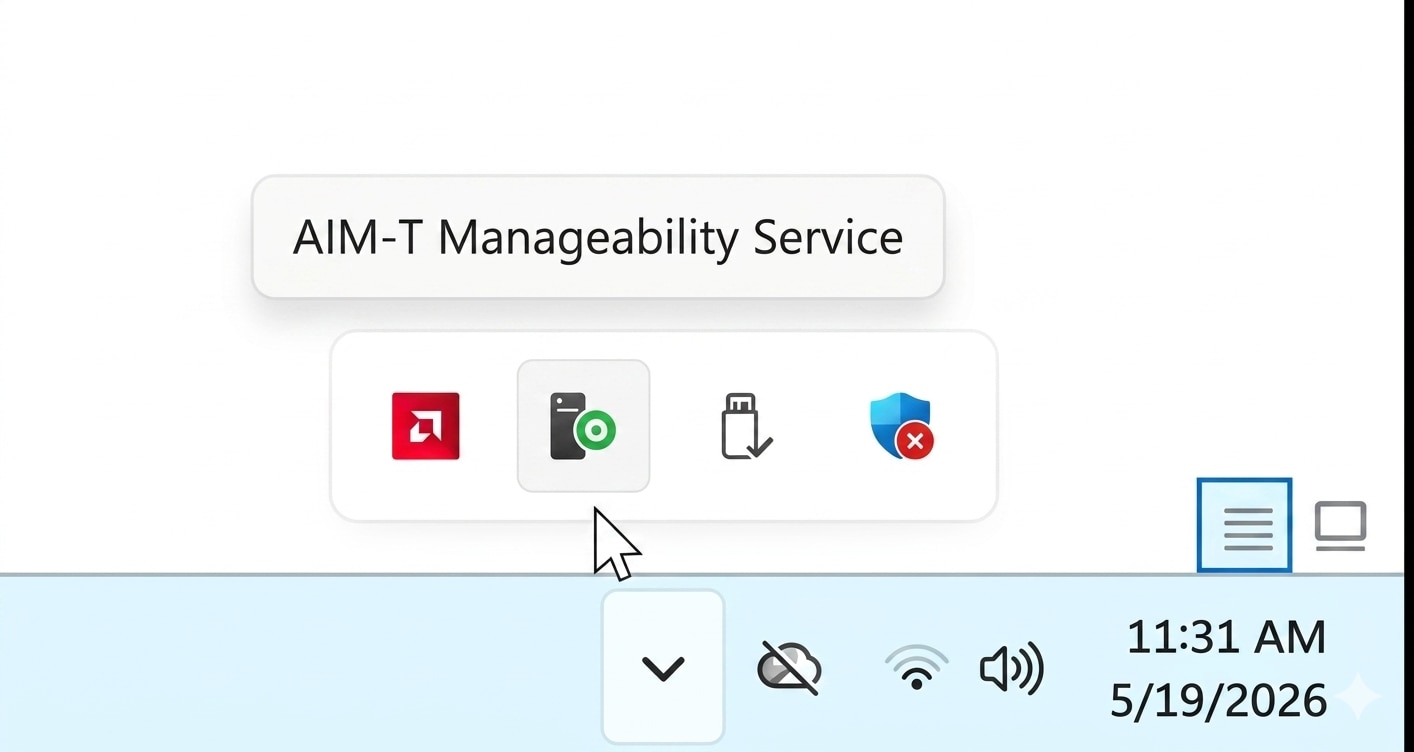
To verify that BIOS settings are enabled, check the AIM-T Manageability Service in the system tray.
The Manageability status should display "ON" when properly configured.
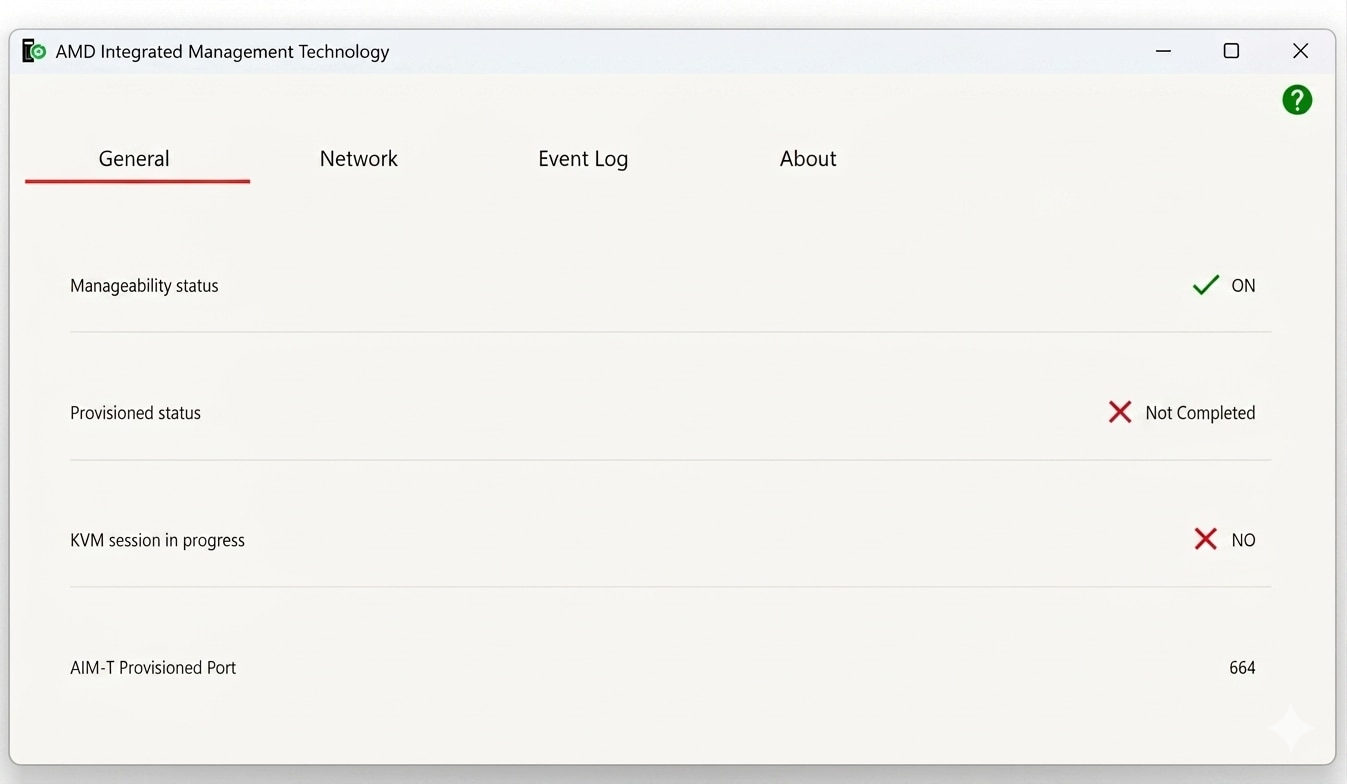
The Manageability status will show "OFF" in two scenarios:
- Before enabling the BIOS settings outlined on this page
- If BIOS settings were not applied/saved correctly.
If you see the "OFF" status, repeat the configuration steps above to enable the settings.
To save the settings, ensure that you use the correct options containing "Save" and "Apply Changes" to properly save your changes before leaving the BIOS menu.
Next Steps
In order to use remote manageability, the system must be provisioned.
Use the AMD Provisioning Tool, to provision and deploy the provisioning package across all your devices.
For more information about AIM-T (AMD Integrated Management Technology), visit the AMD PRO Manageability Tools Page.
Contact dashsupport@amd.com for queries regarding AMD Manageability.
Footnotes
AIM-T (AMD Integrated Management Technology) is available only on AMD PRO.
AIM-T requires both an AMD PRO processor and a compatible WLAN module with AIM-T support, such as
- Qualcomm WCN6856, Wi-Fi 6E NFA725A, Wi-Fi 7 NCM825, NCM835
- MediaTek RZ616 and RZ717/MT 7925
- Realtek WLAN - 8852CE – Wi-Fi 6, Realtek WLAN - 8922AE – Wi-Fi 7
Footnotes
AIM-T (AMD Integrated Management Technology) is available only on AMD PRO.
AIM-T requires both an AMD PRO processor and a compatible WLAN module with AIM-T support, such as
- Qualcomm WCN6856, Wi-Fi 6E NFA725A, Wi-Fi 7 NCM825, NCM835
- MediaTek RZ616 and RZ717/MT 7925
- Realtek WLAN - 8852CE – Wi-Fi 6, Realtek WLAN - 8922AE – Wi-Fi 7

Related Blogs
-
-
Kimi K3 on AMD Instinct GPUs with TokenSpeed
TokenSpeed delivers fast, agentic LLM inference on AMD Instinct™ MI355X GPUs, with optimized kernels and leading Kimi K3 performance.
October 09, 2026
-
scikit workloads with AOCL Data Analytics
Accelerate supported scikit-learn workloads with AOCL-Data Analytics while keeping your existing Python code and familiar scikit-learn APIs.
October 09, 2026
-
Completing the GPU Performance Picture: Understanding TAF Alongside Peak FLOPs and MAF — ROCm Blogs
Learn how Typical Attained FLOPs complements Peak FLOPs and Max-Achievable FLOPs, including the methodology and MI325X results
October 05, 2026
-
ROCm 10.1: Breaking the Data-Movement Bottleneck — ROCm Blogs
ROCm 10.1 targets the data-movement bottleneck with AMD Infinity Storage, NUMA-aware memory, and a modernized stack.
October 04, 2026
-
MoRI UMBP Empowers AMD Instinct GPUs
See how UMBP, MoRI and SGLang optimize KV cache reuse to boost AMD Instinct™ MI355X GPU agentic AI performance and cost efficiency
October 01, 2026
-
Rightsizing Cloud Workloads on AMD Part 1 Foundations
Learn the foundations of rightsizing cloud workloads on AMD: define goals, choose the right time, classify workloads, and select relevant benchmarks.
October 01, 2026
-
MORI CCO
MORI CCO enables compute-communication overlap on AMD Instinct™ GPUs. Build faster distributed inference and training kernels with device-side communication.
September 29, 2026