Accelerate your scikit-learn workloads with AOCL Data Analytics
Oct 09, 2026

If you use scikit‑learn for classical machine learning, performance can become a bottleneck long before model complexity does. Hyperparameter sweeps, cross-validation, and repeated retraining can turn otherwise straightforward workflows into time-consuming CPU jobs.
Optimizing the algorithm itself can help, but it can also mean rewriting code, adding dependencies, or disrupting a workflow that already works. What if you could accelerate your scikit-learn workloads without changing your Python code?
AOCL‑Data Analytics provides optimized implementations for a broad set of scikit-learn algorithms, allowing developers to accelerate supported workloads while continuing to use familiar scikit-learn APIs.
Drop‑in acceleration: no code changes
Consider a standard scikit‑learn support vector classifier, using the stock API:
		from sklearn import svm
from sklearn.datasets import make_blobs
import numpy as np

# Generate some synthetic data
X, y = make_blobs(n_samples=10000, centers=2, cluster_std=2)

# Compute SVC
clf = svm.SVC(kernel="linear", C=1000)
clf.fit(X, y)
On an AMD EPYC™ 9755 processor (Turin), fitting this model takes approximately 13.8 seconds.
Now let’s compare two ways of running the same script:
python svm.py
versus
python -m aoclda.sklearn svm.py
In the second call, the AOCL‑Data Analytics scikit‑learn patch has been enabled, and the same computation takes 1.8 seconds. This is a 7.5x1 speedup with no changes to the Python code, model configuration, or data preprocessing.
Where the performance comes from
Under the hood, the AOCL-Data Analytics scikit-learn patch redirects supported scikit-learn operations to optimized native implementations designed for AMD EPYC Server CPU architectures. You continue to use the familiar scikit-learn APIs while AOCL-Data Analytics handles the underlying computation.
AOCL‑Data Analytics provides optimized implementations for many scikit‑learn algorithms, including clustering (k‑means, DBSCAN), decision forests, linear models, support vector machines, PCA and nearest‑neighbors methods.
The benchmark figures below summarize the achievable speedups across various workloads.
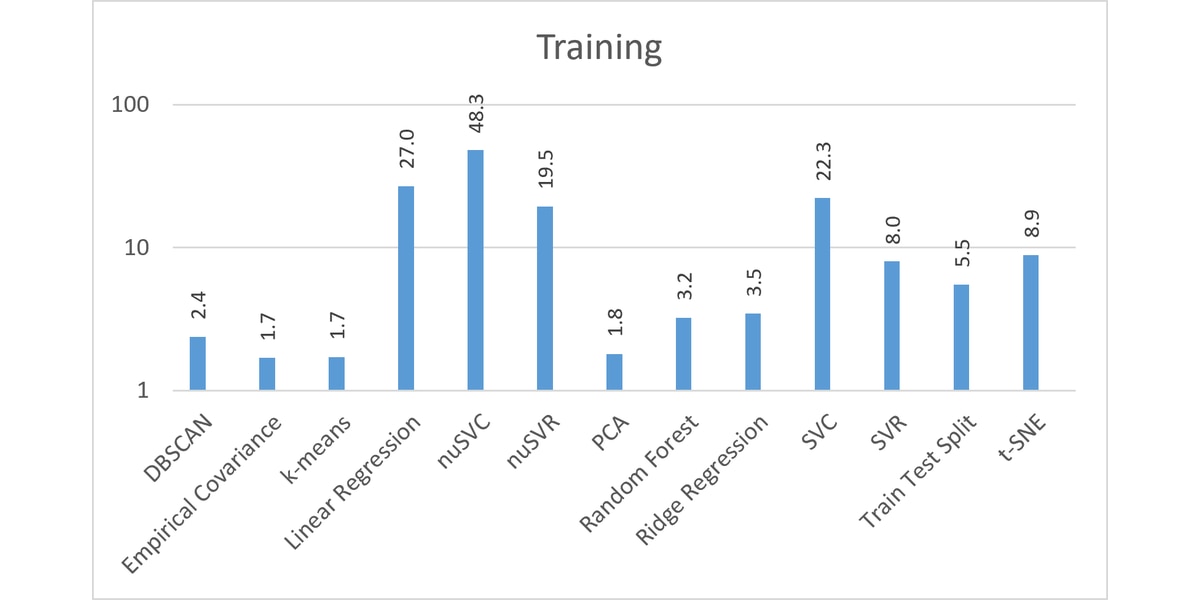
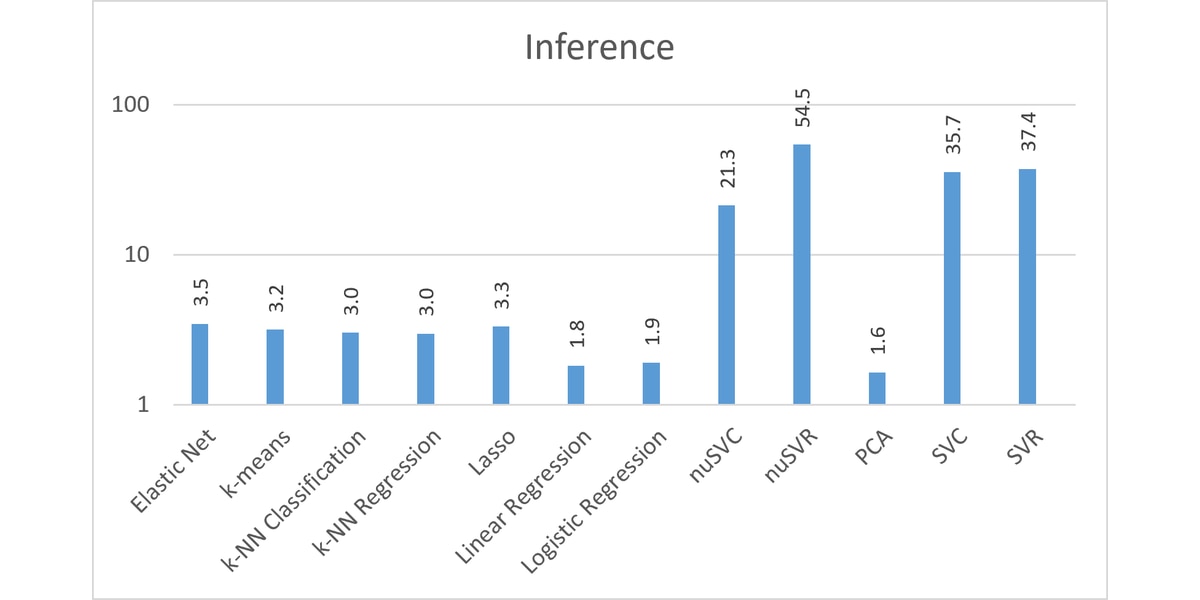
Averaged over all our benchmarks, AOCL-Data Analytics is 2.5x faster than scikit-learn.
Why this matters for real workflows
If you are already comfortable with scikit‑learn, AOCL‑Data Analytics has a lot to offer.
- Faster hyperparameter sweeps: grid searches that took hours may only take minutes now.
- Cross‑validation becomes cheap enough to run aggressively
- You no longer need to train model quality for turnaround time
- Experimentation cycles are quicker
- CPU utilization is better, not just on AMD EPYC systems, but on x86 CPUs more widely.
Beyond scikit‑learn
Although the scikit‑learn layer is the easiest entry point, it is not the only way to access AOCL‑Data Analytics.
For workflows that mix Python prototyping with C++ deployment—or that need functionality not available in scikit‑learn—the library also provides:
- Native Python APIs,
- C and C++ APIs,
- R wrappers.
This gives you access to algorithms that are currently outside of scikit‑learn, such as approximate nearest neighbors, interpolation, and nonlinear least‑squares optimization.
Installation and use
The easiest way to obtain AOCL-Data Analytics is from the Python Package Index:
pip install aoclda
To use the patch, you can simply add -m aoclda.sklearn to your Python call, or add the following lines to the top of your Python script, before your scikit-learn imports:
		from aoclda.sklearn import skpatch
skpatch()
So why not enable the patch for one of your slowest pipelines and measure the difference?
Useful resources
The following links will point you towards our prebuilt binaries (for C/C++ users), our source code and our API documentation.
- AOCL-Data Analytics binaries
- AOCL-Data Analytics source code
- AOCL-Data Analytics documentation
- AOCL-Data Analytics on PyPI
Note that AOCL-Data Analytics is part of a wider suite of AOCL libraries providing optimized numerical libraries for EPYC CPUs. Python users may also be interested in using NumPy and SciPy Python libraries with AOCL.
Footnotes
Footnote
Data measured on July 10 2026.
System Configuration
- AMD EPYC Turin System Model: Supermicro AS-2126HS-TN
- CPU: 2x AMD EPYC 9755 128-Core Processor (256 cores, 512 threads; SMT enabled)
- NUMA: 2 NUMA nodes, one per socket. NUMA auto-balancing enabled
- Memory: 1536 GiB (24x 64 GiB dual-rank x4 DDR5 RDIMMs; 1510.76 GiB OS-visible)
- Disk: 2x 1.92 TB Samsung NVMe SSDs (3.84 TB / 3.49 TiB raw)
- Host OS: Red Hat Enterprise Linux 8.10 (Ootpa)
- Kernel: 4.18.0-553.125.1.el8_10.x86_64
- System BIOS: 1.5, dated 2025-05-12
- System BIOS Vendor: American Megatrends International, LLC.
Footnotes
Footnote
Data measured on July 10 2026.
System Configuration
- AMD EPYC Turin System Model: Supermicro AS-2126HS-TN
- CPU: 2x AMD EPYC 9755 128-Core Processor (256 cores, 512 threads; SMT enabled)
- NUMA: 2 NUMA nodes, one per socket. NUMA auto-balancing enabled
- Memory: 1536 GiB (24x 64 GiB dual-rank x4 DDR5 RDIMMs; 1510.76 GiB OS-visible)
- Disk: 2x 1.92 TB Samsung NVMe SSDs (3.84 TB / 3.49 TiB raw)
- Host OS: Red Hat Enterprise Linux 8.10 (Ootpa)
- Kernel: 4.18.0-553.125.1.el8_10.x86_64
- System BIOS: 1.5, dated 2025-05-12
- System BIOS Vendor: American Megatrends International, LLC.


Related Blogs
-
Two Waves, One Stage Apart: Warp-Pipelining Triton GEMMs on AMD Instinct — ROCm Blogs
Use warp-pipelining to overlap matrix work and data preparation in compute-bound Triton GEMMs on AMD Instinct GPUs.
October 26, 2026
-
Training EAGLE3 Speculative Decoding Draft Models on AMD Instinct MI350X with AMD Quark — ROCm Blogs
Learn how the AMD Quark team trains EAGLE3.1 draft models from scratch on AMD Instinct MI350X GPUs using ROCm, vLLM, TorchSpec, and SPEED-Bench.
October 26, 2026
-
Group-GEMM in XLA: Making Mixture-of-Experts Fast and Memory-Efficient — ROCm Blogs
Learn how to make JAX/MaxText MoE training more efficient with two new OpenXLA Group-GEMM backends for ragged-dot: ROCm hipBLASLt and generic Triton.
October 25, 2026
-
Scaling 3D Gaussian Splatting with Distributed Compute: Why One GPU Is Never Enough — ROCm Blogs
Learn how to scale 3D Gaussian splatting across GPUs with distributed training, RCCL, and real-world optimization tips for AMD Instinct GPUs
October 22, 2026
-
FP8 GEMM Optimization on AMD RDNA™ 4 Architecture — ROCm Blogs
Learn how to port an FP16 GEMM kernel to FP8 on AMD RDNA 4 and use the smaller element size to unlock larger tiles and deeper K slices.
October 22, 2026
-
Introducing rocOpt: GPU-Accelerated Decision Optimization on AMD ROCm — ROCm Blogs
Run large-scale MILP, LP, QP, and vehicle routing problems on AMD Instinct GPUs - introducing rocopt, optimization built for ROCm.
October 19, 2026
-
FP16 GEMM Optimization on AMD RDNA™ 3 and RDNA™ 4 Architectures — ROCm Blogs
Learn how to build an FP16 GEMM kernel with WMMA on AMD RDNA 3 and RDNA 4, one optimization at a time, and approach hipBLASLt performance.
October 15, 2026
-
Completing the GPU Performance Picture: Understanding TAF Alongside Peak FLOPs and MAF — ROCm Blogs
Learn how Typical Attained FLOPs complements Peak FLOPs and Max-Achievable FLOPs, including the methodology and MI325X results
October 05, 2026