Unlocking High-Performance Document Parsing of PaddleOCR-VL-1.5 on AMD GPUs with ROCm Software
Jan 29, 2026

We’re excited to share that AMD achieves Day 0 support for Baidu’s latest PaddleOCR-VL-1.5 model, successfully running it on AMD Instinct™ MI Series GPUs using the AMD ROCm™ software release 7.0. This milestone delivers Day 0 model services for enterprises and developers worldwide, unlocking high-performance document parsing capabilities by leveraging PaddleOCR-VL-1.5’s advanced features and ROCm’s optimized acceleration.
With this release, user can deploy PaddleOCR-VL-1.5 on AMD GPUs from day one, this provides low-latency, and high-throughput document parsing solutions to support mission-critical workflows, while enabling developers to quickly integrate state-of-the-art OCR capabilities into their applications without lengthy adaptation cycles, significantly reducing development and deployment costs.
In this blog, we present a comprehensive guide to help users seamlessly adopt PaddleOCR-VL -1.5 on AMD GPUs. We will first introduce the core strengths of PaddleOCR-VL-1.5, including its SOTA performance and innovative features. Then, we provide dual deployment options—an easy one-click Jupyter Notebook for quick trials and a step-by-step manual setup via Docker for customized workflows. We also detail the implementation of two inference backends (native PaddlePaddle and vLLM) to cater to different production needs, followed by performance comparisons and detailed configuration references.
Brief Introduction to PaddleOCR-VL-1.5
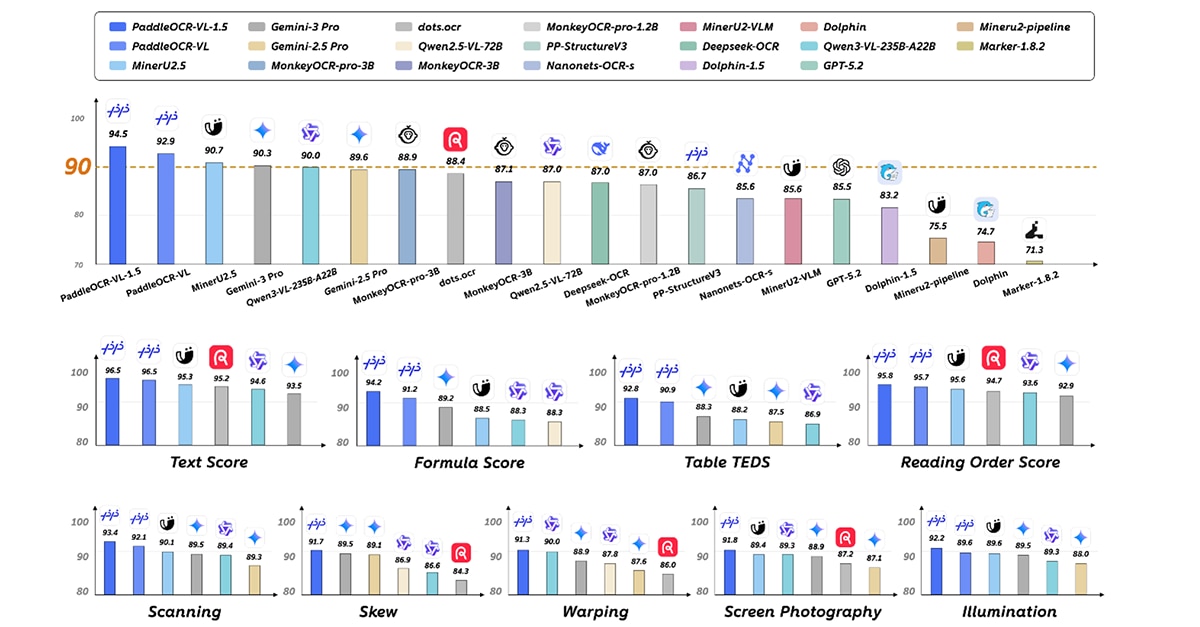
PaddleOCR-VL-1.5 is the latest iteration of the PaddleOCR-VL series. Building on the fully optimized core capabilities of version 1.0, it achieves 94.5% high accuracy on OmniDocBench v1.5, a leading document parsing benchmark, outperforming top global general-purpose LLMs and specialized document parsing models. As the world’s first document parsing model supporting irregular box localization, it delivers superior performance in real-world scenarios such as scanning, tilting, folding, screen capture, and complex lighting, achieving overall SOTA. Additionally, it integrates seal recognition, text detection, and recognition tasks, with key metrics consistently leading mainstream models. If you want to learn about model architecture.
Key capabilities of PaddleOCR-VL-1.5 as Figure1 said include:
- With only 0.9B parameters, it achieves 94.5% accuracy on OmniDocBench v1.5, surpassing the previous SOTA model PaddleOCR-VL. Its table, formula, and text recognition capabilities are significantly enhanced.
- The world’s first document parsing model supporting irregular box localization, which can accurately return polygonal detection boxes in tilted and folded scenarios. It outperforms current mainstream open-source and closed-source models in five scenarios: scanning, folding, tilting, screen capture, and lighting changes.
- Newly added text line localization/recognition and seal recognition capabilities, with all technical indicators refreshing the SOTA in the field.
- Optimized recognition of rare characters, ancient books, multilingual tables, underlines, and checkboxes, and extended support for Tibetan and Bengali recognition.
- Supports automatic cross-page table merging and cross-page paragraph title recognition, solving the discontinuity problem in long document parsing.
Next, let's go for the amazing journey on AMD GPUs! Come and give it a try!
Quickstart: One-click Jupyter Notebook
We prepared a quite easy notebook to get you started PaddleOCR-VL-1.5 model on AMD GPUs. Just click quick start
if you would like to hands-on build the environment and running steps, below sections are all you need.
Environment Setup
Hardware Requirement
- AMD Instinct MI300X GPU (ROCm 7.0 compatible)
Docker Container Deployment
Start with the pre-configured Docker container that includes all necessary dependencies:
		```
docker run -it \
  --device=/dev/kfd \
  --device=/dev/dri \
  --security-opt seccomp=unconfined \
  --network=host \
  --cap-add=SYS_PTRACE \
  --group-add video \
  --shm-size 32g \
  --ipc=host \
  -v $PWD:/workspace \
  ccr-2vdh3abv-pub.cnc.bj.baidubce.com/paddlepaddle/paddlex-paddle-vllm-amd-gpu:3.4.0-0.14.0rc2 \
  /bin/bash
```
The container comes pre-installed with:
- PaddlePaddle (compiled with ROCm support)
- vLLM (ROCm-optimized version)
- PaddleX (for OCR pipeline management)
- PaddleOCR-VL-1.5 model dependencies
Verify the environment after launching the container:
		```
# Check ROCm version
cat /opt/rocm/.info/version

# Verify PaddlePaddle ROCm support
python -c "import paddle; print('Paddle ROCm compiled:', paddle.is_compiled_with_rocm())"

# Check GPU detection
rocm-smi
```
Get Started hands-on
Running PaddleOCR-VL with Native Backend on AMD GPU
The native backend uses PaddlePaddle’s built-in inference engine for straightforward deployment.
1. Run inference on your document image:
Download the test image by
		```
wget -q https://paddle-model-ecology.bj.bcebos.com/paddlex/imgs/demo_image/general_ocr_002.png -O /tmp/test_ocr.png
```
2. Change to the PaddleX directory where models are located
		```
cd /opt/PaddleX
```
3. Create the inference.yml file required for native backend
		```
cat > checkpoint-5000/inference.yml << 'EOF'
Global:
  model_name: PaddleOCR-VL-1.5-0.9B
EOF
```
4. Create the native backend pipeline configuration
		```
cat > PaddleOCR-VL-native.yaml << 'EOF'
pipeline_name: PaddleOCR-VL

batch_size: 64
use_queues: True
use_doc_preprocessor: False
use_layout_detection: True
use_chart_recognition: False
format_block_content: False
merge_layout_blocks: True

SubModules:
  LayoutDetection:
    module_name: layout_detection
    model_name: PP-DocLayoutV3
    model_dir: ./layout_0116
    batch_size: 8
    threshold: 0.3
    layout_nms: True

  VLRecognition:
    module_name: vl_recognition
    model_name: PaddleOCR-VL-1.5-0.9B
    model_dir: ./checkpoint-5000
    batch_size: 4096
    genai_config:
      backend: native
EOF
```
5. Then run inference with native backend
		```
paddlex --pipeline PaddleOCR-VL-native.yaml --input /tmp/test_ocr.png
```
Running PaddleOCR-VL with vLLM Backend on AMD GPU
The vLLM backend provides significant performance improvements through optimized batching and inference acceleration, recommended for production environments.
1. Verify the server status:
		```
curl http://localhost:8118/v1/models
```
Expected response:
		```
{"object":"list","data":[{"id":"PaddleOCR-VL-1.5-0.9B","object":"model"}]}
```
2. Execute inference with the vLLM backend
Download the test image by
		```
wget -q https://paddle-model-ecology.bj.bcebos.com/paddlex/imgs/demo_image/general_ocr_002.png -O /tmp/test_ocr.png
```
3. Change to the PaddleX directory where models and config are located
		```
cd /opt/PaddleX
```
4. Fix the pipeline_name in the existing vllm yaml (required for CLI compatibility)
		```
sed -i 's/pipeline_name: PaddleOCR-VL-1.5/pipeline_name: PaddleOCR-VL/' PaddleOCR-VL-vllm.yaml
```
5. Then run inference with vLLM backend!
		```
paddlex --pipeline PaddleOCR-VL-vllm.yaml --input /tmp/test_ocr.png

```
Performance Benchmarking
The vLLM backend is highly recommended for production deployments due to its superior performance, especially when handling large volumes of documents. Both backends maintain PaddleOCR-VL-1.5’s SOTA accuracy while leveraging AMD GPU hardware acceleration.
Backend |
Typical Latency per Image |
Key Advantages |
Native (Paddle) |
~2-5 seconds |
Simple deployment, no additional server setup |
vLLM |
~0.5-1 second |
Optimized throughput, lower latency for batch processing |
Configuration Reference
This section will explain the key config in `PaddleOCR-VL-vllm.yaml` if you’re interested in the yaml file you input.
Key Pipeline Configuration
Parameter |
Description |
Default Value |
pipeline_name |
Unique identifier for the pipeline |
PaddleOCR-VL-1.5 |
use_layout_detection |
Enable document layout analysis |
True |
use_doc_preprocessor |
Enable preprocessing (e.g., image enhancement) |
False |
Parameter |
Description |
Default Value |
use_chart_recognition |
Enable chart element recognition |
False |
merge_layout_blocks |
Merge adjacent layout elements |
True |
batch_size |
Number of documents processed in parallel |
64 |
VLRecognition Module Options
Parameter |
Description |
model_name |
Model identifier (PaddleOCR-VL-1.5-0.9B) |
model_dir |
Path to pre-trained model weights |
genai_config.backend |
Inference backend (native or vllm-server) |
genai_config.server_url |
vLLM server endpoint (for vllm-server backend) |
vLLM Server Configuration
Parameter |
Description |
Default Value |
--model_name |
Name of the model to serve |
Required |
--model_dir |
Path to model checkpoint directory |
Required |
--backend |
Inference backend (vllm, fastdeploy, sglang) |
vllm |
--host |
Server host address |
|
--port |
Server listening port |
8000 |
With this setup in `PaddleOCR-VL-vllm.yaml` , users can now leverage PaddleOCR-VL-1.5’s powerful document parsing capabilities with the ROCm 7 software on AMD GPUs, enabling efficient and accurate processing of diverse document types across industries.
Model Download Link: https://huggingface.co/PaddlePaddle/PaddleOCR-VL-1.5
Conclusion
With Day 0 support for PaddleOCR-VL-1.5 on the AMD GPUs, AMD continues to strengthen its commitment to delivering cutting-edge AI capabilities and optimizing the ROCm software ecosystem for developers and enterprises. This integration combines PaddleOCR-VL-1.5’s SOTA document parsing capabilities—from irregular box localization to multilingual support—with AMD Instinct MI300X’s powerful hardware and ROCm 7 optimized acceleration, creating a robust, efficient solution for real-world document processing workflows. Whether for rapid prototyping via the one-click Jupyter Notebook or large-scale production deployment with the vLLM backend, users can fully unlock the potential of both technologies without compromising on accuracy or performance. Moving forward, AMD will remain focused on expanding Day 0 support for leading AI models, empowering users across industries to build innovative, high-performance AI applications with ease.

Related Blogs
-
From LEAP 2026: Advancing AI Across the Middle East
At LEAP 2026, AMD’s role helping build open AI infrastructure and turn investments into measurable business and economic value was on display.
September 09, 2026
-
Iteratively Tuning hipBLASLt TensileLite Kernels: A Smaller Search, a Faster Kernel — ROCm Blogs
Learn why a small iterative search beats a big one-shot sweep for hipBLASLt TensileLite kernels, in less time and with no risk of regression.
September 08, 2026
-
From Device to Cloud: Routing AI for Trustworthy Digital Journeys
F-Secure and AMD Silo AI are building adaptive AI routing from device to cloud to keep agentic digital journeys private, safe, and trustworthy. Learn how.
September 08, 2026
-
Efficiently Serving NVFP4 Models on AMD Instinct™ MI350X/MI355X Accelerators via Online NVFP4 to Quark MXFP4 Requantization — ROCm Blogs
Serve NVFP4 models on MI350X/MI355X via SGLang's online NVFP4 to MXFP4 requantization: no preprocessing, minimal accuracy impact, native throughput.
September 07, 2026
-
veRL on AMD: Production-Ready RL Post-Training on ROCm — ROCm Blogs
Run veRL RL post-training on AMD Instinct GPUs with a turnkey ROCm container, AITER-accelerated rollout, and validated accuracy on MI300 and MI355.
September 07, 2026
-
Agentic Flow with AMD PACE
AMD PACE evolves into an agentic AI orchestrator, enabling deterministic execution, flexible deployment, custom LangGraph agents, and optimized tool ops.
September 03, 2026
-
Enabling DeepSeek-V4-Flash Training on AMD Instinct MI355X GPUs with Primus — ROCm Blogs
DeepSeek-V4-Flash training on AMD Instinct GPUs with Primus: model architecture introduction, performance projection, kernel optimizations, and how to reproduce.
September 02, 2026
-
AMD Ryzen™ AI Powers On-Device Voice Chat Moderation
CtrlVox uses the NPU in AMD Ryzen AI processors to moderate toxic voice chat in real time, on-device, with no cloud and no frame-rate hit.
August 31, 2026