Article Number: GPU-131
Last Updated: October 30th, 2026
Overview
The AMD Auto-detect and Install tool uses the AMD Software Installer to check your PC for compatible AMD Radeon™ Series Graphics, AMD Ryzen™ Chipsets and the Windows® version and downloads the latest supporting AMD drivers for you to install directly on your PC.
This tool is designed for systems running:
- Windows® 11 version 21H2 and later
- Windows® 10 64-bit version 1809 and later
Note:The steps outlined below are based on AMD Software: Adrenalin Edition 25.5.1 (Default Install) with an AMD Radeon™ RX 9070, and the screenshots used are for illustrative purposes only. Depending on your system configuration, some options and settings may not be available to you or exactly as shown in the examples provided.
Note: For legacy graphic products, please use the product selector to locate and download the last supported driver. Information on how to use the product selector is available here.
Download and Setup
AMD Auto-detect and Install tool is available on AMD Drivers and Support and regularly updated to support the latest AMD Software Package releases. It is recommended to download the latest version from AMD Drivers and Support then run setup by following these steps:
- After the download has completed, open the save folder and double-click the file to begin setup.
- Click Install to unpack the setup files. Note: It is recommended to use the default install location.
- AMD Software Installer should automatically launch and check the system for hardware compatibility then obtain the latest driver versions from AMD for the detected device(s).
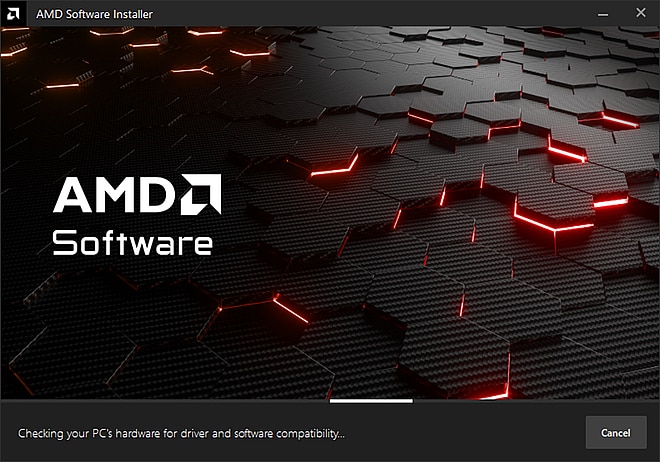
- If newer drivers and software are available for your AMD device(s), it will download the components needed for the update with options for you to customize the setup. You may choose Skip to keep the current driver (if applicable) or Cancel to exit the installer. See examples below.
- A list of the latest Recommended and Optional driver packages available for the installed GPU is displayed from which you can select which driver you wish to install.
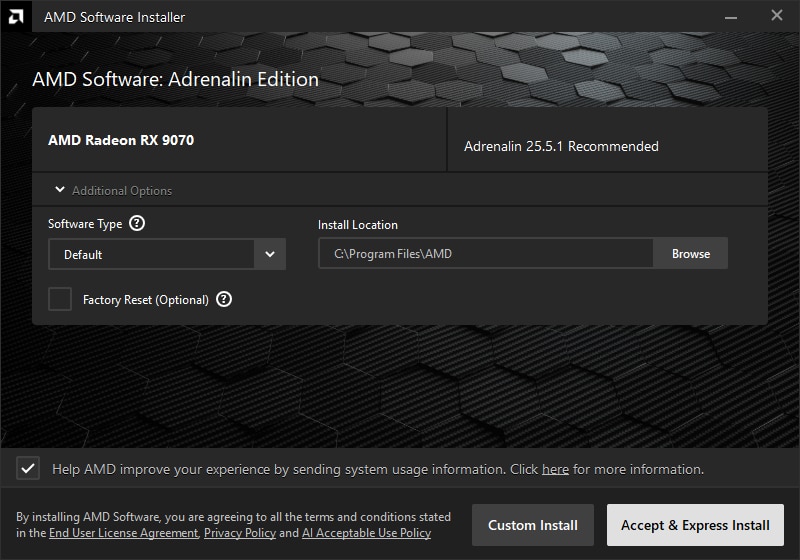
- Recommended Adrenalin
AMD recommends that all users of supported products use the latest Recommended Adrenalin package for the latest validated features, performance, and best stability.
- Optional Adrenalin
Delivers the latest optimizations and fixes for specific new or recently updated games. This optional package is best suited for gamers looking for the latest game support.
Note: See the release notes published with each AMD Software: Adrenalin Edition driver package for a list of optimizations, fixes, and supported games, and to confirm which package is suited to your hardware.
- Install Types:
- Default - Provides all AMD Software features and controls for gaming, recording, streaming, and tweaking your performance on your graphics hardware.
- Minimal - Provides only the basic controls for AMD Software features and does not include advanced features such as performance tweaking or recording and capturing content.
- Driver Only - Provides no user interface for AMD Software features.
- Install Location - For changing the default install location. Note: It is recommended to use the default location (C:\Program Files\AMD) for installation.
- Factory Reset (Optional) - Removes all prior versions of the AMD Software Package and temporarily pauses Windows Updates on your system. The AMD Software Installer will restart the system after removing all the existing versions and will automatically continue the installation upon reboot. Note: You will not be able to roll back to the previously installed drivers.
- Keep user settings - Saves your current AMD Software settings, profiles, and reapplies them after installation has completed. Note: This option is available when using Factory Reset on systems with another version of AMD Software installed.
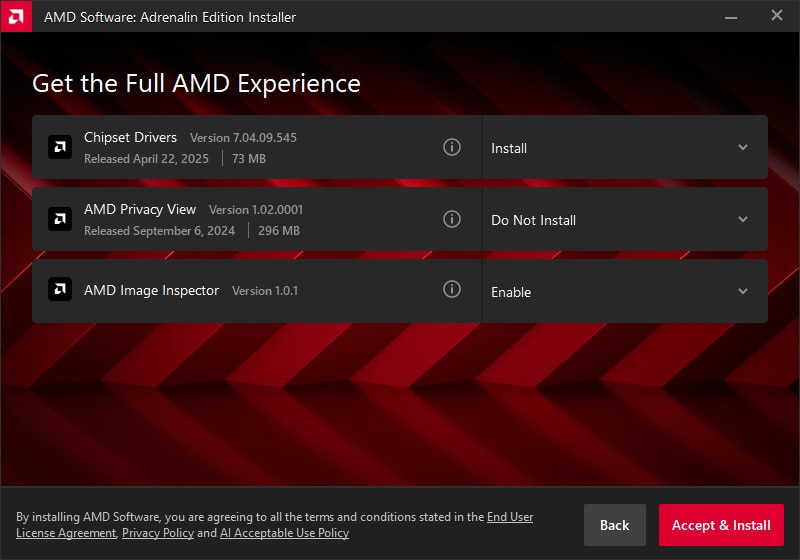
- Custom Install – Allows users to choose components/features as they become available, for example as shown in the image below. Make your selections and click Accept & Install
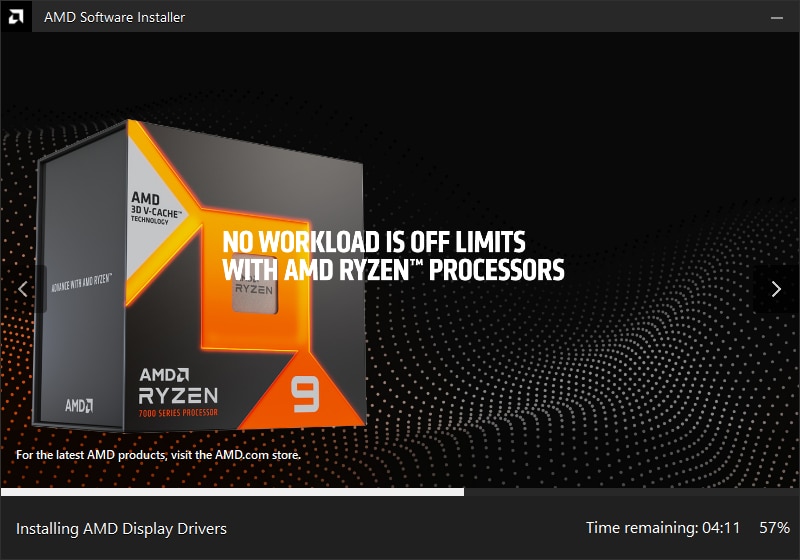
- Driver installation should take no more than a few minutes to complete. It is normal for the display to flicker momentarily while changes are being applied.
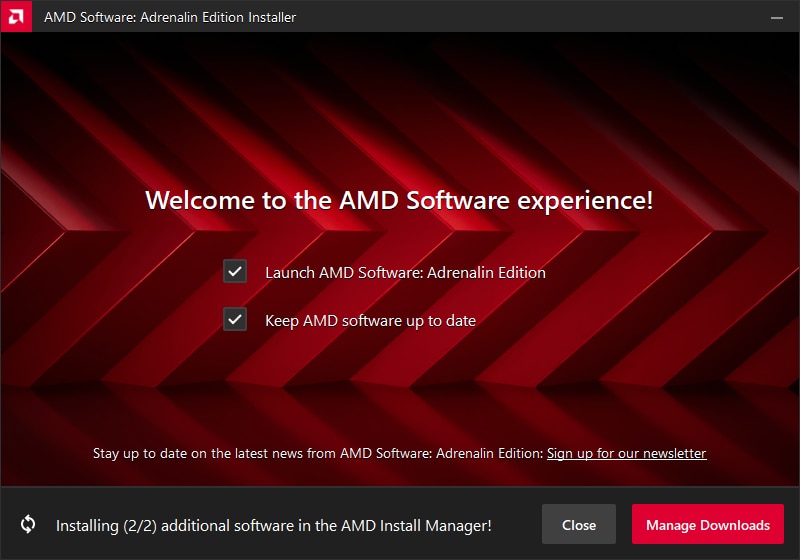
- Click Close to finish.
NOTE: To automatically launch AMD Radeon Software after installation, check the box for "Launch AMD Software: Adrenalin Edition". Also, you can choose to enable the option for automatic updates if you want to keep the AMD software current.
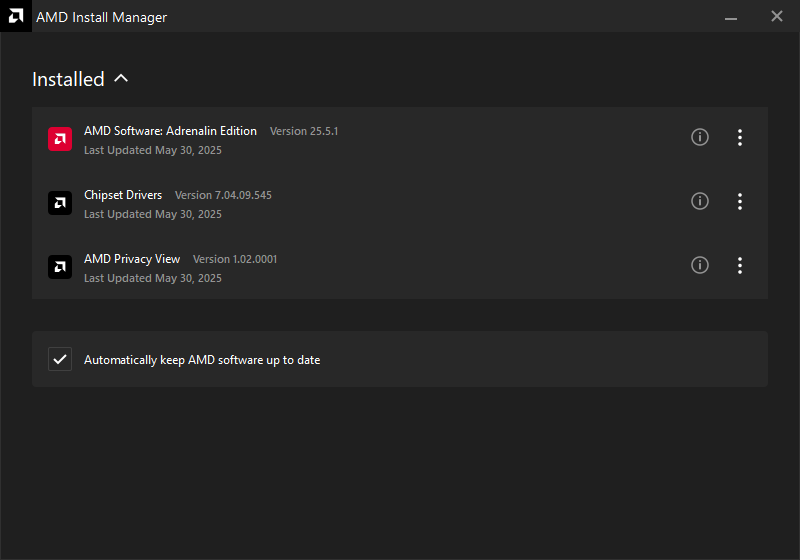
- Click Manage Downloads to launch the AMD Install Manager.
Driver Installation
Custom setup and installation instructions for AMD Radeon Series Graphics and AMD Ryzen Chipsets are available in the articles link below:
- Install AMD Ryzen Chipset Drivers
- Install AMD Software: Adrenalin Edition
- Install AMD Software: PRO Edition
Additional Resources
If your system is unsupported by AMD Auto-Detect and Install Tool or requires drivers for other AMD products, operating systems, please visit AMD Drivers and Support. This site provides tools for you to manually find drivers using product search and menus. To learn how, refer to: How to Find Drivers for AMD Graphics Products.
For help with determining the model of your AMD graphics and chipset, refer to these articles:
© 2026 Advanced Micro Devices, Inc. All Rights Reserved.
DISCLAIMER
The information contained herein is for informational purposes only and is subject to change without notice. While every precaution has been taken in the preparation of this document, it may contain technical inaccuracies, omissions and typographical errors, and AMD is under no obligation to update or otherwise correct this information. Advanced Micro Devices, Inc. makes no representations or warranties with respect to the accuracy or completeness of the contents of this document and assumes no liability of any kind, including the implied warranties of non-infringement, merchantability or fitness for particular purposes, with respect to the operation or use of AMD hardware, software or other products described herein. No license, including implied or arising by estoppel, to any intellectual property rights is granted by this document. This notice does not change the terms and limitations applicable to the purchase or use of AMD's products that may be set forth in a separate signed agreement between you and AMD.
OVERCLOCKING WARNING: AMD processors are intended to be operated only within their associated specifications and factory settings. Operating your AMD processor outside of official AMD specifications or outside of factory settings, including but not limited to the conducting of overclocking (including use of this overclocking software, even if such software has been directly or indirectly provided by AMD or otherwise affiliated in any way with AMD), may damage your processor and/or lead to other problems, including but not limited to, damage to your system components (including your motherboard and components thereon (e.g. memory)), system instabilities (e.g. data loss and corrupted images), reduction in system performance, shortened processor, system component and/or system life and in extreme cases, total system failure. AMD does not provide support or service for issues or damages related to use of an AMD processor outside of official AMD specifications or outside of factory settings. You may also not receive support or service from your board or system manufacturer. Please make sure you have saved all important data before using this overclocking software. DAMAGES CAUSED BY USE OF YOUR AMD PROCESSOR OUTSIDE OF OFFICIAL AMD SPECIFICATIONS OR OUTSIDE OF FACTORY SETTINGS ARE NOT COVERED UNDER ANY AMD PRODUCT WARRANTY AND MAY NOT BE COVERED BY YOUR BOARD OR SYSTEM MANUFACTURER’S WARRANTY.
The software that has been directly or indirectly provided by AMD or an entity otherwise affiliated with AMD may disable or alter: (1) software including features and functions in the operating system, drivers and applications, and other system settings; and (2) system services. WHEN THE SOFTWARE IS USED TO DISABLE OR ALTER THESE ITEMS IN WHOLE OR PART, YOU MAY EXPERIENCE (A) INCREASED RISKS THAT CERTAIN SECURITY FUNCTIONS DO NOT FUNCTION THEREBY EXPOSING YOUR COMPUTER SYSTEM TO POTENTIAL SECURITY THREATS INCLUDING, WITHOUT LIMITATION, HARM FROM VIRUSES, WORMS AND OTHER HARMFUL SOFTWARE; (B) PERFORMANCE AND INTEROPERABILITY ISSUES THAT MAY ADVERSELY AFFECT YOUR EXPERIENCE AND THE STABILITY OF YOUR COMPUTING SYSTEM; AND (C) OTHER EXPERIENCES RESULTING IN ADVERSE EFFECTS, INCLUDING, BUT NOT LIMITED, TO DATA CORRUPTION OR LOSS.
AMD, the AMD Arrow logo, AMD Radeon, AMD Freesync and combinations thereof are trademarks of Advanced Micro Devices, Inc.
Windows and DirectX are registered trademarks of Microsoft Corporation.
Vulkan and the Vulkan logo are registered trademarks of the Khronos Group Inc.
Other names used herein are for identification purposes only and may be trademarks of their respective companies.