Article Number: ai_bundle
What’s inside the AI Bundle
AMD Software: Adrenalin Edition™ 26.1.1 introduced the AI Bundle as an optional feature for supported products. It is a streamlined installer that equips your AMD powered system with these essential tools for AI development and creative workflows:
- PyTorch on Windows:
- For more information refer to PyTorch’s get started guide and discord.
- ComfyUI:
- For more information check out ComfyUI’s get started guide and community.
- Ollama:
- For more information on using Ollama refer to Ollama’s quick start guide.
- LM Studio:
- For more information refer to LM Studio’s quick start guide and community.
- Amuse:
- For more information visit: Introducing AMD GPU EP for Generative AI with Amuse
What comes with PyTorch on Windows?
Installing PyTorch via AI Bundle provides users with everything needed to begin developing PyTorch code on their AMD powered system. This includes Visual Studio Code, Python 3.12.0 and a recent version of PyTorch ROCm on Windows. Upon launching Visual Studio Code along with the global environment for Python 3.12.0, users can begin developing with PyTorch ROCm on Windows. For more information about PyTorch ROCm on Windows please refer to the latest AMD documentation: Use ROCm on Radeon and Ryzen
Which AMD products are supported by AI Bundle?
AI Bundle is supported by the following AMD products.
| AMD Radeon RX Series Graphics | AMD Ryzen Series Processors |
| AMD Radeon™ RX 9000 Series Graphics AMD Radeon™ RX 7000 Series Graphics* *Requires AMD Radeon™ RX 7700 Series or higher. |
AMD Ryzen™ AI Max Series processors AMD Ryzen™ AI 400 Series processors AMD Ryzen™ AI 300 Series processors |
Why is Internet connection required to install AI Bundle?
An Internet connection is required since some of the components require 3rd party resources which are hosted on the developer’s website.
How much disk space is required to install the full AI Bundle?
The full AI Bundle requires ~35GB of available disk space. The file size for each application can be viewed using “Custom Install” or “AMD Installer Manager” options during setup.
How to uninstall AI Bundle?
The following applications can be uninstalled individually through Window’s Installed apps menu or Programs and Features in the System Control Panel:
- Amuse
- LM Studio
- Ollama
- Python 3.12.0
- Visual Studio Code
To uninstall ComfyUI:
- Open File Explorer (Win + E) then select View > Show > enable Hidden Items.
- Navigate to the folder location C:\Users\[your username]\AppData\Local\AMD\AI_Bundle\
- Delete the ComfyUI folder shown in the image example below.

To uninstall the PyTorch libraries:
- Open File Explorer (Win + E) then select View > Show > enable Hidden Items
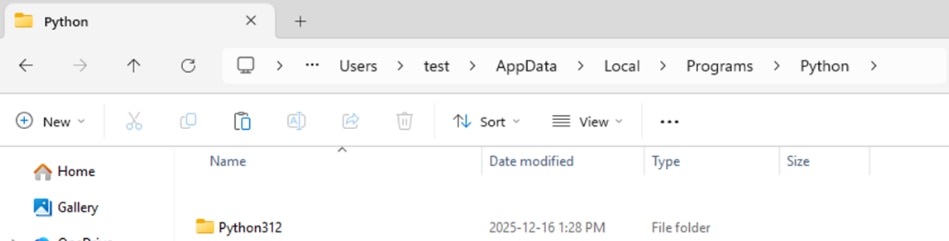
- Navigate to the folder location C:\Users\[your username]\AppData\Local\Programs\Python\
- Delete the Python312 folder shown in the image example below.
© 2026 Advanced Micro Devices, Inc. All Rights Reserved.
DISCLAIMER
The information contained herein is for informational purposes only and is subject to change without notice. While every precaution has been taken in the preparation of this document, it may contain technical inaccuracies, omissions and typographical errors, and AMD is under no obligation to update or otherwise correct this information. Advanced Micro Devices, Inc. makes no representations or warranties with respect to the accuracy or completeness of the contents of this document and assumes no liability of any kind, including the implied warranties of non-infringement, merchantability or fitness for particular purposes, with respect to the operation or use of AMD hardware, software or other products described herein. No license, including implied or arising by estoppel, to any intellectual property rights is granted by this document. This notice does not change the terms and limitations applicable to the purchase or use of AMD's products that may be set forth in a separate signed agreement between you and AMD.
OVERCLOCKING WARNING: AMD processors are intended to be operated only within their associated specifications and factory settings. Operating your AMD processor outside of official AMD specifications or outside of factory settings, including but not limited to the conducting of overclocking (including use of this overclocking software, even if such software has been directly or indirectly provided by AMD or otherwise affiliated in any way with AMD), may damage your processor and/or lead to other problems, including but not limited to, damage to your system components (including your motherboard and components thereon (e.g. memory)), system instabilities (e.g. data loss and corrupted images), reduction in system performance, shortened processor, system component and/or system life and in extreme cases, total system failure. AMD does not provide support or service for issues or damages related to use of an AMD processor outside of official AMD specifications or outside of factory settings. You may also not receive support or service from your board or system manufacturer. Please make sure you have saved all important data before using this overclocking software. DAMAGES CAUSED BY USE OF YOUR AMD PROCESSOR OUTSIDE OF OFFICIAL AMD SPECIFICATIONS OR OUTSIDE OF FACTORY SETTINGS ARE NOT COVERED UNDER ANY AMD PRODUCT WARRANTY AND MAY NOT BE COVERED BY YOUR BOARD OR SYSTEM MANUFACTURER’S WARRANTY.
The software that has been directly or indirectly provided by AMD or an entity otherwise affiliated with AMD may disable or alter: (1) software including features and functions in the operating system, drivers and applications, and other system settings; and (2) system services. WHEN THE SOFTWARE IS USED TO DISABLE OR ALTER THESE ITEMS IN WHOLE OR PART, YOU MAY EXPERIENCE (A) INCREASED RISKS THAT CERTAIN SECURITY FUNCTIONS DO NOT FUNCTION THEREBY EXPOSING YOUR COMPUTER SYSTEM TO POTENTIAL SECURITY THREATS INCLUDING, WITHOUT LIMITATION, HARM FROM VIRUSES, WORMS AND OTHER HARMFUL SOFTWARE; (B) PERFORMANCE AND INTEROPERABILITY ISSUES THAT MAY ADVERSELY AFFECT YOUR EXPERIENCE AND THE STABILITY OF YOUR COMPUTING SYSTEM; AND (C) OTHER EXPERIENCES RESULTING IN ADVERSE EFFECTS, INCLUDING, BUT NOT LIMITED, TO DATA CORRUPTION OR LOSS.
AMD, the AMD Arrow logo, AMD Radeon, AMD Freesync and combinations thereof are trademarks of Advanced Micro Devices, Inc.
Windows and DirectX are registered trademarks of Microsoft Corporation.
Vulkan and the Vulkan logo are registered trademarks of the Khronos Group Inc.
Other names used herein are for identification purposes only and may be trademarks of their respective companies.