AMD Software: Adrenalin Edition™ AI Bundle — AI Made Simple
Jan 21, 2026

Artificial Intelligence is playing a growing role in how we create, work and innovate. Yet for many developers and creators, the journey from idea to execution is slowed by the hassle of setting up an AI environment: juggling driver installations, configuring Python, tracking down the right frameworks, and troubleshooting compatibility. AMD is changing that.
With the AMD Software: Adrenalin Edition™ AI Bundle, AMD brings next-level simplicity to local AI setup. Integrated as an optional feature within the AMD Software: Adrenalin Edition application, the AI Bundle lets you install everything you need to start building and running AI workloads, with just one click.
Why AI setup has been hard, until now
Traditionally, getting an AI stack ready on Windows meant multiple steps and frequent detours: graphics drivers, Python environments, framework downloads, environment variables, and versions that don’t play nicely together. It’s time-consuming and fragile, especially when you just want to focus on creating, experimenting, or shipping features.
AI Bundle eliminates that complexity. During your AMD Software: Adrenalin Edition application install, simply check the AI Bundle option, and you’re ready to go. No hunting for dependencies. No manual configurations. No wasted hours.
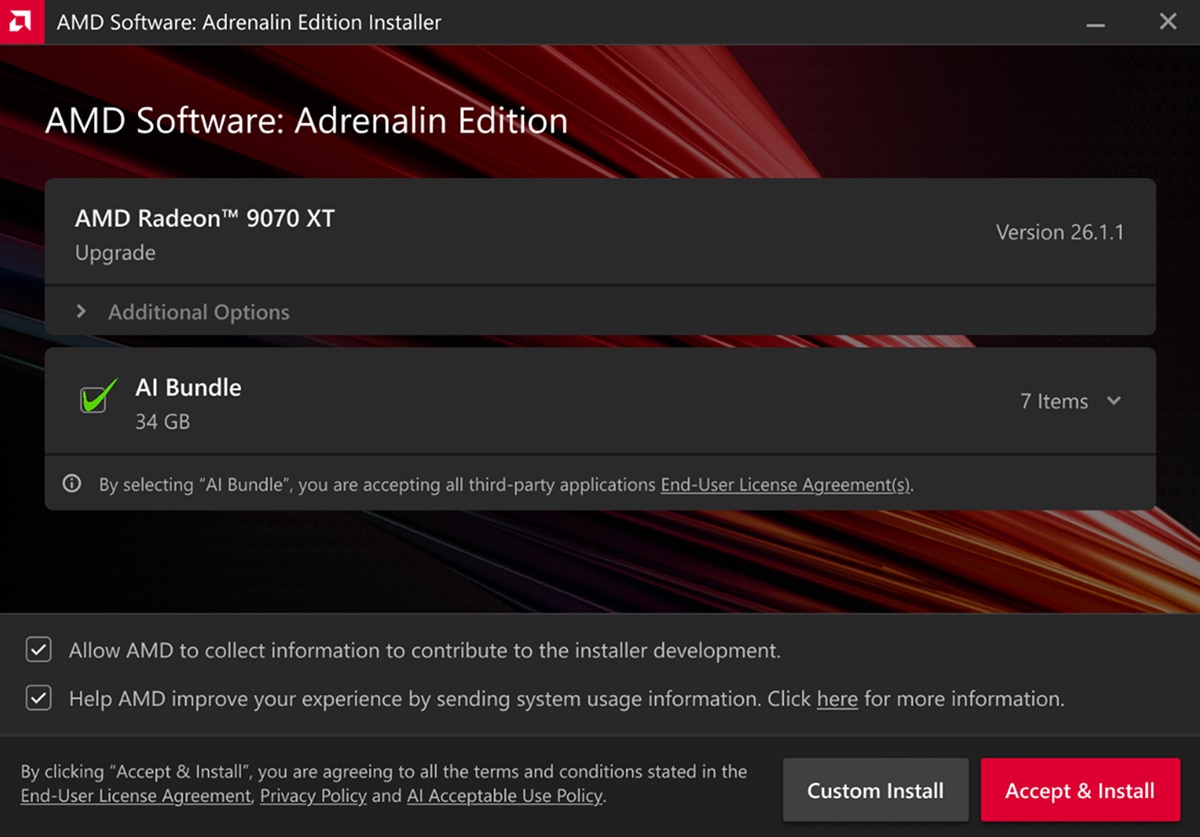
What’s inside the AI Bundle
The AI Bundle is a streamlined installer that equips your AMD powered system with essential tools for AI development and creative workflows:
- PyTorch on Windows:
- Available on Windows for the first time as part of the AMD Software: Adrenalin Edition application, you can use this to build and train models from scratch or load existing models for inference
- Learn more about PyTorch using the official get started guide or join their community discord
- Additional information on running PyTorch on AMD Ryzen processors can be found here.
- ComfyUI:
- Accelerated by the AMD ROCm™ platform’s version of PyTorch on Windows, ComfyUI can be used to install models to create visual workflows for image generation and LLM outputs.
- To learn more check our ComfyUI’s get started guide or join the ComfyUI community.
- Ollama:
- Run LLMs locally for text generation, prototyping, and automation, without relying on cloud services from within code, CLI and application interface. Learn more on how to get started with from Ollama’s quick start guide.
- LM Studio:
- Install and run large language models in application while able to tune model's parameter tuning easily
- Learn more on how to get started from LM Studio’s quick start guide or join the LM Studio community
Together, these tools make starting (or scaling) your AI work easy, fast, and reliable.
Key benefits
Save Time
Skip the manual installs and configuration rabbit holes. With one click, your environment is ready, so you can spend your time building, not debugging.
Unlock Creativity
Run AI models locally for image generation, text generation, and more. Whether you’re iterating on prompts, testing new architectures, or crafting production-ready pipelines, the AI Bundle puts powerful tools at your fingertips.
Cost Efficiency
Avoid ongoing cloud costs by leveraging your AMD hardware. Local workloads help you prototype more, iterate fast, and control your budget.
Who it’s for
- Creators exploring generative image workflows, visual storytelling, or prompt engineering with intuitive tools like ComfyUI.
- Developers who want a reliable local environment for training, inference, and rapid prototyping.
- Students and researchers who need a predictable setup to learn, test ideas, and run experiments without cloud constraints.
Getting started is simple
Users running an AMD Radeon™ RX 7700 series graphics card or newer, or an AMD Ryzen™ AI 300, Ryzen™ AI 400 or Ryzen™ AI Max series processor, can do the following:
- Download or open the AMD Software: Adrenalin Edition application.
- During installation or update, select the AI Bundle option.
- Launch your tool of choice, whether it’s PyTorch, ComfyUI, and Ollama, and start building.
From there, you can load a model, test a workflow, or kick off a creative session in minutes. No extra packages. No manual patching. Just a clean, integrated environment designed to work.
Going further with the AMD AI Developer Program
Ready to go deeper? The AMD AI Developer program is designed for both local and cloud users of AMD hardware. Join for access to technical resources, updates, and community. Sign up here: AMD AI Developer Program
The bottom line
AI shouldn’t be hard to set up. With AMD Software: Adrenalin Edition™ AI Bundle, it isn’t. Whether you’re coding, creating, or experimenting, the AI Bundle gives you a frictionless way to get started, and a dependable path to keep going. One click, and you’re ready to build.

Related Blogs
-
Kimi K3 on AMD Instinct GPUs with TokenSpeed
TokenSpeed delivers fast, agentic LLM inference on AMD Instinct™ MI355X GPUs, with optimized kernels and leading Kimi K3 performance.
October 09, 2026
-
scikit workloads with AOCL Data Analytics
Accelerate supported scikit-learn workloads with AOCL-Data Analytics while keeping your existing Python code and familiar scikit-learn APIs.
October 09, 2026
-
MangoBoost Delivers Open AI Models Powered by AMD
Mango Inference a serverless inference service providing production-ready access to open models powered by AMD Instinct™ GPUs and AMD ROCm™ software
October 09, 2026
-
Pre-Training Hybrid LLMs from Scratch in Primus on AMD Instinct™ GPUs — ROCm Blogs
Pre-train hybrid LLMs mixing MLA attention with Gated DeltaNet, Kimi Delta Attention and Mamba2 mixers on AMD Instinct MI355X GPUs, with open recipes.
October 07, 2026
-
DI Series: Serving Kimi-K3 MXFP4 Wide-EP Disaggregated on AMD Instinct MI300X and MI325X — ROCm Blogs
Learn how to serve a 1.4 TiB Kimi-K3 MXFP4 mixture-of-experts model disaggregated across AMD Instinct MI300X and MI325X GPUs.
October 07, 2026
-
AMD Instinct MI455X vs MI355X: A Technical Look at the Advancing AI 2026 Inference Numbers — ROCm Blogs
Explore the MI455X vs MI355X inference numbers from Advancing AI 2026, and learn how each benchmark was measured and what it really means.
October 07, 2026
-
Completing the GPU Performance Picture: Understanding TAF Alongside Peak FLOPs and MAF — ROCm Blogs
Learn how Typical Attained FLOPs complements Peak FLOPs and Max-Achievable FLOPs, including the methodology and MI325X results
October 05, 2026
-
How Agentic AI Is Expanding the Role of the DPU
As agentic AI drives more stateful workloads, DPUs are becoming critical for networking, storage, KV-cache management, and infrastructure efficiency.
October 05, 2026