AMD x ComfyUI: Advancing Professional Quality Generative AI on AI PCs
Jan 05, 2026
As models grow, many creator workflows have drifted to distant cloud services. With AMD ROCm™ 7.1.1 and the new one click ComfyUI experience on AMD, creators can bring power back to local devices where they have more control over cost, data and iteration speed. Read More: ComfyUI Official AMD ROCm™ Support blog.
ComfyUI Integration powered by AMD ROCm™ 7.1.1
ComfyUI has become the control room for advanced diffusion workflows. Power users design node-based workflows, try out state of the art models and share templates that spread quickly through the community.
The ComfyUI installer for Windows eliminates most of the friction associated with setting up ComfyUI. It arrives pre-packaged with AMD ROCm™ 7.1.1 and tuned pipelines for popular models, so users can move from install to first image in just a few steps on supported AMD Ryzen™ AI systems or AMD Radeon™ AI based workstations.

Three ways to install ComfyUI on AMD
We are excited to announce that AMD ROCm™ support is now natively integrated into ComfyUI - including the Desktop application. To meet different user needs, there are now three supported ways to install ComfyUI on AMD hardware:
- Official Windows .exe installer
An easy GUI-based installer for Windows that handles dependencies and configuration for you, powered by AMD ROCm™ 7.1.1. Download here. AMD recommends an AMD Ryzen™ AI Max+ 128GB system (set to 64GB VGM) or an AMD Radeon™ AI Pro R9700 (coupled with 64GB RAM) for the optimal experience.
- Official portable Windows build from the ComfyUI GitHub repository
A portable archive that can be downloaded and unpacked, also powered by AMD ROCm™ 7.1.1, ideal for users who want a contained folder they can move between systems. The latest portable release can be downloaded directly from the ComfyUI Github repository.
- Manual setup through git
For developers who prefer full control, ComfyUI can still be installed manually and paired with AMD ROCm™ nightlies for early access to upcoming features, expanded support and optimizations. Detailed instructions can be found here.
Across all three options, the aim is the same: let users choose the level of control they want without sacrificing performance on AMD platforms.
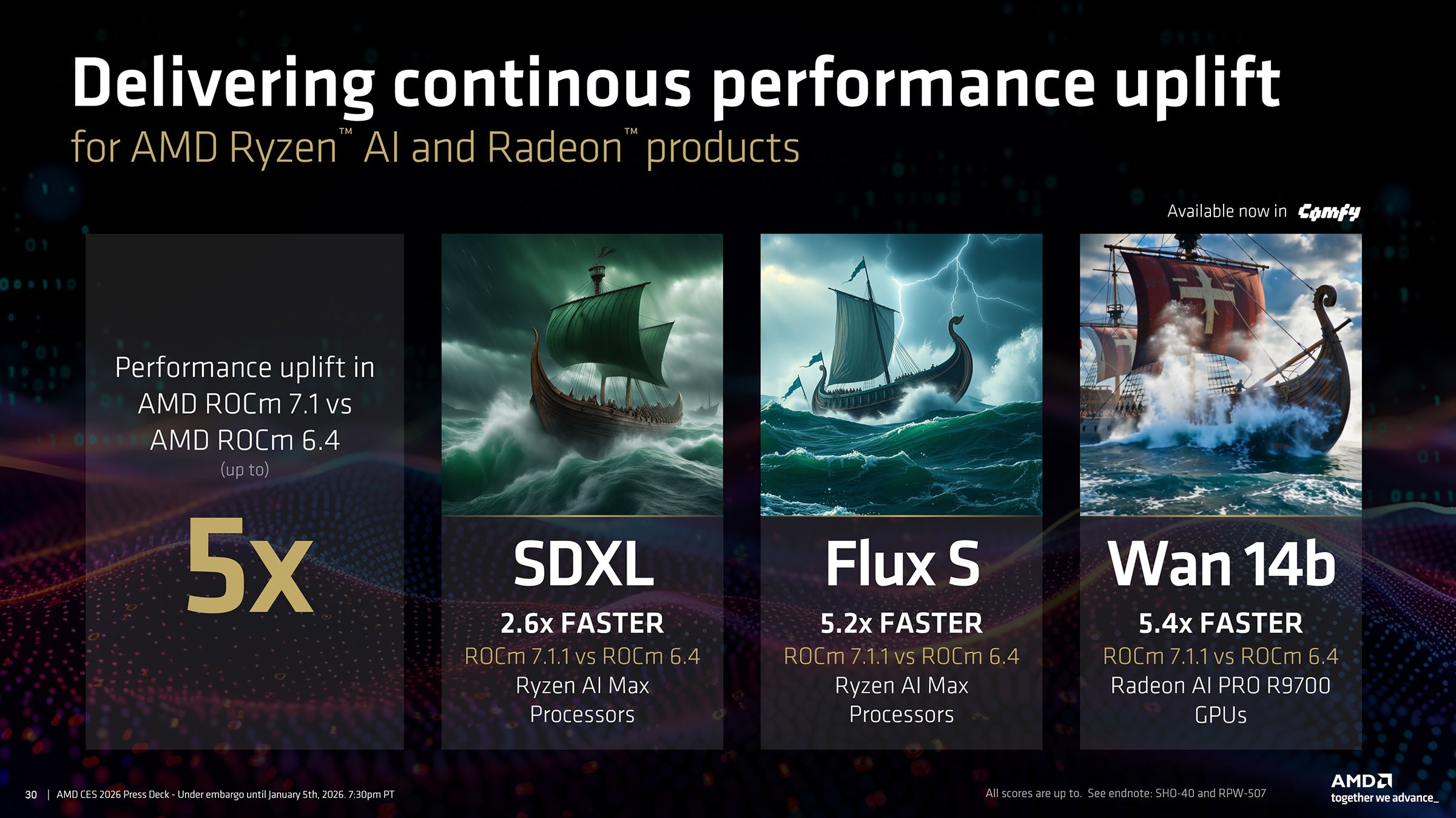
AMD ROCm™ 7.1.1 powers up to 5.4x performance uplift in advanced models
AMD ROCm™ 7.1.1 builds on the foundation of ROCm 6.4 and delivers up to 5.4x performance uplifts in ComfyUI on Windows.
Along with performance improvements, and when coupled with the AMD ROCm 7.1.1 driver (which will soon be part of the main-line AMD Software: Adrenalin™ Edition drivers in an upcoming release), it delivers a host of stability improvements: a more consistent experience across AMD Ryzen™ AI powered devices, AMD Radeon™ and Radeon™ AI PRO GPUs, continued tuning for mixed precision formats such as FP16, BF16 and FP8, and better memory handling.
For users, the technical work shows up as faster renders, fewer crashes and workflows that transfer more easily between machines. This release marks the first (Beta) release of the AMD x ComfyUI experience – with more performance and stability improvements on the way.
Modern image quality needs State of the Art models
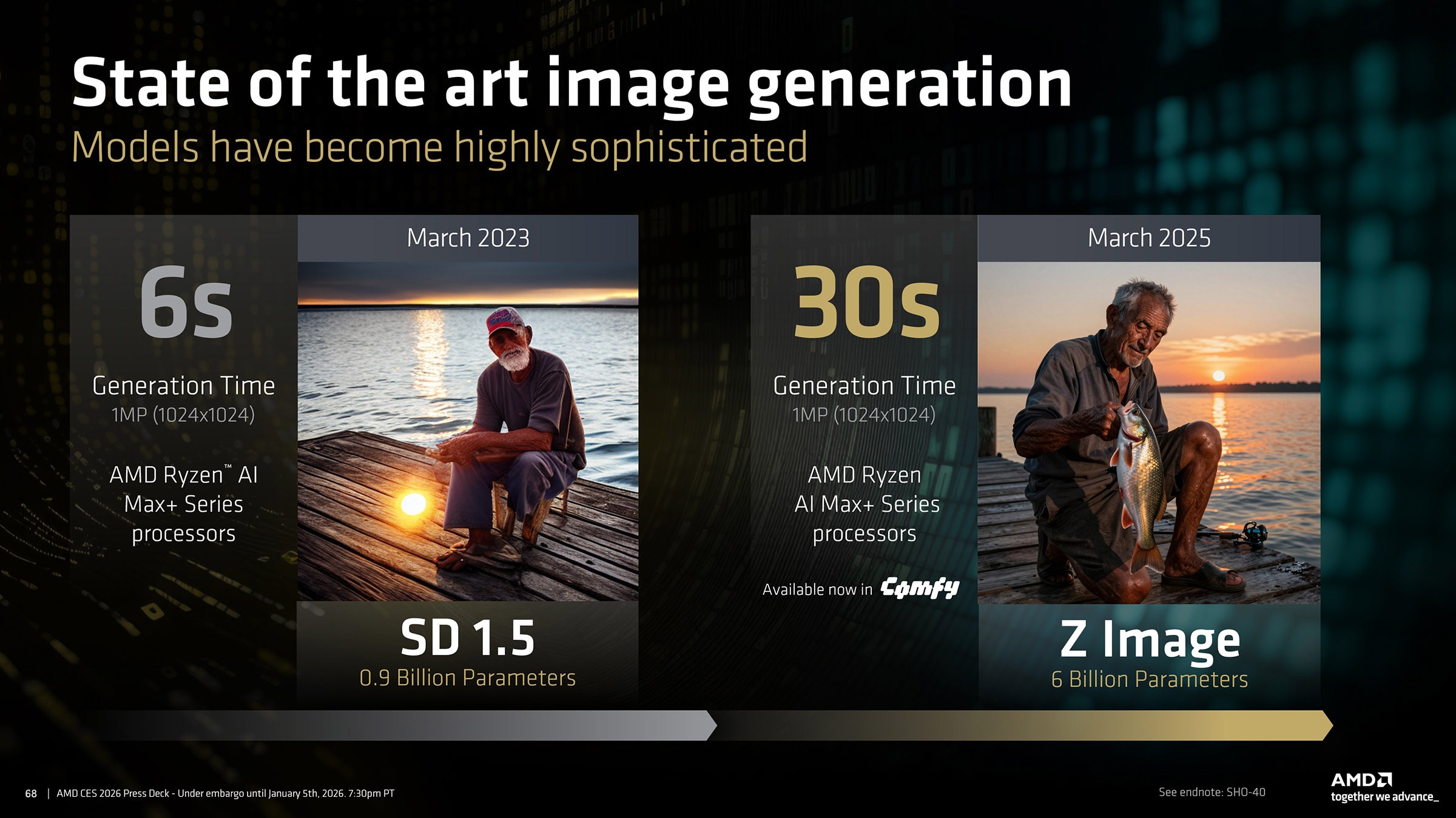
The visuals themselves tell an important story. Early (and now dated) diffusion models such as Stable Diffusion 1.5, with about 0.9 billion parameters, could generate an image in a few seconds on an AMD Ryzen™ AI Max+ system, but the quality was not usable in professional contexts. Faces often looked distorted and fine details like hands, text or structural details were garbled. These models were impressive for their time, yet they were not close to true photo quality.
Creators now expect much more. Newer models such as Z Image Turbo in the 6 billion parameter range, produce scenes with realistic lighting, sharper textures, convincing anatomy and superb text handling. Skies have depth, skin tones look natural and small details such as reflections or fabric folds hold up under scrutiny.
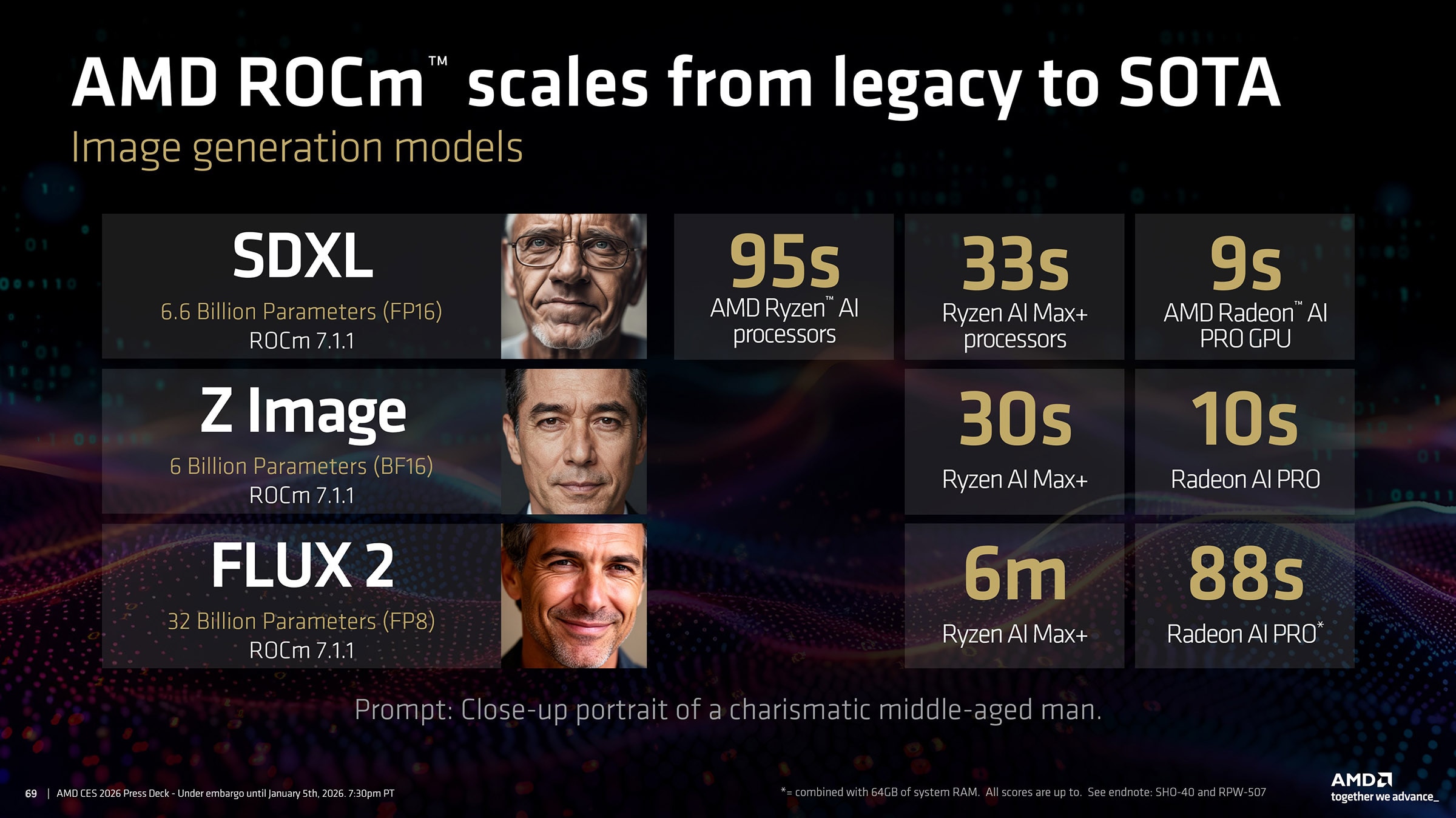
At the high end, Flux 2 reaches about 32 billion parameters in FP8. An AMD Ryzen™ AI Max+ system can handle the model if needed, while AMD Radeon™ AI PRO graphics cards provide significantly faster acceleration. Similarly, large video models such as WAN 2.2, at about 14 billion FP8 parameters, provide superb visual fidelity and video dynamics – with long render times.
Because ComfyUI runs on top of AMD ROCm™ 7.1.1 across both environments, teams can prototype on portable hardware and then scale up without changing tools or workflows.
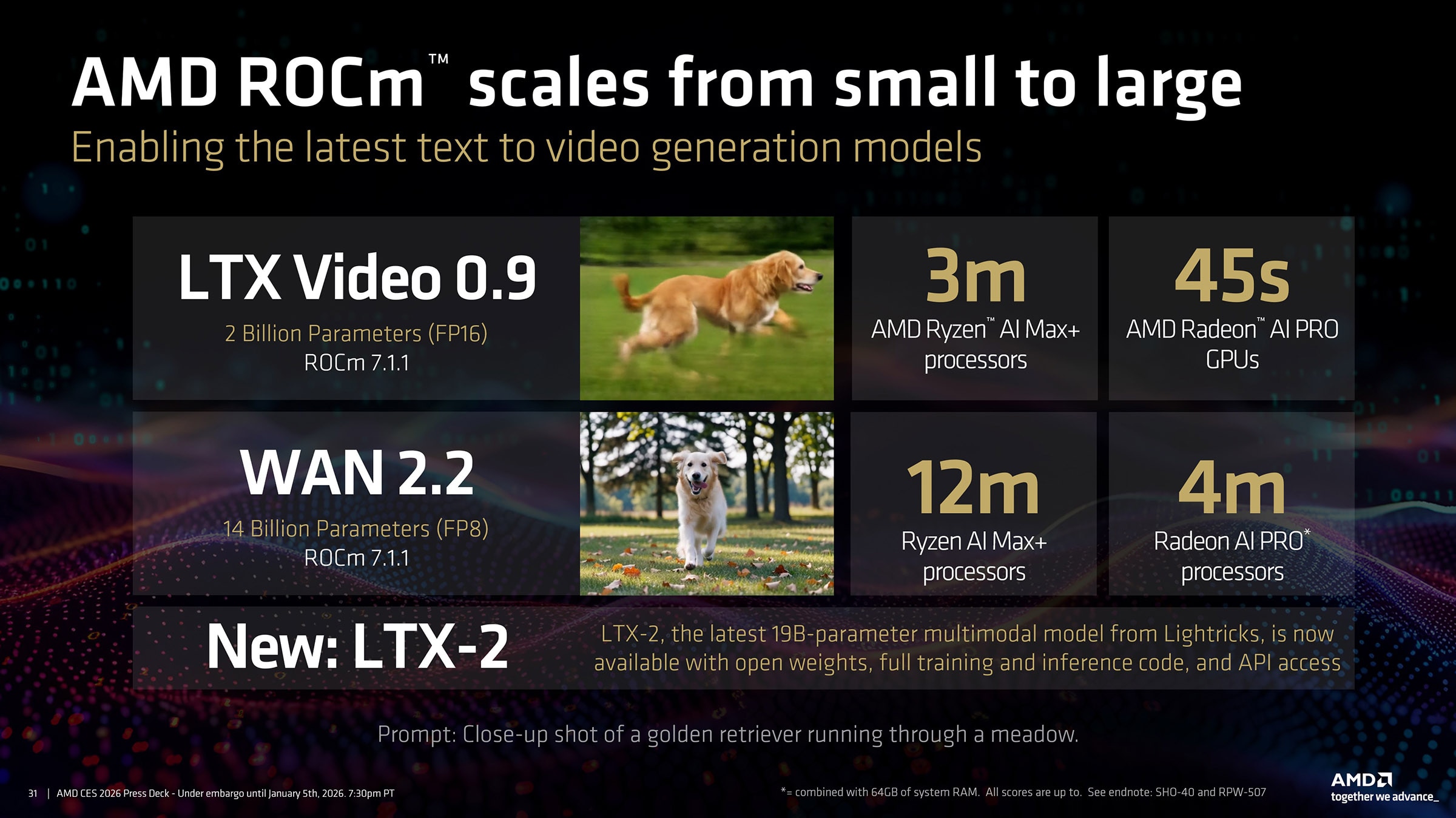
AMD ROCm™ 7.1.1 lets ComfyUI do what it does best so creators can choose between quick turnaround or higher polish as needed. For studios and enterprises, that means rough cuts, product explainers and visual experiments can often be generated locally, with workstation capacity reserved for final, heavy production runs.
SHO-40: Testing as of December 2025. Tests conducted using ComfyUI portable build with ROCm 6.4 integrated + AMD Software: Adrenalin™ Edition Driver 25.20.01.14 and ComfyUI portable build with ROCm 7.1.1 integrated + AMD Software: Adrenalin™ Edition Driver 25.20.01.17. All tests conducted with official templates and default settings provided by ComfyUI. AMD Ryzen™ AI Max+ 395 processor in ASUS ROG Flow Z13 with 128GB memory and VGM set to 64GB. Performance may vary. SHO-40
RPW-507: Testing as of December 2025. Tests conducted using ComfyUI portable build with ROCm 6.4 integrated + AMD Software: Adrenalin™ Edition Driver 25.20.01.14 and ComfyUI portable build with ROCm 7.1.1 integrated + AMD Software: Adrenalin™ Edition Driver 25.20.01.17. All tests conducted with official templates and default settings provided by ComfyUI. AMD Radeon™ AI Pro R9700 with AMD Ryzen 9950X3D, 64GB DDR5 RAM and Windows 11 Pro 25H2. Performance may vary. RPW-507

Related Blogs
-
FP16 GEMM Optimization on AMD RDNA™ 3 and RDNA™ 4 Architectures — ROCm Blogs
Learn how to build an FP16 GEMM kernel with WMMA on AMD RDNA 3 and RDNA 4, one optimization at a time, and approach hipBLASLt performance.
October 15, 2026
-
Day 0 Support for Muse Spark Open on AMD
AMD is excited to announce Day-0 support for Meta’s latest Muse Spark Open model family on AMD Instinct™ MI350X and MI355X GPUs
October 15, 2026
-
Introducing FastFlow SDK
Explore AMD FastFlow-SDK for local AI development on AMD Ryzen™ AI NPUs, from running models to customizing inference and optimizing operators with FastFlow, IRON, and HRX.
October 15, 2026
-
MiniCPM Day 0 Support Across AMD Hardware
Explore Day 0 support for MiniCPM-V 4.7 on AMD Radeon™ GPUs, Ryzen™ AI Max processors, and Ryzen™ AI NPUs for on-device AI inference.
October 14, 2026
-
Long Context, One Node: Serving GLM-5.3-FP8 on MI300X with DP8+EP8 — ROCm Blogs
Learn how to serve GLM-5.3-FP8 on one AMD Instinct™ MI300X node with DP8+EP8 and vLLM v0.28 for long-context workloads, and compare it with TP=8.
October 13, 2026
-
Meet the Next AMD Ryzen™ AI Halo
Meet the next AMD Ryzen™ AI Halo developer platform, powered by the AMD Ryzen™ AI Max+ PRO 495 processor. Run larger local LLMs, up to 300B parameters, thanks to the 192GB of unified memory that comes on the new platform.
October 12, 2026
-
AMD AI NIC™ Technology Driving AI-Ready Ethernet
Learn how AMD AI NIC™ technology helps organizations build AI-ready Ethernet networks with open standards, programmability, and transport innovation.
October 11, 2026
-
Kimi K3 on AMD Instinct GPUs with TokenSpeed
TokenSpeed delivers fast, agentic LLM inference on AMD Instinct™ MI355X GPUs, with optimized kernels and leading Kimi K3 performance.
October 09, 2026