From Pixels to Predictions: Edge AI Pipeline Acceleration with GStreamer for AMD Vitis™ AI
Jul 16, 2026

Deploying a neural network to edge hardware sounds straightforward, until you try it. You train a model in PyTorch, get great accuracy, and then face a wall of unfamiliar questions: How do you reduce precision without compromising accuracy? How do you target a specific adaptive SoC? How do you integrate inference seamlessly into real-time video pipelines with minimal development effort? Each of these steps can demand weeks of engineering effort on its own. AMD Vitis™ AI and the Vitis Video Analytics SDK (VVAS) are designed to close exactly those gaps.
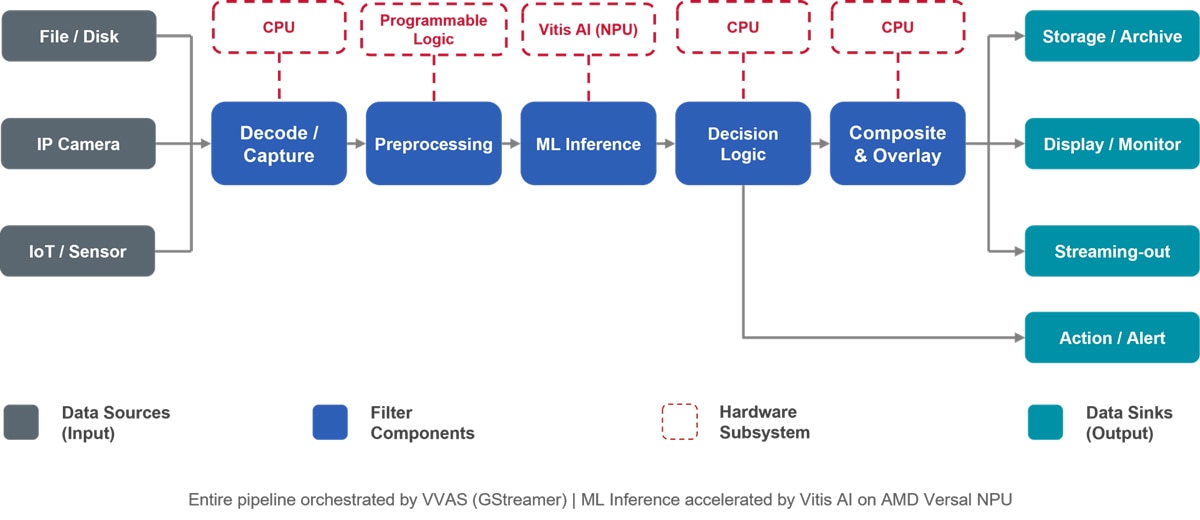
To understand where these tools fit, it helps to first picture what a complete AI-powered video analytics application looks like end to end. Video data enters from one or more sources, such as files, IP cameras, or IoT sensors, and flows through a sequence of stages: capture and decode, preprocessing, inference, postprocessing and rendering, and finally to storage, a display, or a streaming endpoint. Each of these stages needs to be efficient, and they all need to work together without introducing unnecessary data copies or CPU bottlenecks. Figure 1 shows this typical pipeline, with Vitis AI accelerating the ML Inference stage and VVAS (via GStreamer) connecting and orchestrating pipeline elements around it:
From Training to Deployment: Where Things Get Complex
The pipeline in Figure 1 looks clean on paper. In practice, building it without the right tools is where projects slow down. Let's be specific about where the pain actually is.
No clear path from training to inference. Most developers are comfortable in PyTorch or TensorFlow, but those frameworks do not directly provide binaries for AMD NPUs (Neural Processing Units, which in the case of AMD Versal™ AI Edge Series Gen 2 devices is an AI inference accelerator built on AI Engines).
Quantization is a challenge. Naively converting FP32 weights to INT8 without proper calibration or tuning can result in noticeable accuracy loss. Finding the right calibration strategy, handling mixed-precision requirements (for example, keeping YOLO postprocessing in higher precision to avoid scale mismatch), and validating results all require specialized knowledge and tooling.
Video pipeline integration is a separate engineering problem. Even after inference is functioning, integrating it with a live video stream, including hardware-accelerated preprocessing, metadata propagation, bounding box overlay, and multi-stream management, requires deep expertise in GStreamer and adaptive SoCs or FPGAs. Most AI developers simply don't have that background.
Profiling and debugging are hard. When latency is high, it's not obvious whether the bottleneck is the NPU, CPU fallback, preprocessing, or postprocessing. Without good observability tooling, optimization is guesswork.
Each of these gaps maps directly to a capability in Vitis AI or VVAS. Let's walk through how the toolchain addresses them, starting with the model side.
Vitis AI: Closing the Model-to-NPU Gap
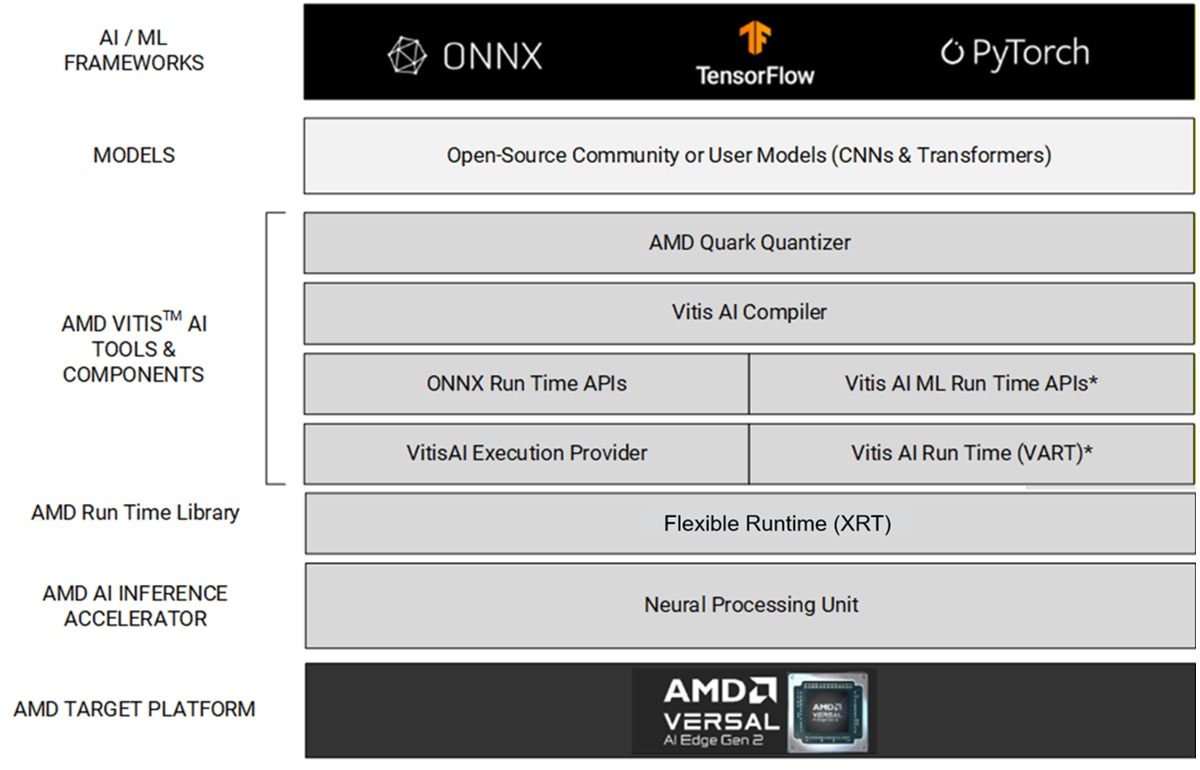
Vitis AI provides a complete, integrated toolchain that takes you from an ONNX model to an optimized NPU executable running on Versal AI Edge Series Gen 2 devices. Before diving into individual stages, it is worth understanding how the software stack layers relate to each other. At the top, developers work with familiar machine learning frameworks such as PyTorch and TensorFlow. Standard open-source models can be exported to ONNX from these frameworks. The Vitis AI tooling (AMD Quark for quantization, the Vitis AI Compiler for hardware-specific optimization) sits in the middle, translating those models into efficient NPU binaries. At runtime, two API paths, namely ONNX runtime with the Vitis AI Execution Provider and the native VART runtime, invoke the hardware through the flexible runtime (XRT) layer. The diagram below maps out this full stack:
Here is what each stage gives you.
Quantization with AMD Quark
AMD Quark is the quantization toolkit included with Vitis AI. The Vitis AI compiler supports three precision modes for different performance-accuracy trade-offs. For FP16 & INT8, Vitis AI leverages AMD Quark as its quantization toolkit.
- BF16 (automatic): The Vitis AI compiler converts FP32 models to BF16 during compilation automatically. No calibration is needed. This is the recommended starting point.
- FP16: Explicit conversion via Quark, useful for vision transformer architectures where BF16 may lose too much accuracy.
- INT8 (high performance): Post-training quantization using a small calibration dataset. Delivers higher throughput and lower latency than FP16 or BF16 at the cost of accuracy.
For models like YOLO where INT8 accuracy suffers due to scale mismatch in postprocessing, Vitis AI supports mixed precision: quantizes the compute-heavy core to INT8, keeps accuracy-sensitive postprocessing in FP32, and the compiler automatically converts those FP32 subgraphs to BF16 so the entire model stays on the NPU.
Compilation
The Vitis AI compiler takes your ONNX model and produces NPU-optimized binaries. It handles operator fusion, memory scheduling, and CPU/NPU partitioning automatically. You configure it with a JSON file pointing at your target device and optimization preferences.
The Vitis AI compiler supports two parallelization strategies, namely data parallelism and tensor parallelism, to optimize model performance on NPU hardware. Data parallelism (batching) replicates the entire model across multiple NPU compute blocks, so independent inference requests can run concurrently. This makes it the go-to choice for high-throughput scenarios like handling multiple camera streams. Tensor parallelism partitions a single inference request across multiple NPU compute units in parallel, lowering per-request latency and accommodating models that exceed the memory capacity of the NPU compute block. The choice between these strategies depends on your application needs, with data parallelism preferred for throughput-oriented workloads and tensor parallelism for latency-critical or memory-constrained use cases. The ability of Vitis AI to physically partition workloads across dedicated AI Engines (later referred to as “spatial partitioning”) is an important feature, helping designers reduce power and improve latency determinism.
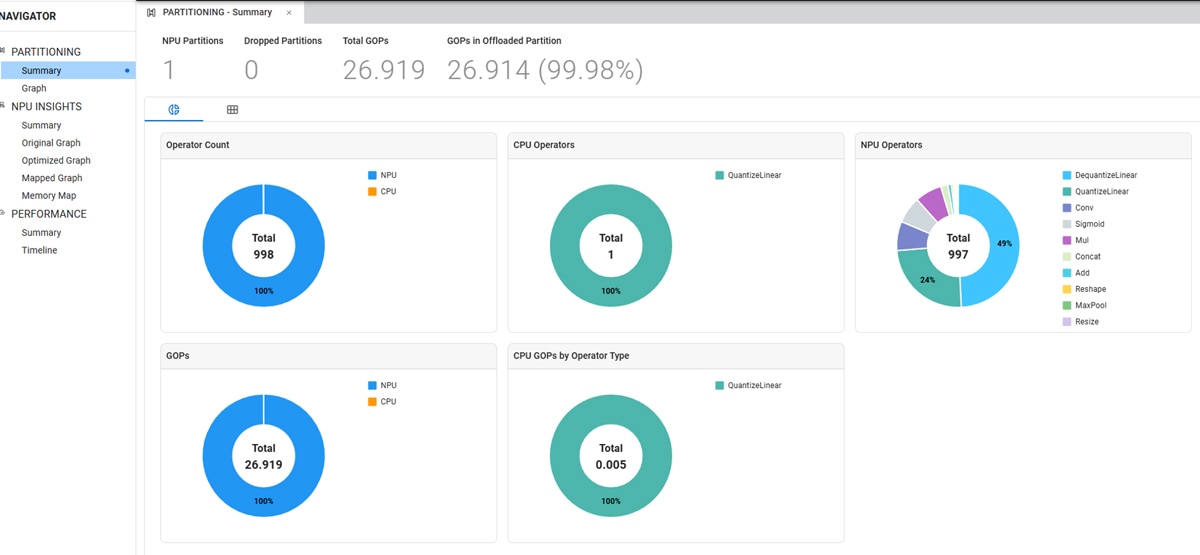
Once compilation is complete, the AI Analyzer provides a visual breakdown showing which operators run on the NPU and which fall back to the CPU, helping you identify where optimization is needed. The example diagram of AI Analyzer below illustrates how operators are partitioned on the NPU and the CPU.
Deployment Runtimes
Vitis AI offers two runtimes to match your deployment stage. The right choice depends on how much control your application needs over execution details.
ONNX Runtime + Vitis AI Execution Provider is the fastest path to running inference. If your application is already built around ONNX Runtime, adding the Vitis AI Execution Provider requires minimal changes. You simply pass the provider name and your compiled model, and ONNX Runtime automatically partitions the operators, sending supported ones to the NPU and falling back to the CPU for the rest. This is the practical option for teams that want to preserve an existing ONNX Runtime-based stack while enabling hardware acceleration:
		import onnxruntime as ort

session = ort.InferenceSession(
    "model.onnx",
    providers=["VitisAIExecutionProvider"]
)
outputs = session.run(None, {"input": input_data})
VART-ML is the higher-performance C++ runtime for production. It helps eliminate CPU fallback overhead entirely for fully NPU-offloaded models and supports zero-copy execution, making it the better fit when the application needs tighter control over runtime behavior and performance tuning:
		auto runner  = vart::Runner::create_runner(subgraph, "run");
auto job_id  = runner->execute_async(inputs, outputs);
runner->wait(job_id.first, -1);
In summary: ONNX Runtime offers a familiar integration path for getting up and running quickly; VART is the right choice when you need more direct control over execution and the lowest possible latency.
Ease of Use and OOBE
Getting started is quick and straightforward. A pre-built Docker image contains all quantization and compilation tools. Pre-built boot images for the AMD Versal AI Edge Series Gen 2 VEK385 Evaluation Board let you run a ResNet50 inference within minutes of first power-on. Python™ APIs handle rapid prototyping; C++ APIs scale to production. This out-of-the-box experience means you spend your time on your application, not on the environment setup.
With the model quantized, compiled, and running on the NPU, you still need to solve another challenge: integrating components that surround inference in a real application, including the video decode, the preprocessing, the metadata propagation, and the multi-sink output routing. This is where VVAS comes in.
VVAS: Closing the Pipeline Integration Gap
With Vitis AI handling model quantization, compilation, and NPU execution, the next question is: what connects all those pipeline stages you saw in Figure 1? VVAS is the solution. Without it, each handoff in that pipeline, including decoding frames into the correct buffer format, feeding them to the programmable logic (PL) preprocessing kernel, passing results to NPU inference, propagating metadata to the overlay stage, and routing outputs to multiple sinks, would require separate custom integration projects and deep expertise in GStreamer and adaptive SoC or FPGAs.
VVAS absorbs all that complexity behind a clean, plugin-based SDK, leveraging open-source GStreamer technology. As shown in the architecture below, your application sits at the top and uses VVAS plugins directly, while VVAS manages the underlying layers, including GStreamer, Vitis AI, XRT, and the NPU.
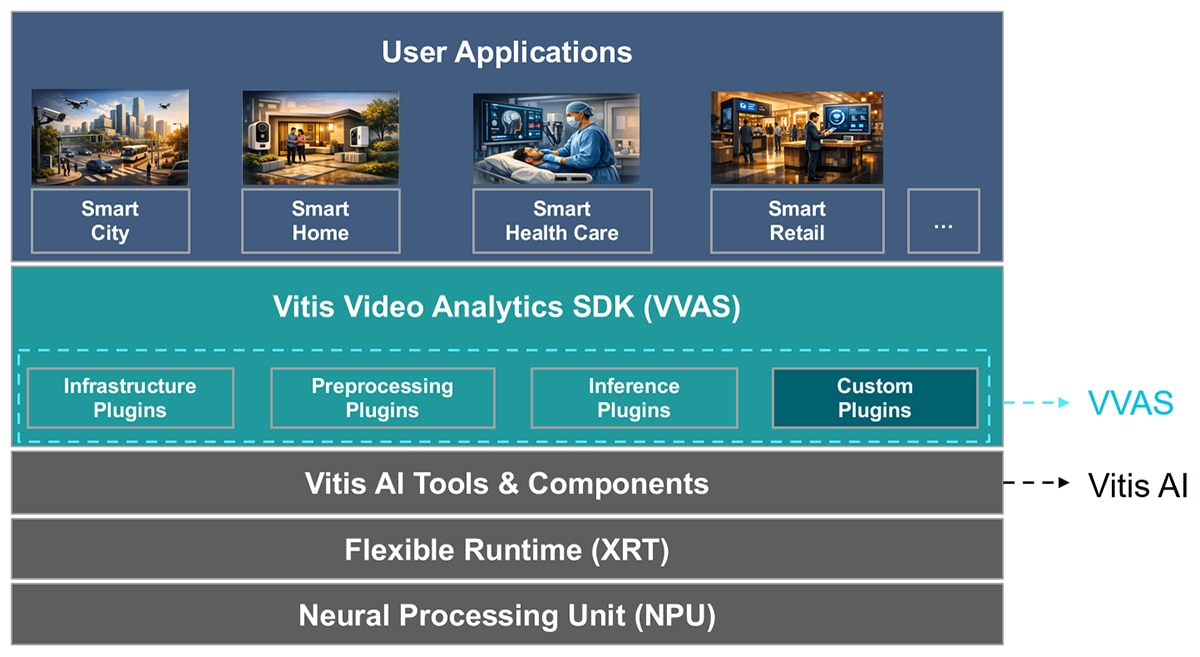
Each stage of the pipeline maps directly to a purpose-built VVAS plugin, configured through a JSON file with no custom C++ or GStreamer boilerplate required:
- vvas_xabrscaler: Provides hardware-accelerated resizing, color conversion, and normalization, and there is no CPU overhead for preprocessing.
- vas_xinfer: An ML inference plugin with ONNX Runtime and VART backends. Handles batching, metadata generation, and NPU execution.
- vvas_xmetaconvert / vvas_xoverlay: Parses inference metadata and draws bounding boxes, labels, and shapes directly on the output frame.
- vvas_xmetaaffixer: Enables metadata propagation between streams at different resolutions.
- vvas_xmulticrop / vvas_xfunnel / vvas_xdefunnel: Supports cropping regions of interest, merge, and split streams for cascaded multi-model pipelines.
To make this concrete, the following example illustrates a complete YOLOX object detection pipeline in practice, including reading from a file, parsing the raw video, performing inference, converting metadata, overlaying results, and sending the output to a sink, all expressed as a single gst-launch command:
		gst-launch-1.0 \
  filesrc location=input.bgr \ # source element: reads file from disk
  ! rawvideoparse width=640 height=426 format=bgr \ # Parses the video
  ! vvas_xinfer config-file=/etc/vvas/configs/infer/yoloxm_int8_vart_zerocopy.json \ # Runs inference
  ! vvas_xmetaconvert config-location=/etc/vvas/configs/metaconvert/metaconvert_config.json \ # Converts tensor results to user-consumable structure
  ! vvas_xoverlay \ #Draws inference results of classification/detection onto frame
  ! filesink location=output.bgr # saves results to file
The JSON files used for inference and meta convert are:
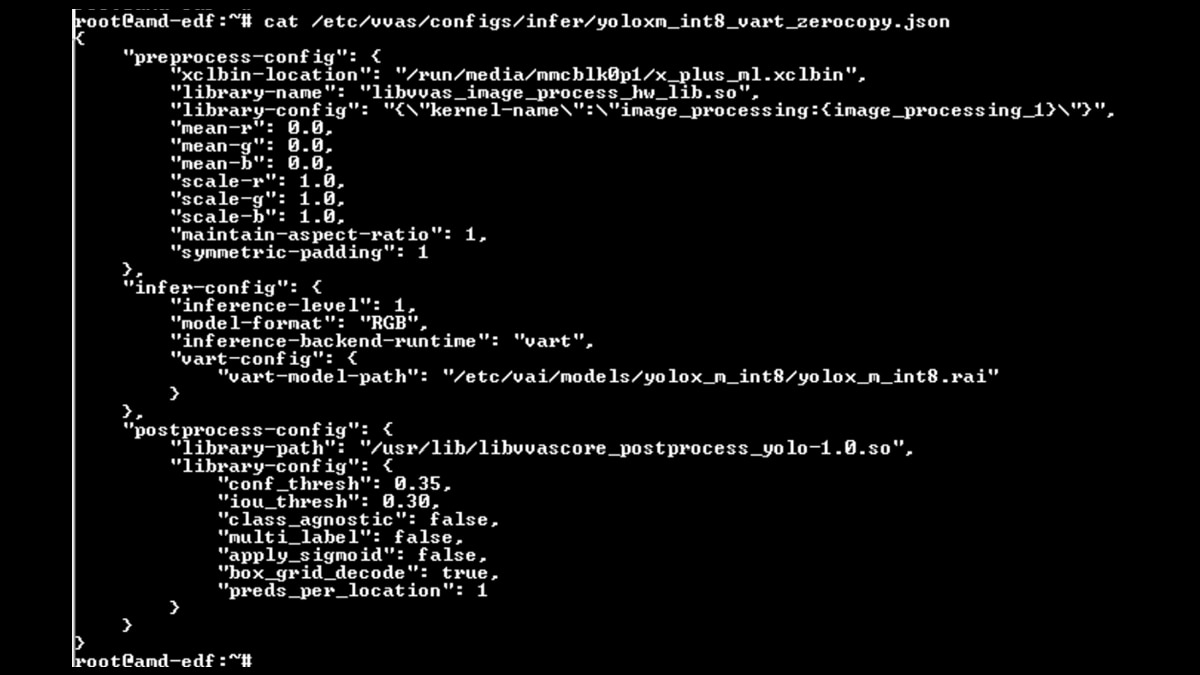
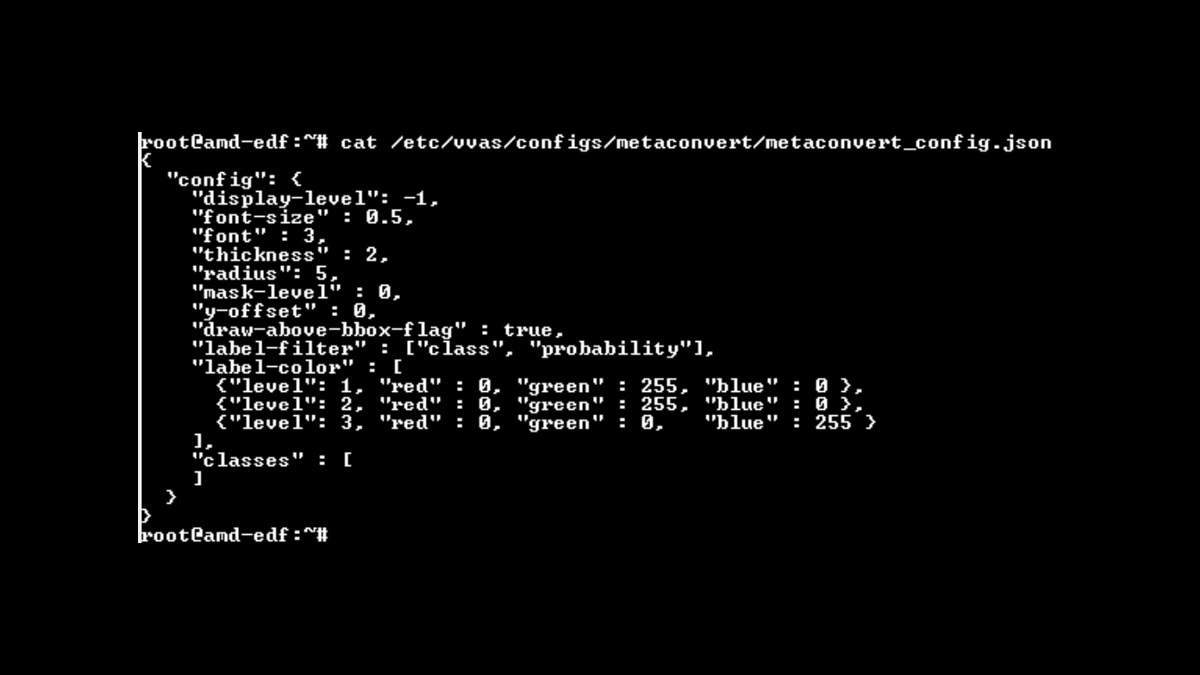
This style of pipeline allows you to remain within a familiar media framework while fully leveraging hardware-aware plugins at every stage of analytics. It helps eliminate the need for custom buffer management and deep familiarity with GStreamer internals, relying instead on straightforward plugin composition defined through JSON configuration.
VVAS also supports advanced deployment configurations offered by Vitis AI that would otherwise require significant custom engineering: spatial partitioning (two models running concurrently on separate NPU column partitions), temporal sharing (multiple models time-multiplexed on the same NPU resources), and zero-copy inference (DMA-BUF and XRT buffer objects pass directly to the NPU without intermediate copies).
For profiling, VVAS uses standard GStreamer tracers. You can measure frames per second with `fpsdisplaysink`, latency with GST_TRACERS="latency", and CPU utilization with GST_TRACERS="rusage". The same observability approach commonly used for GStreamer pipelines applies here as well.
Taken together, Vitis AI and VVAS cover the full journey: from a trained floating-point model all the way to a profiled, production-ready video analytics application running on AMD Versal AI Edge Series Gen 2 hardware. Here is how to think about the value each brings.
Key Takeaways
AI pipeline development is not limited to the model alone. The real challenge is connecting model optimization, runtime execution, media handling, detailed profiling insights, and hardware acceleration into one maintainable application. That is why the combination of Vitis AI and VVAS is compelling: one addresses model preparation and NPU execution, while the other structures and orchestrates the surrounding pipeline.
Together, they help you to:
- Optimize throughput and latency of the entire Embedded AI pipeline.
- Reduce development effort by reusing proven model quantization, compilation, and pipeline infrastructure rather than building the entire pipeline from scratch.
- Minimize integration work across runtime, buffer management, and media stages because VVAS and Vitis AI absorb that complexity.
- Accelerate prototyping with reusable plugin components, pre-built boot images, and Python APIs, so you reach a working proof of concept faster.
- Shorten the path to production, as the same toolchain used for rapid prototyping can scale to optimized, production-grade deployments with VART and zero-copy inference.
Conclusion
The examples in this blog, ranging from a simple three-line ONNX Runtime session to a complete YOLOX GStreamer pipeline expressed in a single command, demonstrate how the toolchain operates in practice. The examples also show that the hard parts of edge AI deployment are entirely solvable; they just require the right abstractions at the right layer.
Vitis AI and VVAS provide those abstractions. Whether you are starting with a PyTorch model and need a path to the NPU, or you already have inference working and need to wire it into a live video stream, the toolchain meets you where you are and scales with you as requirements grow. For teams building real time AI based applications running on Versal AI Edge Series Gen 2, Vitis AI, VVAS, Quark, and AI Analyzer provide the necessary infrastructure and tooling to help designers confidently implement, optimize, and deploy their designs to production.
Ready to get started? Explore the Vitis AI 6.2 User Guide and VVAS 6.2 User Guide for complete documentation, quick-start tutorials, and pre-built examples on the AMD Versal AI Edge Series Gen 2 VEK385 Evaluation Board.

Related Blogs
-
Scaling 3D Gaussian Splatting with Distributed Compute: Why One GPU Is Never Enough — ROCm Blogs
Learn how to scale 3D Gaussian splatting across GPUs with distributed training, RCCL, and real-world optimization tips for AMD Instinct GPUs
October 22, 2026
-
FP8 GEMM Optimization on AMD RDNA™ 4 Architecture — ROCm Blogs
Learn how to port an FP16 GEMM kernel to FP8 on AMD RDNA 4 and use the smaller element size to unlock larger tiles and deeper K slices.
October 22, 2026
-
AMD and Advantech - Architecting the Next Generation of Regulated Casino Games
Discover how Advantech and AMD are redefining regulated casino gaming with Ryzen Embedded 8000 Series processors, integrated RDNA 3 graphics, XDNA AI acceleration, and purpose-built DPX platforms. The solution enables immersive multi-screen experiences, predictive maintenance, stronger security, lower power consumption, simplified designs, and long-term platform availability for gaming OEMs worldwide.
October 21, 2026
-
Introducing rocOpt: GPU-Accelerated Decision Optimization on AMD ROCm — ROCm Blogs
Run large-scale MILP, LP, QP, and vehicle routing problems on AMD Instinct GPUs - introducing rocopt, optimization built for ROCm.
October 19, 2026
-
From AI That Answers to AI That Acts
Why physical AI requires a new definition of performance – one built around the whole system, not peak compute.
October 19, 2026
-
FP16 GEMM Optimization on AMD RDNA™ 3 and RDNA™ 4 Architectures — ROCm Blogs
Learn how to build an FP16 GEMM kernel with WMMA on AMD RDNA 3 and RDNA 4, one optimization at a time, and approach hipBLASLt performance.
October 15, 2026
-
Rapid Validation on AMD Versal Silicon without Leaving MATLAB or Python
AMD Vitis™ Hardware in the Loop (Vitis HIL) bridges simulation and hardware bring-up by enabling system-level verification on evaluation hardware directly from existing MATLAB® or Python™ test environments.
October 07, 2026
-
Completing the GPU Performance Picture: Understanding TAF Alongside Peak FLOPs and MAF — ROCm Blogs
Learn how Typical Attained FLOPs complements Peak FLOPs and Max-Achievable FLOPs, including the methodology and MI325X results
October 05, 2026