Lemonade by AMD: A Unified API for Local AI Developers
Feb 10, 2026

The AI PC Ecosystem for Developers, by Developers
Developers need free, private, and optimized on-device AI with:
- All the LLM, speech, and image capabilities required for natural interactions and powerful outcomes.
- Zero-friction deployment across the entire AI PC ecosystem, especially AMD Ryzen™ and Radeon™ products.
A growing community of open-source developers and AMDers is building Lemonade to make this a reality!
The Real Developer Challenge: Universal AI PC Deployment
For any developer working with local AI, the challenges are familiar: a mix of hardware architectures, competing runtimes, platform-specific optimizations, and deployment hurdles. The result is a fragmented ecosystem. These friction points slow down not just individual developers, but the broader AI PC ecosystem.
That's why Lemonade prioritizes the ecosystem’s needs:
- Implemented in lightweight C++ for native and quick installation across Windows, Linux, MacOS and Docker.
- Automatically configures optimized NPU, GPU, and CPU backends for text, image, and audio inference for each specific computer.
- Ability to run multiple models simultaneously, limited only by available RAM.
Image Zoom
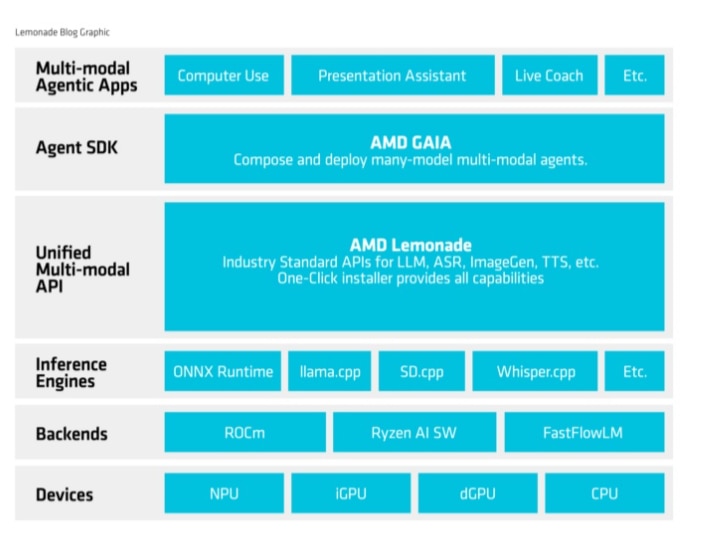
Multi-Modal AI: Beyond Just Large Language Models
Modern AI applications extend well beyond text, and Lemonade is designed to support multiple generative modalities through a consistent, local‑first developer experience.
- Text generation for natural language interfaces, agents, and tool‑driven workflows.
- Image generation for content creation and visual feedback loops inside applications.
- Speech‑to‑text and speech recognition for accessibility scenarios and hands‑free interaction.
Image Zoom
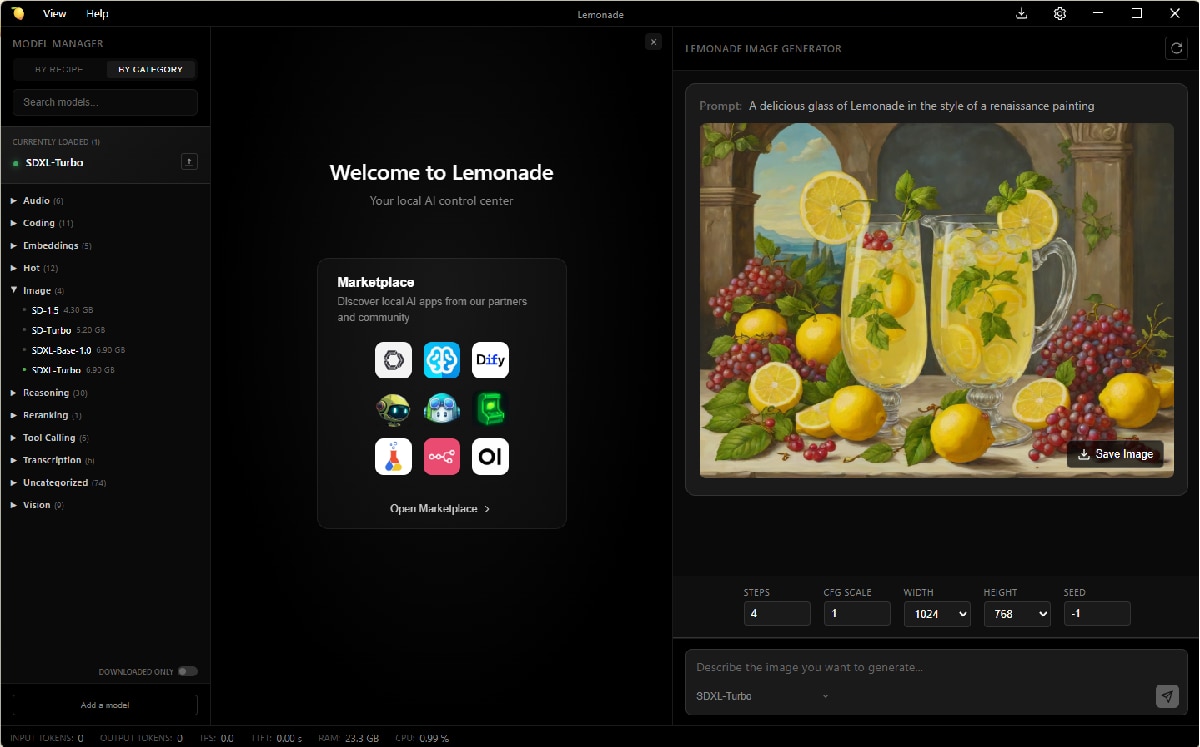
Multi-Engine Architecture: Performance That Scales
Lemonade’s multi‑engine design lets developers focus on application behavior rather than hardware details. With Lemonade, developers interact with a unified interface that supports text generation, image synthesis, speech recognition, and text‑to‑speech across different hardware accelerators. Lemonade handles backend selection and optimization based on available hardware, reducing integration complexity while preserving flexibility.
Engine support is ever-expanding and already includes: llama.cpp, ryzenai, FastFlowLM, whisper.cpp, stablediffusion.cpp, and Kokoro.
Lemonade Desktop App
Beyond the command‑line interface, Lemonade includes a full‑featured desktop application that serves as a central control center for local AI development. The app provides a graphical interface for downloading and managing your model library, with a visual Model Manager for browsing, installing, and organizing models. In addition to the built‑in chat experience, the UI exposes interfaces for working with common AI workflows such as image generation, speech input and output, embeddings, and reranking. This makes it easy to test models, switch configurations, and monitor server status from a single place during development.
Image Zoom
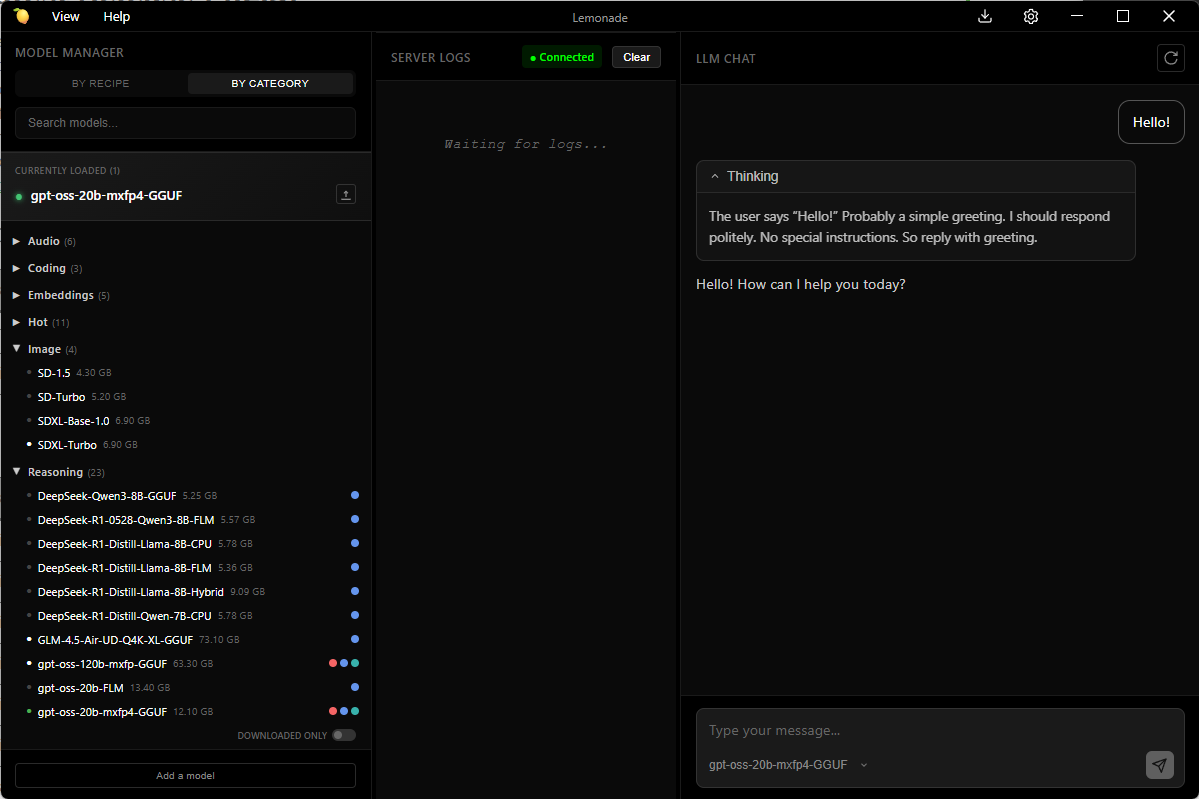
The desktop app also handles the complexity of backend selection and hardware optimization automatically, making it accessible to both developers and non-technical users. Whether you're experimenting with new models, building AI workflows, or want a user-friendly way to run LLMs locally, the desktop app lowers the barrier of entry from a developer tool into a comprehensive AI platform for your PC.
Community-Driven, AMD-Optimized
Lemonade balances two critical needs: community alignment and enterprise reliability.
The project is community driven, shaped by developers who see value in the approach and choose to contribute to it. Our roadmap is based on actual user feedback, integration requests, and ecosystem needs. For example, when a developer said, "I need text-to-speech," Michele Balistreri (@bitgamma) built support for text-to-speech. We seek out our developer community to guide us to impactful actions and Lemonade is shaped by developers who see value in the approach and choose to contribute to it.
With AMD backing Lemonade, the stack is thoroughly tested and optimized for AMD hardware. Providing developers with confidence that their applications will work consistently across AMD's expanding AI PC hardware lineup, from Ryzen AI NPUs to integrated and discrete GPUs.
Developer Ecosystem Integration
To validate our goal of making Lemonade easy to integrate, the team put it to the test by bringing it into the tools developers already rely on. Lemonade now works with:
- VS Code via GitHub Copilot integration.
- Continue for code completion.
- n8n for workflow automation.
- OpenWebUI for a feature-rich, self-hosted AI platform.
- And more…





















These integrations exist today because Lemonade's OpenAI compatibility makes integration straightforward for tool maintainers.
Come Build with Us
With Lemonade, running AI locally is straightforward thanks to OpenAI API compatibility. If your app already targets OpenAI, in the cloud or via another local runtime, moving to Lemonade is a simple change: update the endpoint and select a model. From there, the same code runs locally with AMD‑optimized CPU, GPU, and NPU backends, giving you privacy by default and predictable costs. If this is the direction you want the ecosystem to go, Lemonade is where that work is happening. Come build with us!
To Get Started
- Check out the Lemonade Website to learn more and download.
- Check out GitHub repo here.
- Join Discord here.
- Join the AMD AI Developer Program.
Subscribe to the Ryzen AI Newsletter to get the latest tools and resources for AI PCs.

Related Blogs
-
Kimi K3 on AMD Instinct GPUs with TokenSpeed
TokenSpeed delivers fast, agentic LLM inference on AMD Instinct™ MI355X GPUs, with optimized kernels and leading Kimi K3 performance.
October 09, 2026
-
scikit workloads with AOCL Data Analytics
Accelerate supported scikit-learn workloads with AOCL-Data Analytics while keeping your existing Python code and familiar scikit-learn APIs.
October 09, 2026
-
MangoBoost Delivers Open AI Models Powered by AMD
Mango Inference a serverless inference service providing production-ready access to open models powered by AMD Instinct™ GPUs and AMD ROCm™ software
October 09, 2026
-
Pre-Training Hybrid LLMs from Scratch in Primus on AMD Instinct™ GPUs — ROCm Blogs
Pre-train hybrid LLMs mixing MLA attention with Gated DeltaNet, Kimi Delta Attention and Mamba2 mixers on AMD Instinct MI355X GPUs, with open recipes.
October 07, 2026
-
DI Series: Serving Kimi-K3 MXFP4 Wide-EP Disaggregated on AMD Instinct MI300X and MI325X — ROCm Blogs
Learn how to serve a 1.4 TiB Kimi-K3 MXFP4 mixture-of-experts model disaggregated across AMD Instinct MI300X and MI325X GPUs.
October 07, 2026
-
AMD Instinct MI455X vs MI355X: A Technical Look at the Advancing AI 2026 Inference Numbers — ROCm Blogs
Explore the MI455X vs MI355X inference numbers from Advancing AI 2026, and learn how each benchmark was measured and what it really means.
October 07, 2026
-
Completing the GPU Performance Picture: Understanding TAF Alongside Peak FLOPs and MAF — ROCm Blogs
Learn how Typical Attained FLOPs complements Peak FLOPs and Max-Achievable FLOPs, including the methodology and MI325X results
October 05, 2026
-
How Agentic AI Is Expanding the Role of the DPU
As agentic AI drives more stateful workloads, DPUs are becoming critical for networking, storage, KV-cache management, and infrastructure efficiency.
October 05, 2026