Enabling AIM-T on Lenovo AMD PRO BIOS
May 15, 2026

AIM‑T (AMD Integrated Management Technology) is a PC manageability solution designed to enable secure, remote management of AMD PRO PCs. At its core, it brings together a dedicated management processor with tightly integrated hardware, firmware, and software to deliver reliable out‑of‑band control.
With AIM‑T, IT administrators gain the ability to monitor, diagnose, and manage systems remotely, even when the operating system is unavailable. Built on open standards, it ensures interoperability and flexibility, while seamless support across leading wired and wireless network solutions enables consistent, dependable manageability in diverse enterprise environments.
Lenovo platforms that support AIM-T
Lenovo devices featuring Ryzen™ PRO 6000, 7000, 8000 Series, and 200 Series processors, as well as the latest Ryzen™ AI PRO processor-based models. Examples include the following:
- Lenovo ThinkPad L14 Gen 5, Gen 6, Gen 7
- Lenovo ThinkPad T14 Gen 3, Gen 4, Gen 5, Gen 6, Gen 7
- Lenovo ThinkPad P16s Gen 2, Gen 4, and Gen 5
- Lenovo ThinkCentre M75q/s/t Gen 5
Update to the latest BIOS for your AMD PRO-based Lenovo notebook/desktop.
To find the latest BIOS for your Lenovo AMD device, visit support.lenovo.com.
Alternatively, use the Lenovo Vantage app to update the BIOS.
Step-by-Step: Enabling AIM-T in the BIOS
1. Enter the BIOS Menu: Use one of the following methods
a) Type "UEFI" in the Windows search bar, then select "Change advanced startup options" and click "Restart now"
b) On Windows, open Command Prompt as Administrator and run the following command:
shutdown /r /fw /t 0
This instructs Windows to reboot directly into UEFI/BIOS setup on the next restart.
c) Start with the system powered down.
As you power the device on, repeatedly press the F1 key. This interrupts the standard boot sequence and opens the Lenovo BIOS Setup.
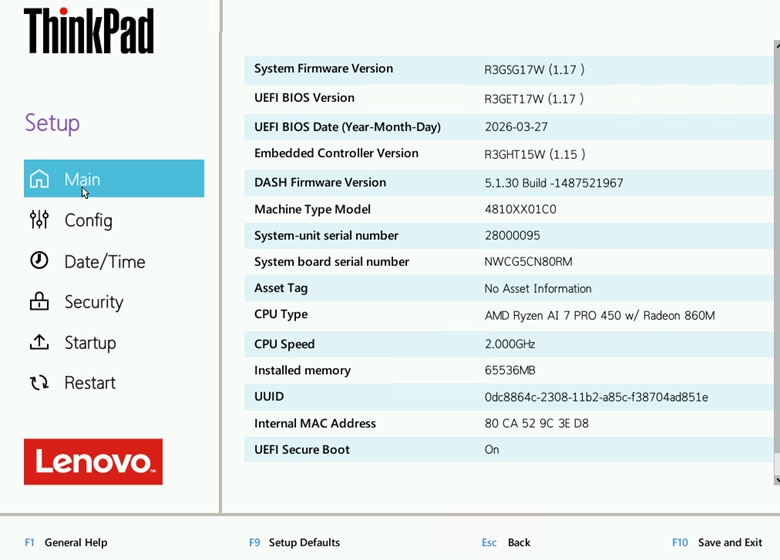
2. Once inside the BIOS, navigate from Main to the Config tab using the arrow keys. Then, select AIM-T.
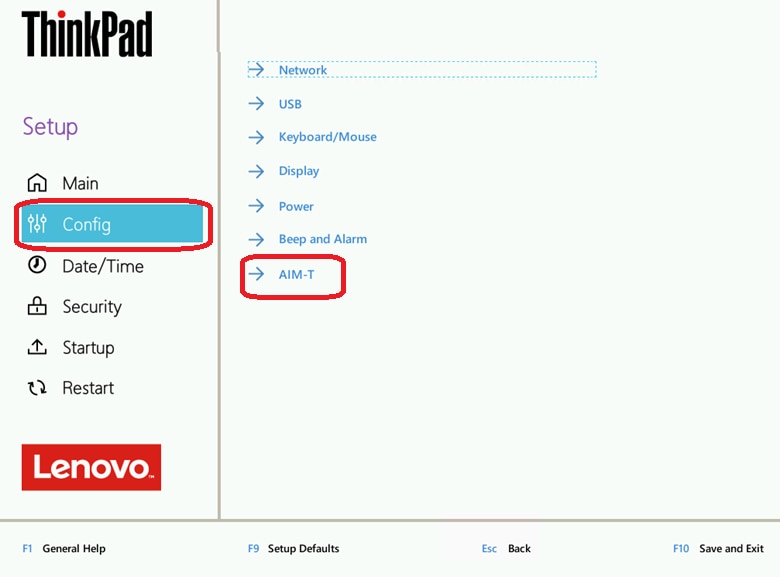
AIM-T is the option for enabling wireless manageability.
Note that only the options relevant to AIM-T are covered here. Follow standard protocol and product guidance for other options listed in the BIOS settings.
3. Set the AIM-T Control option to Enabled.
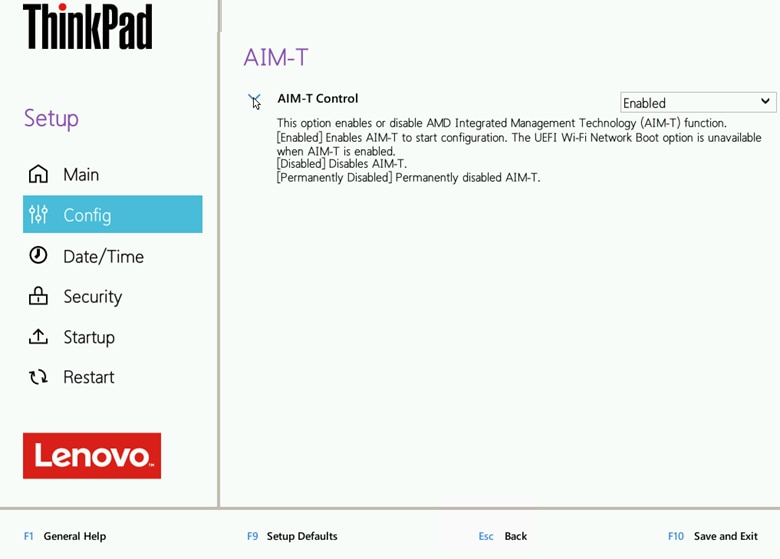
4. Save your changes and exit using F10.
The system will reboot, applying the hardware-level activation.
Troubleshooting: If these AMD management options don't appear in the BIOS, verify the device has a "PRO" series processor.
To verify that your device has a "PRO" series processor, check the product label on your Lenovo device for the model name.
In Windows, you can also use one of these options to confirm the processor name includes 'PRO' (e.g., AMD Ryzen 7 PRO 7840U)
- System Information - check 'Processor'
- Device Manager - expand 'Processors'
Verification
To verify that BIOS settings are enabled, check the AIM-T Manageability Service in the system tray.
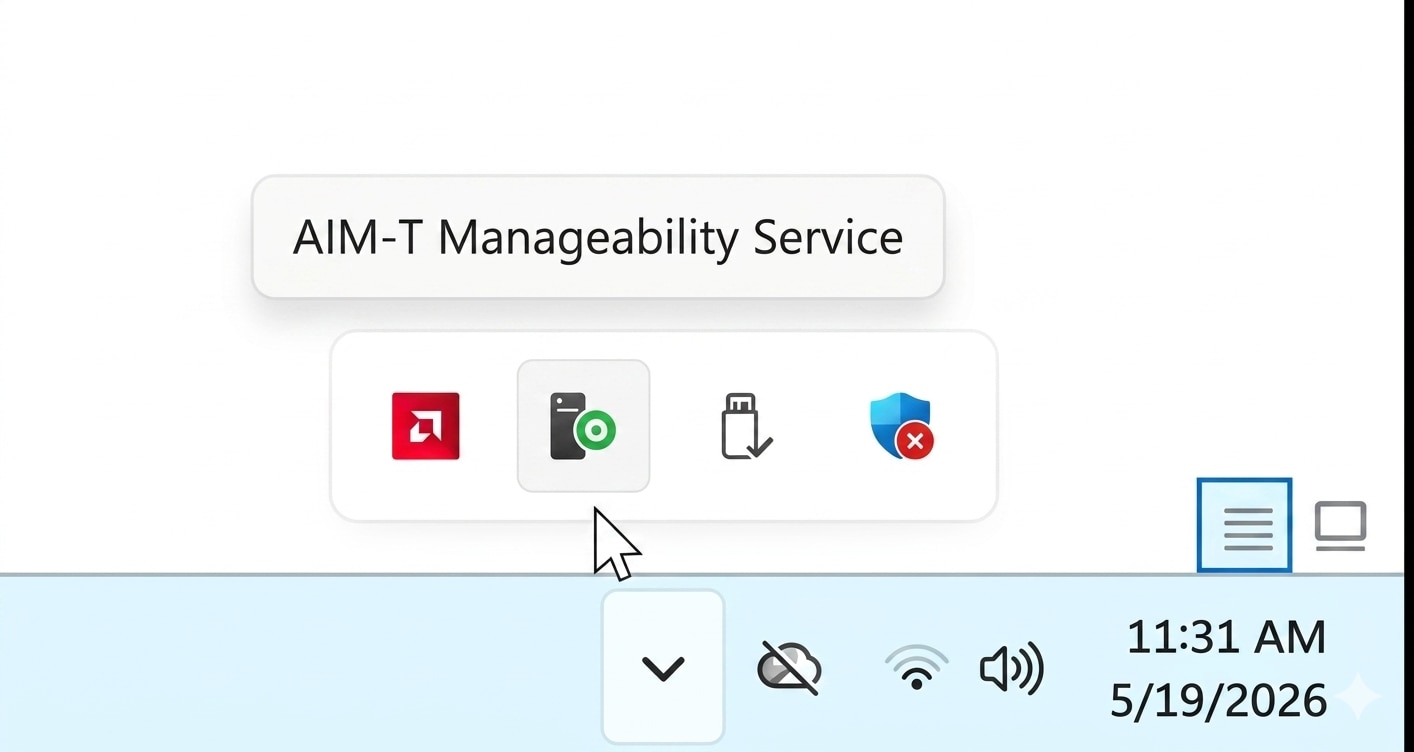
The Manageability status should display "ON" when properly configured.
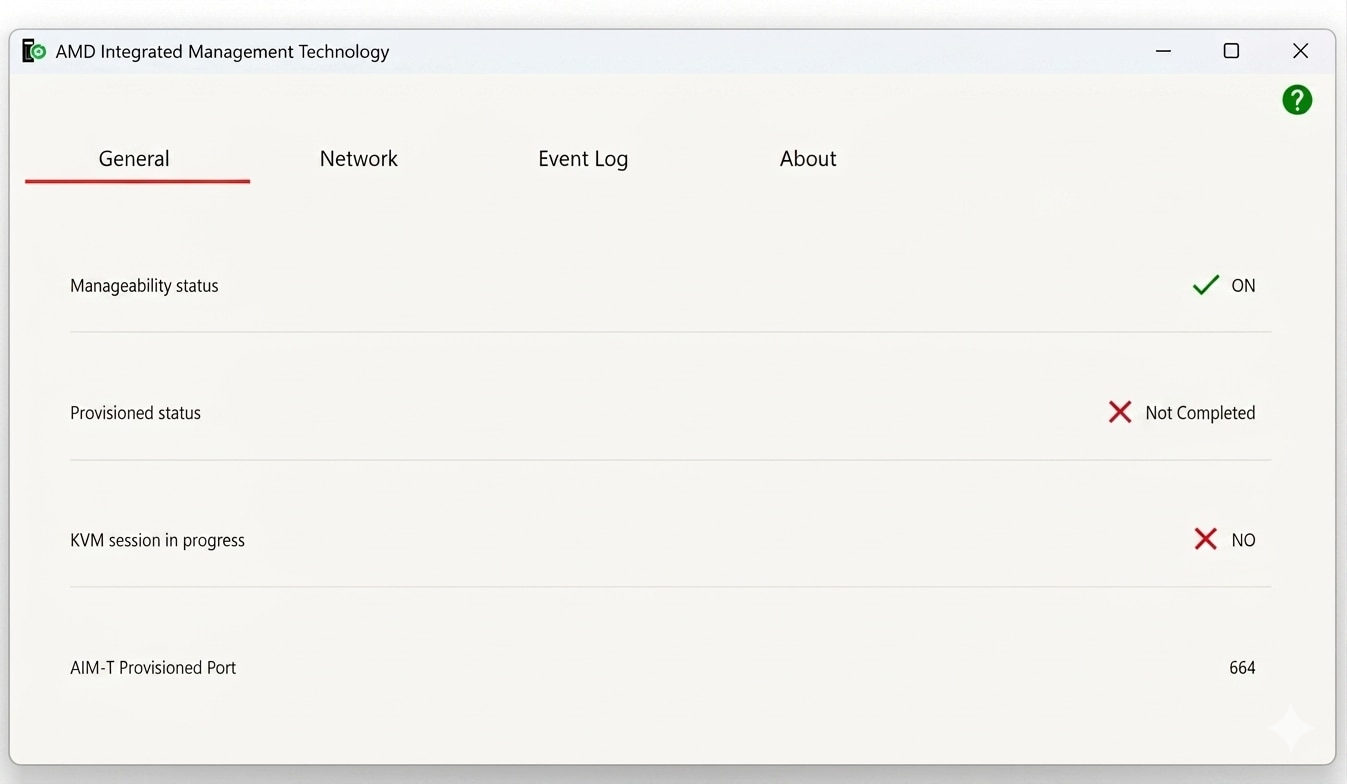
The Manageability status will show "OFF" in two scenarios:
- Before enabling the BIOS settings outlined on this page
- If BIOS settings were not applied/saved correctly.
If you see the "OFF" status, repeat the configuration steps above to enable the settings.
To save the settings, ensure that you use the correct options containing "Save" and "Apply Changes" to properly save your changes before leaving the BIOS menu.
Next Steps
In order to use remote manageability, the system must be provisioned.
Use the AMD Provisioning Tool, to provision and deploy the provisioning package across all your devices.
For more information about AIM-T (AMD Integrated Management Technology), visit the AMD PRO Manageability Tools Page.
Contact dashsupport@amd.com for queries regarding AMD Manageability.
Footnotes
AIM-T (AMD Integrated Management Technology) is available only on AMD PRO.
AIM-T requires both an AMD PRO processor and a compatible WLAN module with AIM-T support, such as
- Qualcomm WCN6856, Wi-Fi 6E NFA725A, Wi-Fi 7 NCM825, NCM835
- MediaTek RZ616 and RZ717/MT 7925
- Realtek WLAN - 8852CE – Wi-Fi 6 and Realtek WLAN - 8922AE – Wi-Fi 7
Footnotes
AIM-T (AMD Integrated Management Technology) is available only on AMD PRO.
AIM-T requires both an AMD PRO processor and a compatible WLAN module with AIM-T support, such as
- Qualcomm WCN6856, Wi-Fi 6E NFA725A, Wi-Fi 7 NCM825, NCM835
- MediaTek RZ616 and RZ717/MT 7925
- Realtek WLAN - 8852CE – Wi-Fi 6 and Realtek WLAN - 8922AE – Wi-Fi 7


Related Blogs
-
Rightsizing Cloud Workloads on AMD Part 1 Foundations
Learn the foundations of rightsizing cloud workloads on AMD: define goals, choose the right time, classify workloads, and select relevant benchmarks.
October 01, 2026
-
EPYC CPUs Deliver for Every Layer of the Agentic AI Stack
Agentic systems combine multiple CPU roles into a workflow. The latest AMD EPYC CPU generation lets customers optimize for each task.
September 18, 2026
-
Building Infrastructure for an AI World in Motion
The biggest risk is not choosing the wrong technology today. It is building infrastructure that cannot adapt tomorrow.
September 17, 2026
-
Advancing AI 2026: From Gigawatt Data Centers to Agentic PCs
Explore how AMD connects data center, cloud, and local AI to enable secure, cost-aware agentic workflows across enterprise PCs.
September 16, 2026
-
From LEAP 2026: Advancing AI Across the Middle East
At LEAP 2026, AMD’s role helping build open AI infrastructure and turn investments into measurable business and economic value was on display.
September 09, 2026
-
Optimize SQL Server Costs with AMD on AWS
Optimize SQL Server licensing costs on AWS with AMD-powered Amazon EC2 and Amazon RDS instances while maintaining performance.
September 03, 2026
-
The Data Center Math has Changed
Run more work on fewer servers to reduce power, space and licensing costs while creating capacity for what comes next.
September 02, 2026
-
Optimizing ATOM and vLLM-ATOM for High-Interactivity Inference — ROCm Blogs
Cut per-token latency on AMD Instinct MI355X GPUs: see how ATOM, vLLM-ATOM, and AITER strip fixed costs out of the LLM decode path.
August 31, 2026