Accelerating Python Performance with AOCL on AMD “Zen” Cores
Feb 11, 2026

Introduction
Python is one of the most popular languages for scientific computing, machine learning, and data analysis. However, performance can often be a bottleneck when working with large datasets or complex numerical computations. AMD addresses this challenge by providing Python users with a collection of Python libraries optimized with AMD Optimizing CPU Libraries (AOCL) – NumPy, SciPy, PyTorch, NumExpr and SciPy Sparse Extension.
AMD Optimizing CPU Libraries is a collection of highly tuned mathematical libraries designed to leverage the power of AMD “Zen” cores (e.g., higher count, increased memory bandwidth, larger cache, and AVX-512) that deliver accelerated performance on AMD EPYC™ and AMD Ryzen™ processors.
Our solution Python libraries with AOCL, brings the power of AOCL directly into the Python ecosystem through pre‑built, easy‑to‑install wheels. Designed for simplicity and performance, all libraries undergo extensive validation to guarantee a smooth, out‑of‑the‑box experience.
How are we better?
In this blog, we highlight our optimizations by running NPBench suite. This is a comprehensive benchmarking suite with a set of NumPy code samples representing a large variety of HPC, Data science and deep learning categories. A subset of benchmarks from the suite have been chosen for our tests with large input size (L). For SciPy, we select linalg.lstsq benchmark (lstsq source) as an example of the performance achievable with SciPy with AOCL.
Both NumPy and SciPy optimizations are driven by AOCL-BLAS and AOCL-LAPACK https://www.amd.com/en/developer/aocl.html.
The histograms in Figure 1 and Figure 2, compare the relative speedup of NumPy with AOCL against stock NumPy (i.e., using OpenBLAS as BLAS backend) for both single-threaded and multi-threaded. The baseline is set to 1.0 (stock performance). Higher bars indicate better performance gains.
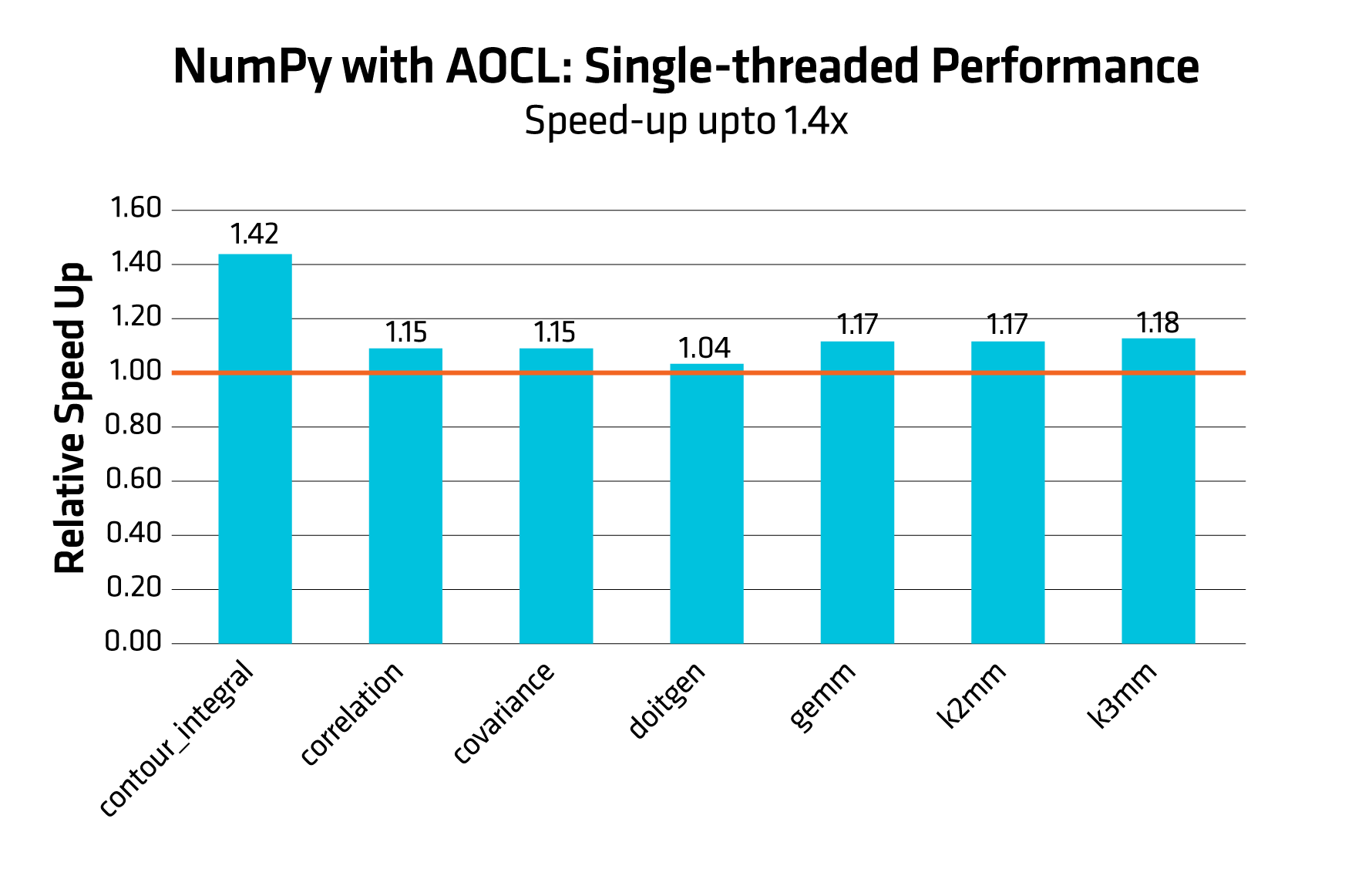
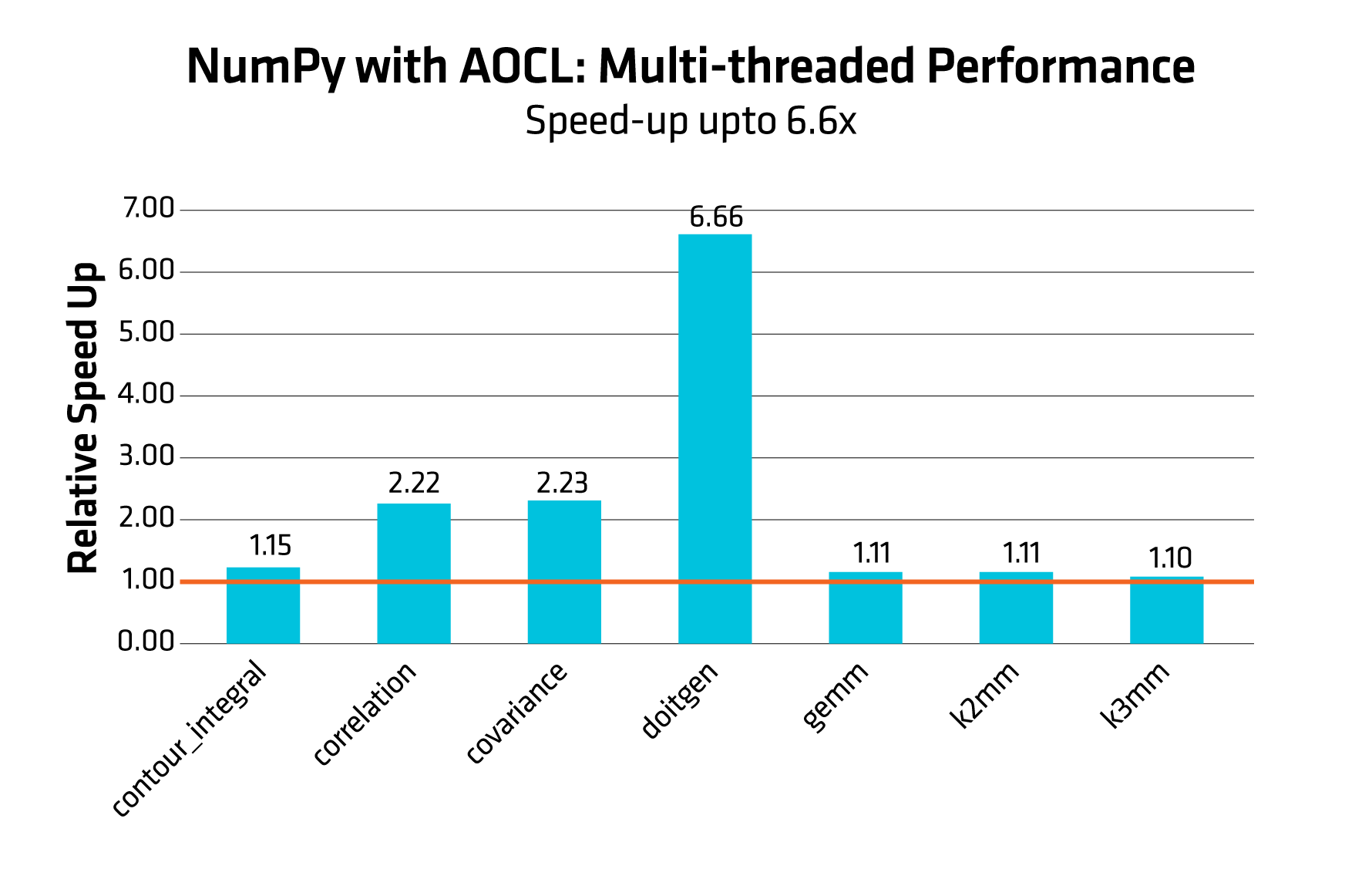
Performance results are based on validation with given tested configuration.
Figure 2 shows doitegen achieving a dramatic performance boost of 6.6x. Correlation and covariance also scale more than 2x while other benchmarks show modest gains. AOCL delivers excellent scalability and unlocks significant performance gains for compute-heavy and parallelizable workloads.
OpenMP is the threading model for AOCL-BLAS and AOCL-LAPACK libraries and thus parallelization for NumPy with AOCL and SciPy with AOCL can be controlled with OpenMP environment variable. Depending on the workload, you must set the required number of threads. For example, if you have access to 8 cores, set up the environment variable OMP_NUM_THREADS=8 in your run environment.
The optimal strategy of choosing OpenMP threads for best performance can vary between applications, and it is often worth experimenting with. More information on OpenMP thread placement strategies can be found at https://www.openmp.org/.
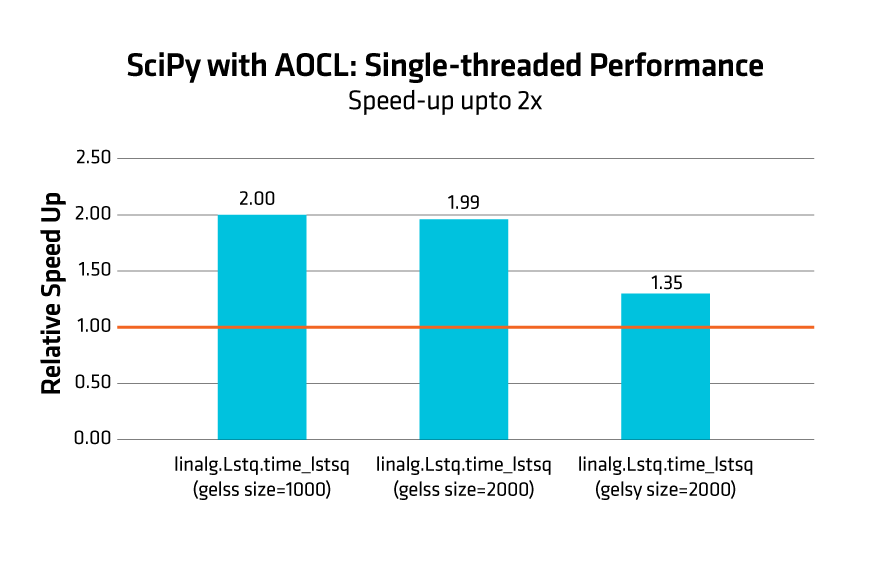
Figure 3 report the comparison for linalg.lstsq benchmark achieving a performance uplift up to 2x for SciPy with AOCL as compared to the stock SciPy implementation.
AOCL + Python = Secret behind the Speedup’s
Now that we have explored the performance gains, let us break down what is driving them! At the heart of these improvements are AOCL’s highly optimized kernels - specifically tuned for AMD architecture. By selectively leveraging AVX‑512 instructions, AOCL achieves maximum vectorization and throughput. Even the kernel dimensions are thoughtfully designed to align with AMD Zen cores.
Further, extensive low-level optimizations are crafted that include – loop optimizations for better instruction scheduling, branch prediction to minimize pipeline stalls/ full utilization of CPU pipelines, data prefetching for tactfully reducing read/write latencies.
As we step deeper, AOCL employs cache blocking techniques tailored specifically for Zen architecture to ensure fewer access to slower memory; computations stay closer to the CPU, flowing smoothly through the cache hierarchy. This reduces bottlenecks and helps workloads scale more gracefully as complexity increases.
To sum up, the architectural, microarchitectural, and memory‑level optimizations come together to deliver what users experience: lower latency and higher throughput compared to generic upstream implementations.
Quick Setup Made Simple: Install with Wheel Files
Each wheel can be installed using pip by downloading the given version from Python libraries with AOCL .
As we provide AOCL‑enabled wheels for each Python library, users can benefit from the optimizations without making any changes to their code.
Environment setup and Installation
We recommend using the Python virtual environments or Conda for good environment isolation. In this blog, we use the conda environment that can be created / activated as follows:
conda create -n <env_name> python=<version>
Follow the steps below to download and install the wheel (as an example):
- Download the wheel from Python libraries with AOCL
- Install required wheel –
pip3 install /path/to/numpy*.whl
For detailed instructions, please refer to https://docs.amd.com/r/en-US/57404-AOCL-user-guide/AOCL-User-Guide
Conclusion
AOCL brings hardware‑aware intelligence to Python workloads, unlocking the full potential of AMD Zen architecture, making computations faster and more efficient experiences.
If you are building data‑heavy, compute‑intensive, or performance‑sensitive applications, now is the perfect time to take advantage of what AOCL offers.
Give it a try - and feel the difference!


Related Blogs
-
Kimi K3 on AMD Instinct GPUs with TokenSpeed
TokenSpeed delivers fast, agentic LLM inference on AMD Instinct™ MI355X GPUs, with optimized kernels and leading Kimi K3 performance.
October 09, 2026
-
MangoBoost Delivers Open AI Models Powered by AMD
Mango Inference a serverless inference service providing production-ready access to open models powered by AMD Instinct™ GPUs and AMD ROCm™ software
October 09, 2026
-
Pre-Training Hybrid LLMs from Scratch in Primus on AMD Instinct™ GPUs — ROCm Blogs
Pre-train hybrid LLMs mixing MLA attention with Gated DeltaNet, Kimi Delta Attention and Mamba2 mixers on AMD Instinct MI355X GPUs, with open recipes.
October 07, 2026
-
DI Series: Serving Kimi-K3 MXFP4 Wide-EP Disaggregated on AMD Instinct MI300X and MI325X — ROCm Blogs
Learn how to serve a 1.4 TiB Kimi-K3 MXFP4 mixture-of-experts model disaggregated across AMD Instinct MI300X and MI325X GPUs.
October 07, 2026
-
AMD Instinct MI455X vs MI355X: A Technical Look at the Advancing AI 2026 Inference Numbers — ROCm Blogs
Explore the MI455X vs MI355X inference numbers from Advancing AI 2026, and learn how each benchmark was measured and what it really means.
October 07, 2026
-
How Agentic AI Is Expanding the Role of the DPU
As agentic AI drives more stateful workloads, DPUs are becoming critical for networking, storage, KV-cache management, and infrastructure efficiency.
October 05, 2026
-
MoRI UMBP Empowers AMD Instinct GPUs
See how UMBP, MoRI and SGLang optimize KV cache reuse to boost AMD Instinct™ MI355X GPU agentic AI performance and cost efficiency
October 01, 2026
-
Automating Performance Bottleneck Identification with the TraceLens Agent — ROCm Blogs
TraceLens Agent is an agentic workflow that examines GPU traces to deliver a prioritized optimization report, detailing root causes and fixes.
September 29, 2026