From Commands to Conversation: How an AI Agent Improves the AMD Quark User Experience
Aug 24, 2026

TL;DR
AMD Quark is a powerful cross-platform quantization toolkit, but using it directly requires users to choose the right entry point, navigate numerous configuration options, manage their environment, and recover from errors on their own. This post introduces the Quark AI Agent Skills, a conversational layer that lets users simply describe what they want — "Quantize Qwen/Qwen3-8B to FP8" or "quantize my ResNet-50 to XINT8" — and have the assistant route the request, inspect the model and environment, propose a plan, generate a reviewable script, and run it after user approval. The result is an out-of-the-box, reproducible experience that keeps the full power of Quark while removing most of the manual effort. We walk through PyTorch (LLM) and ONNX (vision) examples and note a few things to keep in mind when using the skills.
Introduction of Quark Workflow
AMD Quark is a cross-platform model quantization toolkit designed to make large models smaller, faster, and more cost-effective to deploy, while preserving as much accuracy as possible. It is flexible and script-driven, giving developers full control over quantization.
A typical journey looks like this: install the package and the matching target build; locate the entry point that fits the task, such as quantize_quark.py for language models on the PyTorch backend or writing your own script for the ONNX backend; choose the quantization settings, such as the data type, calibration data, algorithm, and accuracy improvement algorithms; run the command or script; and finally evaluate or validate the result. It is a capable flow that rewards familiarity with both quantization concepts and Quark's conventions. For more details, please refer to the Quark documentation.
That same flexibility, however, places most of the decisions on the user. The experience presents a few recurring challenges:
- Handling setup details.
Users must pick the right wheel, match the PyTorch build, and set variables for large models before the first run. - Knowing where to start.
Users must choose PyTorch or ONNX, then find the right example or script for their goal. - Choosing configuration.
Selecting data types, calibration, algorithms, exclusions, and targets requires quantization expertise. - Recovering from issues.
Errors such as OOM, missing providers, or unsupported models require users to diagnose, adjust, and retry. - Reproducing results.
Without checkpoints or recorded artifacts, reproducibility depends on users documenting every step.
These are precisely the points of friction — planning, configuration, environment setup, recovery, and record-keeping — that the AI Agent Skills are designed to absorb.
How the Quark AI Agent Skills Help Quark Users
Quark AI Agent Skills are a family of reusable, self-contained capabilities that package Quark's quantization workflows as skills an AI coding assistant can invoke. Each skill is described in a Markdown file named SKILL.md and is surfaced through assistants such as the Claude Code command-line interface. The idea is that the user does not need to know which Quark skill to call. Instead, the user states a quantization goal in natural language, and the system selects and sequences the appropriate Quark skills automatically.
The benefit brought by Quark AI Agent Skills is an out-of-the-box experience: quantization becomes something the user can simply ask for. Rather than reading through examples, memorizing flags, or writing scripts, the user describes the outcome they want in plain language, and the assistant handles the underlying steps — routing to the right backend, inspecting the model and environment, proposing settings, running the work, and validating the result. The full power of Quark stays available, but the effort of driving it by hand largely goes away.
Consider the Quark installation as an example. The below exampleperfectly reflects how the Quark AI Agent Skills help the users.
Old School Way:
		# Choose the wheel that matches your accelerator and platform yourself:
pip install amd-quark                           # universal (CPU fallback)
pip install amd-quark --extra-index-url https://pypi.amd.com/quark/cu128/simple    # CUDA 12.8
pip install amd-quark --extra-index-url https://pypi.amd.com/quark/rocm72/simple   # ROCm 7.2
# ...then verify the install and confirm it matches your Python and PyTorch build.
AI Agent Age:
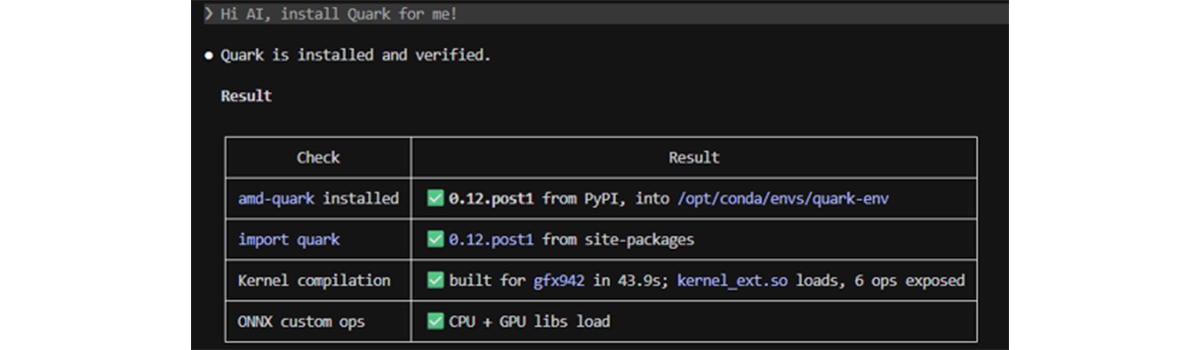
The assistant checks the operating system, Python version, accelerator, and driver stack, selects the matching command, asks for confirmation, runs it, and verifies the result — so the user gets a correct installation without having to know which variant applies to their machine.
This approach gives Quark users a consistent, reviewable workflow that produces a standard set of artifacts for each run, making results easier to reproduce and hand off.
Examples of Using Quark Skills
Example of Large Language Model Quantization
Suppose a user wants to quantize Qwen3-8B to FP8. Instead of finding the appropriate script and selecting every option manually, they can describe the result they want:
"Quantize Qwen/Qwen3-8B to FP8 and save the result to ./output/qwen3-8b-fp8."
The quark-torch-ptq skill turns this request into a guided workflow with review points along the way:
1. Analyze the model. The assistant inspects the model configuration and presents a summary that includes the Qwen3 architecture, the layers targeted for quantization, the default exclusion of lm_head, compatibility information, and any risks that may affect the run. The user can verify this analysis before proceeding.
2. Propose a quantization plan. Based on the requested FP8 format, the assistant presents the important choices and explains the defaults:
Setting |
Proposed value |
Reason |
Quantization scheme |
FP8 |
Requested by the user |
KV cache |
FP8 |
Matches the FP8 inference path |
Excluded layers |
lm_head |
Keeps the output head at full precision |
Calibration |
128 samples, sequence length 512 |
Practical starting point for calibration |
Algorithm |
RTN baseline |
Simple and fast starting point |
The user can approve the plan or request changes, such as a different calibration size or an accuracy-improvement algorithm.
3. Review and approve the command. Once the plan is confirmed, the assistant shows the exact command, output directory, and export format before anything runs:
		python3 examples/torch/language_modeling/llm_ptq/quantize_quark.py \
  --model_dir Qwen/Qwen3-8B \
  --output_dir ./output/qwen3-8b-fp8 \
  --quant_scheme fp8 \
  --kv_cache_dtype fp8 \
  --num_calib_data 128 \
  --seq_len 512 \
  --model_export hf_format \
  --data_type auto \
  --device cuda
4. Run and report the result. After the user approves the command, the assistant runs the quantization and verifies the output. The resulting Hugging Face safetensors model, configuration, tokenizer files, and Quark profile are written to ./output/qwen3-8b-fp8. The assistant can then help validate the result, evaluate its accuracy, or convert it to another supported format.
The workflow retains model_analysis.json, quant_plan.json, and run_manifest.yaml so that the decisions and exact command can be reviewed, reproduced, or handed off. If the run encounters an out-of-memory error, a model-loading failure, or a version mismatch, the assistant explains the issue and uses quark-torch-debug guidance to recommend the smallest practical adjustment.
Example of Vision Model Quantization
A common task is preparing a vision model — such as a ResNet-50 image classifier — for efficient deployment on a CPU, GPU, or AMD NPU. Suppose an engineer wants to quantize their model to XINT8 using a folder of calibration images. They describe the goal in natural language:
"Quantize my resnet50.onnx with XINT8 using the images in ./calib, and write the result to ./output/resnet50_xint8.onnx."
Without Quark Skills
Done by hand, this task involves several moving parts that the user has to assemble and get right:
1. Prepare calibration data. The user writes a custom CalibrationDataReader (often an ImageDataReader) that loads images from disk, applies the correct preprocessing — resize, normalization, and layout such as NCHW versus NHWC — and yields input feeds that match the model's input name and shape.
2. Choose a configuration. The user selects a data type and preset (for example, an XINT8 specification), a calibration method, and any accuracy-improvement algorithm such as CLE or AdaQuant and decides which nodes to exclude. For NPU targets, they also need the matching custom-operator library to be available.
3. Write a quantization script. They wire the data reader, a QConfig, and ModelQuantizer.quantize_model(...) together in a Python script, taking care that the settings are compatible with the intended deployment target.
4. Run and troubleshoot. They launch the script and work through any issues themselves — a missing execution provider, a custom operator that fails to load, or an out-of-memory error — by reading the error and adjusting.
5. Validate the result. Finally, they inspect the output on their own to confirm the model was quantized as intended before handing it off.
Each of these steps is doable, but together they ask the user to know the ONNX graph, the preprocessing pipeline, and Quark's configuration surface before seeing the first result.
With Quark Skills
With the skills, the same request is a single sentence, and the quark-onnx-ptq workflow carries it through a four-step flow, pausing at each checkpoint for confirmation. Importantly, execution never invokes the quantizer directly; it runs a generated, reviewed script.
1. Intake — reads the ONNX graph and records the opset, input and output shapes, an operator histogram, and deployment-target compatibility in model_analysis.json.
2. Plan — selects the XINT8 preset, a calibration method, and any algorithm, with gating for the chosen deployment target, and records the decision in quant_plan.json.
3. Manifest — the workflow generates the calibration and quantization script — including the image data reader and configuration — and records it in run_manifest.yaml.
4. Execute — after the user confirms, the script runs and produces the quantized model, ready for deployment.
If execution fails because an execution provider is missing, a custom operator fails to load, or the machine runs out of memory, the workflow hands off to a dedicated installation or debugging step, which diagnoses the problem and proposes the smallest next action to unblock the user. Afterward, a validation step can confirm that QDQ nodes were inserted and that the non-quantized initializers remain byte-identical to the originals.
Example Summary
The contrast is the heart of the story: what was a multi-part scripting exercise becomes a single described goal, with the assistant handling data preparation, configuration, target compatibility, execution, and validation — while still pausing for the user to review and confirm along the way.
Challenge |
Without AI agent skills |
With AI agent skills |
Setup and environment |
User picks the right package variant, matching PyTorch build, and any large-model environment settings, then verifies the install themselves. |
The assistant inspects OS, Python, accelerator, and drivers, proposes the matching install steps, runs them after confirmation, and checks that Quark is usable. |
Finding the right entry point |
User chooses PyTorch vs ONNX and hunts through examples for the script or pattern that fits the task. |
User states the outcome in plain language; the assistant routes to the correct backend and workflow. |
Configuration |
User navigates data types, calibration, algorithms, exclusions, and deployment targets and must know what works together. |
The assistant analyzes the model and environment, proposes a plan with defaults and rationale, and waits for approval or changes. |
Error recovery |
User reads stack traces, searches docs, and retries in a self-directed loop (OOM, missing providers, unsupported ops, and similar). |
The assistant explains what failed, suggests the smallest practical fix, and can guide install or debug steps before retrying. |
Reproducibility and handoff |
Exact commands and choices live in notes or shell history unless the user writes them down. |
Review checkpoints before execution plus saved analysis, plan, and run records make runs easier to repeat and share. |
Things to Keep in Mind
The skills are designed to make Quark easier and safer to use and getting the most from them is largely a matter of staying engaged along the way. A few things are worth keeping in mind:
- State your deployment target and priorities clearly. The assistant plans from what you tell it, so a request that names where the model will run — CPU, GPU, or AMD NPU — and what matters most to you, such as holding accuracy over shrinking the model as far as possible, produces a far better first proposal than a bare model name and data type. Left unsaid, these fall back on general defaults that are reasonable but may not match your deployment.
- Review all generated scripts and commands before execution. Much of the value comes from the confirmation checkpoints, where the assistant presents the plan, the full script, and the exact command before anything runs. Read the script itself rather than only the summary of it, checking the paths it writes to, the settings it encodes, and the preprocessing it assumes — a generated ONNX calibration reader, for example, carries a templates resize, normalization, and tensor layout, which can quietly affect accuracy if your model expects something different. Taking a moment here, rather than confirming quickly, is what keeps a run aligned with your intent.
- Be mindful of larger runs. Because a single sentence can trigger a model's download and a full quantization run, it is worth being aware that these operations can use significant disk, memory, and time. Reviewing the plan before confirming helps you start such work intentionally.
- Expect results to vary between runs and across models. Read each plan on its own merits rather than assuming it repeats the last one and rely on the recorded model_analysis.json, quant_plan.json, and run_manifest.yaml when you need a specific run to be reproducible. The assistant's analysis and proposed settings come from a language model, so the same request might produce a slightly different plan a little bit on a second run, and a different assistant may reason your architecture or deployment target differently.
These points are simply the natural trade-offs of a conversational layer over a powerful toolkit, and the skills' checkpoints, generated-script transparency, and validator skills are there to help you manage them.
Conclusion
The Quark AI Agent Skills brings a guided, conversational experience to model quantization. By letting users express what they want to achieve rather than how to achieve it, the Quark AI Agent Skills turns a broad and capable toolkit into an approachable, step-by-step workflow. Each skill is consistent, safe by default, and traceable to the official Quark documentation and source code.
Whether you are quantizing a large language model with the PyTorch backend or preparing a vision model for the AMD NPU with the ONNX backend, the skills meet you where you are: describe your goal, review the proposed plan, confirm, and let the assistant handle the details. We invite Quark users to try the skills in Claude Code, and to share feedback as we continue to expand the catalog, broaden coverage, and strengthen the system over time.
For more information about Quark AI Agent Skills for Pytorch and ONNX backends, please refer to the AI Agent Skills documentation: Quark AI Agent Skills for Pytorch and Quark AI Agent Skills for ONNX
Acknowledgements
We would like to express our thanks to our colleagues Ke Wang, Lin Zhao, Jiangyong Ren, Peng Lu, and the AMD Quark team, for their insightful feedback and technical assistance.
Appendix
Quark currently ships a family of skills covering the full quantization journey. They fall into three groups: skills that apply to both backends, skills specific to the PyTorch flow, and skills specific to the ONNX flow.
Shared skills (both backends)
- quark-env-preflight collects environment facts — operating system, Python version, GPU, and CUDA/ROCm status — before any installation or quantization step.
- quark-install installs and verifies the AMD Quark package and its core dependencies.
PyTorch backend skills
- quark-torch-install installs or verifies the correct PyTorch build for the user's accelerator.
- quark-torch-model-intake inspects a Hugging Face or safetensors model and reports its architecture, quantization targets, and risks.
- quark-torch-ptq runs the complete PyTorch large language model PTQ pipeline end to end.
- quark-torch-export exports a quantized model to Hugging Face safetensors, GGUF, or ONNX.
- quark-torch-llm-eval evaluates the accuracy of a model using common benchmarks.
- quark-torch-file2file-quantization performs low-memory, file-to-file quantization for very large checkpoints.
- quark-torch-result-validator validates the exported PyTorch quantization result.
- quark-torch-debug diagnoses failures in the PyTorch flow and suggests fixes.
ONNX backend skills
- quark-onnx-install installs or verifies the correct ONNX Runtime build and matching ONNX package.
- quark-onnx-model-intake inspects an ONNX graph — opset, input/output shapes, operator histogram, and deployment-target compatibility.
- quark-onnx-ptq runs the complete ONNX-to-ONNX PTQ pipeline for vision and CNN models.
- quark-onnx-autosearch-pro automatically searches for the best quantization configuration.
- quark-onnx-result-validator validates the quantized ONNX output.
- quark-onnx-debug diagnoses failures in the ONNX flow and suggests fixes.

Related Blogs
-
NeuroSpark Expands AI Compute Choice with AMD
NeuroSpark uses AMD Instinct GPUs and ROCm software on OCI to deliver flexible, cost-effective AI training and inference
October 23, 2026
-
Sovereign AI for European Customer Conversations
LeadDesk, QuTwo, and AMD Silo AI collaborate on a sovereign AI stack that brings near-frontier, open-weight models to European customer conversations.
October 22, 2026
-
Micro-World 2: Streaming Real-time Interactive World Model — ROCm Blogs
This blog demonstrates how Micro-World 2 combines precisely annotated action data, four-step diffusion distillation, and ROCm-optimized inference to deliver controllable, long-horizon, real-time world generation on a single AMD Instinct GPU through a fully open-source pipeline.
October 20, 2026
-
MoE Training Optimization with Primus — ROCm Blogs
Learn how to speed up MoE training on AMD Instinct GPUs with Primus: a fused MoE megakernel, FP8/MXFP8 expert GEMMs, and training-at-scale tuning.
October 20, 2026
-
Optimizing World Action Models on AMD GPUs — ROCm Blogs
Speed up World Action Models on AMD GPUs with GEAK kernels, fewer denoising steps, and latent actions, cutting FastWAM latency 25× at about 97 percent success.
October 20, 2026
-
Bringing Ultra-Fast, Interactive LLM Inference to AMD Instinct™ MI355X GPUs — ROCm Blogs
Accelerate single-request LLM inference on AMD Instinct MI355X with megakernels, speculative decoding, and MXFP4 for 1.9-3.3x faster decode.
October 19, 2026
-
From Prompt to Playback: Nunchux Turns AMD Instinct™ GPU Performance into Responsive Video AI
See how AMD Instinct™ MI355X GPUs and AMD ROCm™ software enable faster-than-playback MiniMax-H3 video generation.
October 19, 2026
-
From AI That Answers to AI That Acts
Why physical AI requires a new definition of performance – one built around the whole system, not peak compute.
October 19, 2026