ZenDNN 5.2: Accelerating vLLM V1 Engine and Recommender Systems Inference on AMD EPYC™ CPUs
Mar 13, 2026

AMD is making a bold statement: the future of AI inference is flexible, efficient, and increasingly powered by the CPU you already have in your rack. Indeed, in the world of artificial intelligence, the narrative is dominated by the GPU. And for good reason - GPUs aren’t going anywhere. Their massive parallel processing power remains the gold standard for heavy-lift workloads like high-throughput LLM inferencing. However, the CPU is no longer just a spectator; it is being leveraged as a high-performance engine for LLM inferencing in its own right.
With the latest release of the ZenDNN 5.2, AMD is shattering expectations for what x86 architecture can handle in the AI era. We aren't just talking about incremental gains. We are looking at a massive 200% performance boost over previous versions, effectively doubling the efficiency of AI workloads on AMD EPYC™ processors.
Why This Matters: From Agents to Edge
This isn't just about raw numbers; it’s about enabling new frontiers in computing:
- Agentic AI: To run autonomous agents effectively, you need low-latency, reliable compute. Optimizations for vLLM integration and INT4 quantization enable sophisticated LLM agents to run directly on CPU infrastructure with plug-and-play ease.
- Offline and Edge Use-Cases: Privacy and connectivity aren't always guaranteed. By pushing the limits of Weight-Only Quantization (WOQ), AMD allows massive models to run locally and efficiently without the reliance on a dedicated datacenter GPU.
- Accelerate AI inferencing on hardware you already have: In most standard server deployments, the CPU remains the backbone of the stack and is always present; leveraging it for AI reduces Total Cost of Ownership (TCO).
What’s Under the Hood?
The 5.2 release marks a major architectural shift. AMD has migrated from legacy libraries to the new ZenDNNL, leveraging a Low Overhead API (LOA) that streamlines operator kernels like MatMul and Softmax.
Key Highlights of the Update:
- Seamless vLLM V1 Integration: The new vLLM-ZenTorch Plugin allows for zero-code-change acceleration, making high-throughput inference more accessible than ever.
- Quantization Support: Experimental INT4 support for LLMs and specialized UINT4/W8A8 quantization for recommendation systems (DLRM-v2).
- BFloat16 & Graph Optimizations: Enhanced EPYC™ processor specific kernels and advanced pattern identification ensure that every cycle of the CPU is squeezed for maximum AI performance.
- Modernized Stack: Full support for TensorFlow 2.20, PyTorch 2.10.0, and Python 3.13.
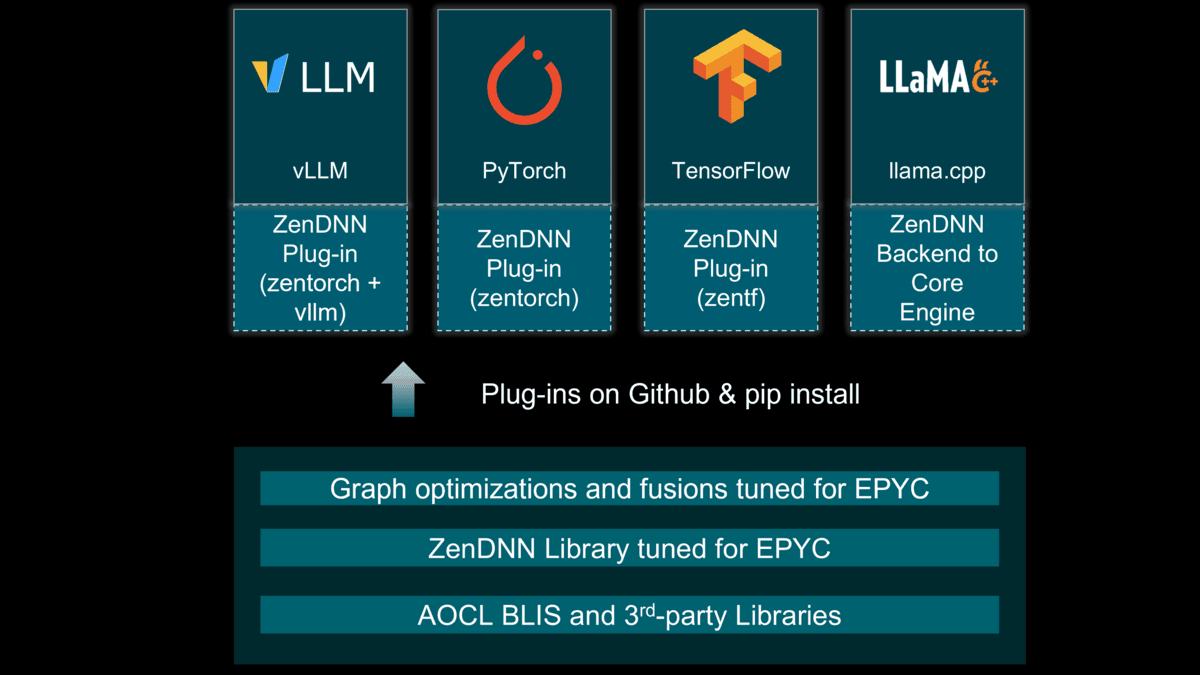
- ZenDNN Backend for Llama.cpp: Engineered during the 5.2 development cycle, this integration allows Llama.cpp users to leverage ZenDNN’s low-latency kernels for superior execution on AMD EPYC™ processors.
Supercharging vLLM V1 Engine with AMD ZenDNN
Leveraging CPUs for LLM inference is rapidly evolving from a niche alternative into a sophisticated and cost-efficient strategy for production workloads. With the release of ZenDNN 5.2, we’ve upgraded our plug-in to support the state-of-the-art vLLM V1 engine. The team focused on a "zero-code-change" philosophy, offering a true plug-and-play experience for vLLM versions 0.12.0 through 0.15.1 while delivering massive speedups under the hood. In our testing on non-cherry-picked models, the combination of vLLM and ZenTorch delivered up to 239% higher performance compared to running native vLLM on a standard CPU setup.
Beyond the improvements to the software stack, we’ve unlocked further gains by optimizing how the hardware handles data. By deploying multiple vLLM instances using numactl and interleaving memory access for each instance, we’ve effectively maximized DRAM memory bandwidth. This approach ensures that the CPU isn't just processing faster, but is also being fed data more efficiently, leading to a significant boost in total decode throughput.
Implementation: Maximizing the Throughput
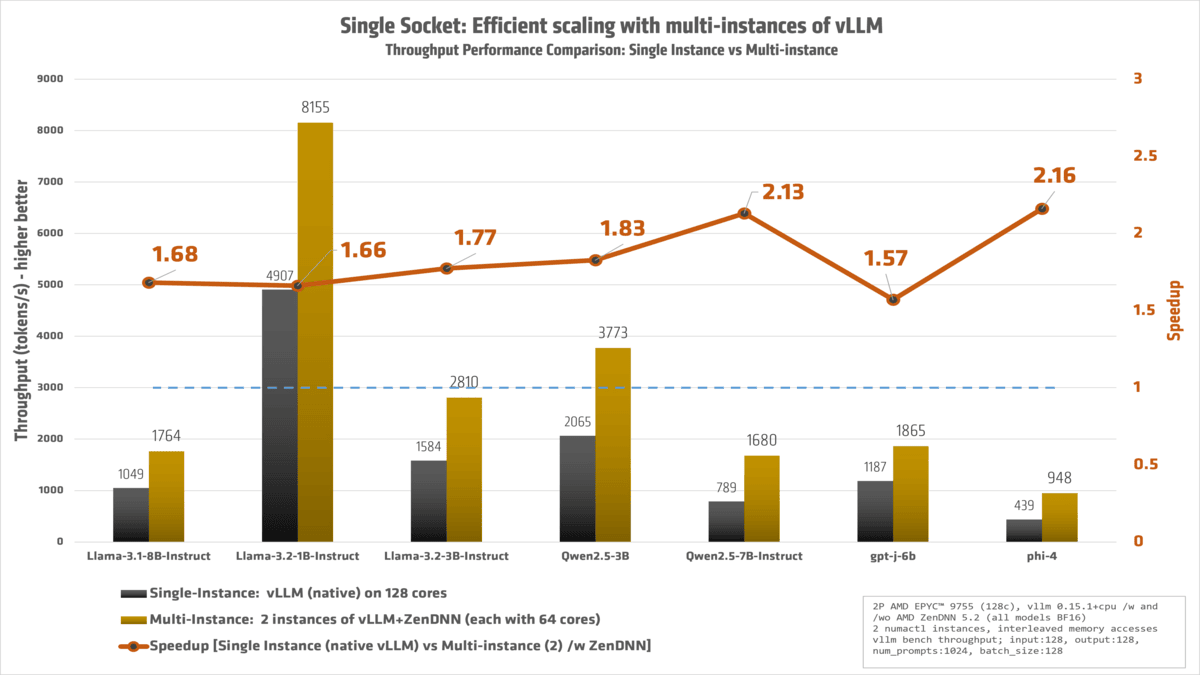
Efficient scaling: While modern AMD EPYC™ processors offer an incredible core density, simply running a single, massive vLLM instance across all 128 cores of a socket often leads to diminishing returns. When we tested native vLLM using the full 0–127 core range, performance was unexpectedly low due to the complexities of managing such a wide compute fabric and memory contention.
To solve this, we implemented a more efficient scaling strategy: splitting the workload into two distinct vLLM instances, with 64 cores dedicated to each. By "interleaving" these cores and binding them to their respective local memory pools, we massively increased total throughput. This approach effectively saturates the available DRAM bandwidth and reduces synchronization overhead, allowing the hardware to operate at its peak potential. As shown in our latest benchmarks, this multi-instance configuration is the key to unlocking the true performance of high-core-count CPU architectures.
You can do this by using numactl to pin specific vLLM instances to dedicated CPU cores and their local memory pools. Here is a quick breakdown of how to implement the memory interleaving strategy mentioned above:
- Install the Plugin: Simply drop the vLLM-ZenTorch plugin into your existing vLLM environment.
- Bind Instances: Use
numactlto bind specific vLLM instances to specific CPU cores. - Interleave Memory: Access the physical cores in a non-sequential manner to ensure memory bandwidth is distributed across all available DRAM channels, preventing bottlenecks during the decode phase.
For example, the following command launches a single vLLM instance bound to the even-numbered cores (0, 2, 4... up to 126) and restricts its memory allocation to Socket 0 (Memory Pool 0):
		numactl --physcpubind=$(seq -s, 0 2 127) --membind=0 \
            vllm bench throughput --model meta-llama/Llama-3.1-8B-Instruct\
            --random-input-len 128 --random-output-len 128 \
            --num-prompts 1024 --max-num-seqs 128
By using this pattern, you can scale your deployment by launching additional instances mapped to the remaining cores and sockets. This "siloed" approach prevents different AI workloads from competing for the same cache or memory bandwidth, effectively maximizing the total decode throughput of the entire server.
Furthermore, for better performance during CPU inference, we enabled freezing by setting export TORCHINDUCTOR_FREEZING=1. This environment variable is available from vLLM version 0.12.0 onwards. While more information can be found here, in brief, freezing allows the runtime to treat model parameters as immutable. This often leads to a reduced memory footprint and an improved Cache Locality, whereby the model data is tighter and more likely to stay within the L3 cache of our AMD EPYC processor.
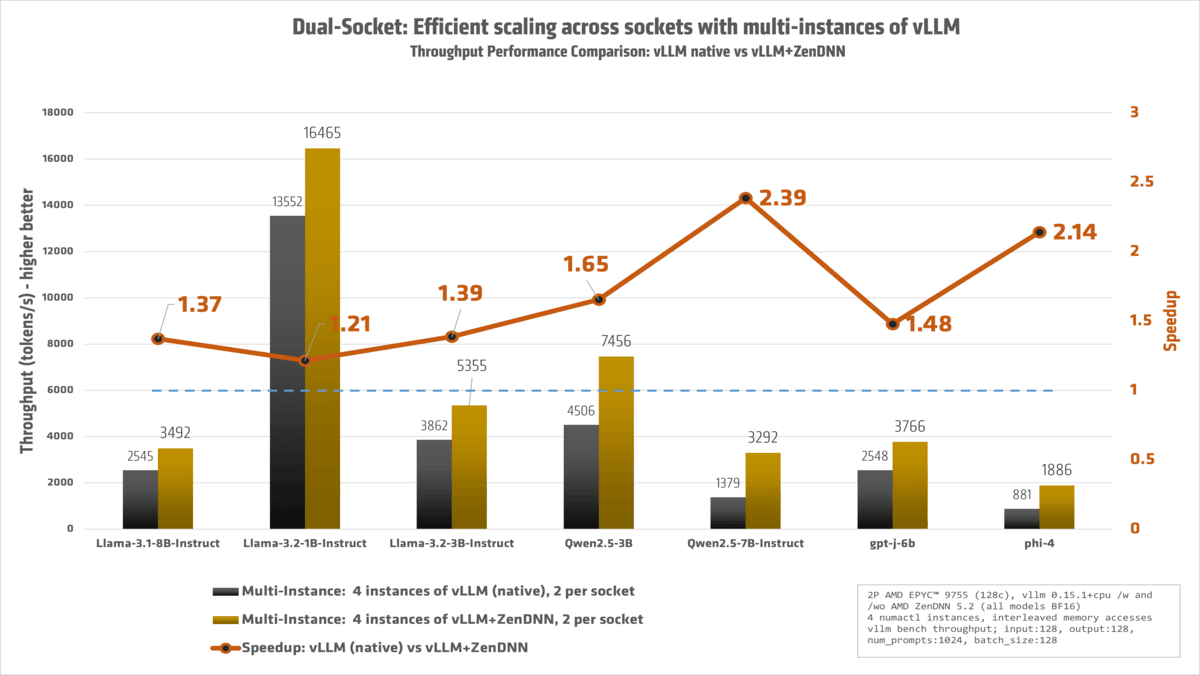
We have a dual-socket system. Can we do better? Yes!
With a 2P AMD EPYC™ powerhouse at our disposal, we fully 'redlined' the machine, ensuring that every single core was engaged and working at peak efficiency.
The result:
Conclusion: Empowering the Future of Flexible AI
The release of ZenDNN 5.2 marks a pivotal moment in how we think about AI infrastructure. While GPUs remain the gold standard for massive parallel workloads, the CPU has evolved from a supporting player into a high-performance engine capable of carrying its own weight. By delivering over 200% performance boost and seamless plugin-ins and integrations with industry heavyweights like vLLM and Llama.cpp, we are giving developers the freedom to run sophisticated AI wherever it makes the most sense - whether that’s in a high-density data center or at the edge.
Our Ongoing Commitment to the Ecosystem
Just as we did with version 5.1, our strategy remains rooted in the open-source community. We continue to upstream our optimizations into the core PyTorch and TensorFlow codebases, ensuring that the work we do on the ZenDNNL Low Overhead API (LOA) and pluggable devices benefits every developer, regardless of their specific stack. By strengthening the native capabilities of these frameworks, we aren't just improving AMD hardware performance; we are improving the AI ecosystem for everyone.
Real-World Results for Every Rack
The technical shifts we've made - from experimental INT4 quantization to architectural "tricks" like NUMA-aware memory interleaving translate directly into tangible business value. You can now achieve higher throughput and lower latency for agentic AI and offline use-cases using the AMD EPYC™ hardware you already own.
Call to Action
We encourage you to experience these gains firsthand. Download the updated AMD ZenDNN Plugin for PyTorch (zentorch) and AMD ZenDNN Plugin for TensorFlow (zentf) (either via pip install or from Github), explore our latest optimizations on GitHub, and join us in pushing the boundaries of what the x86 architecture can achieve.
Try it today:
- Download: Visit our GitHub Repository
- Documentation: Read the full ZenDNN 5.2 Release Notes
We’d love to hear about your performance gains - open an issue or start a discussion on our Github pages!
Footnotes
ZD-059: Results based on AMD Internal Testing as of 3/10/2026.
Workload Configurations: native vllm 1.15.1+cpu, zenTorch 5.2, PyTorch 2.10.0+cpu, input:128, output:128, num_prompts:1024, batch_size:128. 2 NUMA nodes, Python 3.13, BFloat16, tokens per second, singlevllm: native vLLM single instance, singlezendnn: single-instance ZenDNN 5.2, multivllm: native vLLM multi-instance, multizendnn: ZenDNN 5.2 multi-instance
1P AMD EPYC 9755 reference system, 128 total cores, 1536GB 12x128GB DDR5-6400, BIOS RVOT1004C, Ubuntu 22.04 LTS 5.15.0-170-generic, SMT=off, Mitigations=off, Power determinism
Results:
Model singlevllm singlezendnn multivllm multizendnn multizendnnvssinglevllm
Llama-3.1-8B-Instruct 1048.853 1205.183 1403.56 1764.403 1.682
Llama-3.2-1B-Instruct 4907.087 4460.023 7043.177 8154.797 1.662
Llama-3.2-3B-Instruct 1584.057 1837.58 2306.23 2809.573 1.774
Mixtral-8x7B-Instruct-v0.1 399.493 396.66 435.693 442.237 1.107
Qwen2.5-3B 2065.21 2102.967 2699.733 3772.503 1.827
Qwen2.5-7B-Instruct 788.613 1209.833 891.033 1680.34 2.131
gpt-j-6b 1187.337 1420.78 1489.067 1864.55 1.57
phi-4 438.83 704.983 564.103 948.24 2.161
Llama-3.3-70B-Instruct 152.83 185.22 169.483 219.403 1.436
Results may vary due to factors including system configurations, software versions, and BIOS settings.
ZD-060: Results based on AMD Internal Testing as of 3/10/2026.
Workload Configurations: native vllm 1.15.1+cpu, zenTorch 5.2, PyTorch 2.10.0+cpu, input:128, output:128, num_prompts:1024, batch_size:128. 2 NUMA nodes, Python 3.13, BFloat16, tokens per second, basevllm: native vLLM single instance, multivllm: native vLLM multi-instance, multizendnn: ZenDNN 5.2 multi-instance
2P AMD EPYC 9755 reference system, 256 total cores, 3072GB 24x128GB DDR5-6400, BIOS RVOT1004C, Ubuntu 22.04 LTS 5.15.0-170-generic, SMT=off, Mitigations=off, Power Determinism
Results:
Model basevllm multivllm multizendnn multizendnnvsmultivllm
Llama-3.1-8B-Instruct 946 2544.557 3491.72 1.372
Llama-3.2-1B-Instruct 4881.917 13551.903 16464.78 1.215
Llama-3.2-3B-Instruct 1692.653 3862.13 5354.943 1.387
Mixtral-8x7B-Instruct-v0.1 543.367 881.453 892.83 1.013
Qwen2.5-3B 1998.08 4505.807 7455.653 1.655
Qwen2.5-7B-Instruct 838.42 1379.403 3291.7132.386
gpt-j-6b 1171.3 2547.607 3766.347 1.478
phi-4 420.453 880.917 1885.667 2.141
Llama-3.3-70B-Instruct 142.1 324.223 438.723 1.353
Results may vary due to factors including system configurations, software versions, and BIOS settings.
Footnotes
ZD-059: Results based on AMD Internal Testing as of 3/10/2026.
Workload Configurations: native vllm 1.15.1+cpu, zenTorch 5.2, PyTorch 2.10.0+cpu, input:128, output:128, num_prompts:1024, batch_size:128. 2 NUMA nodes, Python 3.13, BFloat16, tokens per second, singlevllm: native vLLM single instance, singlezendnn: single-instance ZenDNN 5.2, multivllm: native vLLM multi-instance, multizendnn: ZenDNN 5.2 multi-instance
1P AMD EPYC 9755 reference system, 128 total cores, 1536GB 12x128GB DDR5-6400, BIOS RVOT1004C, Ubuntu 22.04 LTS 5.15.0-170-generic, SMT=off, Mitigations=off, Power determinism
Results:
Model singlevllm singlezendnn multivllm multizendnn multizendnnvssinglevllm
Llama-3.1-8B-Instruct 1048.853 1205.183 1403.56 1764.403 1.682
Llama-3.2-1B-Instruct 4907.087 4460.023 7043.177 8154.797 1.662
Llama-3.2-3B-Instruct 1584.057 1837.58 2306.23 2809.573 1.774
Mixtral-8x7B-Instruct-v0.1 399.493 396.66 435.693 442.237 1.107
Qwen2.5-3B 2065.21 2102.967 2699.733 3772.503 1.827
Qwen2.5-7B-Instruct 788.613 1209.833 891.033 1680.34 2.131
gpt-j-6b 1187.337 1420.78 1489.067 1864.55 1.57
phi-4 438.83 704.983 564.103 948.24 2.161
Llama-3.3-70B-Instruct 152.83 185.22 169.483 219.403 1.436
Results may vary due to factors including system configurations, software versions, and BIOS settings.
ZD-060: Results based on AMD Internal Testing as of 3/10/2026.
Workload Configurations: native vllm 1.15.1+cpu, zenTorch 5.2, PyTorch 2.10.0+cpu, input:128, output:128, num_prompts:1024, batch_size:128. 2 NUMA nodes, Python 3.13, BFloat16, tokens per second, basevllm: native vLLM single instance, multivllm: native vLLM multi-instance, multizendnn: ZenDNN 5.2 multi-instance
2P AMD EPYC 9755 reference system, 256 total cores, 3072GB 24x128GB DDR5-6400, BIOS RVOT1004C, Ubuntu 22.04 LTS 5.15.0-170-generic, SMT=off, Mitigations=off, Power Determinism
Results:
Model basevllm multivllm multizendnn multizendnnvsmultivllm
Llama-3.1-8B-Instruct 946 2544.557 3491.72 1.372
Llama-3.2-1B-Instruct 4881.917 13551.903 16464.78 1.215
Llama-3.2-3B-Instruct 1692.653 3862.13 5354.943 1.387
Mixtral-8x7B-Instruct-v0.1 543.367 881.453 892.83 1.013
Qwen2.5-3B 1998.08 4505.807 7455.653 1.655
Qwen2.5-7B-Instruct 838.42 1379.403 3291.7132.386
gpt-j-6b 1171.3 2547.607 3766.347 1.478
phi-4 420.453 880.917 1885.667 2.141
Llama-3.3-70B-Instruct 142.1 324.223 438.723 1.353
Results may vary due to factors including system configurations, software versions, and BIOS settings.

Contributors


Related Blogs
-
MORI CCO
MORI CCO enables compute-communication overlap on AMD Instinct™ GPUs. Build faster distributed inference and training kernels with device-side communication.
September 29, 2026
-
How AMD Ryzen AI Max PRO 400 Series Processors Bring Local Agentic AI to Business Customers
See how AMD Ryzen AI Max PRO 400 Series processors bring local agentic AI to business with more memory, flexible deployment, and lower costs.
September 28, 2026
-
Verl 0.9.0 on ROCm™ 10.0: Next-Generation RL Post-Training on AMD Instinct™ GPUs — ROCm Blogs
Enable Verl 0.9.0 on ROCm™ 10. Native AMD platform support, vLLM 0.27 and SGLang in one image, and updated async GRPO/DAPO recipes on AMD Instinct™ GPUs.
September 27, 2026
-
Local Quantization and Multi-Backend Deployment with AMD Quark on Strix Halo — ROCm Blogs
Quantize a 35B MoE model directly on AMD Strix Halo with AMD Quark, export to GGUF and safetensors, validate with llama.cpp and vLLM, and deploy through Lemonade.
September 24, 2026
-
Model Weight Profiles: Where Do the Parameters Go? — ROCm Blogs
Introduce Model Weight Profiles and compare embeddings, attention, and dense layers so checkpoint size and quantization savings make sense.
September 24, 2026
-
UltraQuant on AMD Instinct: More Efficient Agentic Serving for Qwen3.8-MXFP4 — ROCm Blogs
A native 4-bit MXFP4 KV cache that speeds up Qwen3.8 decode over 8-bit KV on AMD Instinct MI355X, with no accuracy loss.
September 24, 2026
-
TileRT AgentX on AMD Instinct GPUs
TileRT achieves 469 tok/s on AgentX with GLM-5.3 on 8× AMD Instinct MI355X GPUs, delivering leading single-user performance.
September 24, 2026
-
Beyond TOPS: AMD Ryzen™ AI Embedded X100 at the Edge
Scale agentic AI at the edge with AMD Ryzen™ AI Embedded X100 Series: more concurrent agents, unified memory, x86 compatibility, and long life.
September 24, 2026