Day-0 Support for Baidu ERNIE-Image on AMD GPUs: Validation on the Instinct MI355X GPU and Radeon AI PRO R9700
Apr 23, 2026

This post documents the successful day-0 support deployment and inference validation of Baidu’s ERNIE-Image text-to-image model on AMD GPUs, covering both the data-center-class AMD Instinct™ MI355X GPUs (CDNA 4) and the professional workstation-class Radeon™ AI PRO R9700 Series graphics (RDNA 4). Using the HuggingFace Diffusers framework and the ROCm™ software stack, ERNIE-Image runs on AMD hardware with zero modifications to the core inference code.
- Instinct MI355X GPUs(288 GB HBM3e): Full single-card deployment with generous memory headroom.
- Radeon AI PRO R9700 (32 GB GDDR6): Single-card deployment via enable_model_cpu_offload(), with peak VRAM usage well within the card’s capacity.
Background
ERNIE-Image Model Overview
ERNIE-Image is a text-to-image model developed by Baidu, built on the Diffusion Transformer (DiT) architecture. It supports both Chinese and English prompt input. The model has been submitted for upstream integration into the HuggingFace Diffusers library via PR #13432.
The model architecture comprises the following components:
Component |
Type |
Size |
Role |
Transformer |
ErnieImageTransformer2DModel |
15 GB |
Diffusion backbone |
Text Encoder |
Mistral3Model |
7.2 GB |
Text encoding |
Prompt Enhancer (PE) |
Ministral3ForCausalLM |
7.2 GB |
Automatic prompt enrichment |
VAE |
AutoencoderKLFlux2 |
161 MB |
Variational autoencoder |
Scheduler |
FlowMatchEulerDiscreteScheduler |
— |
Sampling scheduler |
Total |
|
~29.5 GB |
|
The Prompt Enhancer automatically expands short user inputs into detailed Chinese descriptions, which the model then uses for generation. This works transparently for both English and Chinese inputs.
AMD Instinct MI355X GPUs
AMD Instinct MI355X GPU is the latest AMD datacenter AI accelerator, based on the CDNA 4 architecture (gfx950). Each card carries 288 GB HBM3e, making it well suited for large-scale model training and inference. The test system was an 8-GPU MI355X server; only a single card was used for this inference validation.
AMD Radeon AI PRO R9700 GPUs
AMD Radeon AI PRO R9700 is a professional workstation AI accelerator based on the RDNA 4 architecture (gfx1201), with 32 GB GDDR6 memory. As part of the Radeon AI PRO R9000 series, it targets local AI inference, model development, and other memory-intensive workloads, combining large VRAM capacity with ROCm-based multi-GPU scalability.
In hardware terms, the card includes 64 Compute Units, 4096 Stream Processors, 128 AI Accelerators, and 64 Ray Accelerators. Its memory and board configuration includes a 256-bit memory interface, 640 GB/s of peak bandwidth, 64 MB of Infinity Cache, PCIe 5.0 x16, 300 W total board power, active cooling, and ECC memory support on Linux.
Compared to the MI355X GPUs, the R9700 graphics card represents a validation of whether a professional-class GPU with constrained VRAM can still run a ~29.5 GB model. The test system was a 4-GPU R9700 workstation; only a single card was used.
Enviornment Setup
MI355X Hardware and Software
Hardware:
Item |
Detail |
GPU |
AMD Instinct MI355X × 8 (single card used) |
Architecture |
CDNA 4 (gfx950) |
VRAM per card |
288 GB HBM3e |
Host ROCm |
7.2.1 |
Software:
Software |
Version |
Docker image |
rocm/pytorch:rocm7.2.1_ubuntu24.04_py3.12_pytorch_release_2.9.1 |
PyTorch |
2.9.1+rocm7.2.1 |
ROCm (HIP) |
7.2.53211 |
Diffusers |
0.38.0.dev0 (HsiaWinter/diffusers add-ernie-image branch) |
Transformers |
5.5.3 |
Accelerate |
1.13.0 |
Python |
3.12 |
R9700 Hardware and Software
Hardware:
Item |
Detail |
GPU |
AMD Radeon AI PRO R9700 × 4 (single card used) |
Architecture |
RDNA 4 (gfx1201) |
VRAM per card |
32 GB GDDR6 |
Host ROCm |
7.2 |
Software:
Software |
Version |
Docker image |
rocm/pytorch:rocm7.2_ubuntu24.04_py3.12_pytorch_release_2.9.1 |
PyTorch |
2.9.1+rocm7.2.0 |
ROCm (HIP) |
7.2.26015 |
Diffusers |
0.38.0.dev0 (HsiaWinter/diffusers add-ernie-image branch) |
Transformers |
5.5.3 |
Accelerate |
1.13.0 |
Python |
3.12 |
Deployment Steps
Pull the Docker Image
Pull the ROCm-compatible PyTorch image matching the host ROCm version:
docker pull rocm/pytorch:rocm7.2.1_ubuntu24.04_py3.12_pytorch_release_2.9.1
Create the Container
Create a Docker container with GPU passthrough:
		docker run -d --name ernie-image-test \
  --device=/dev/kfd --device=/dev/dri \
  --group-add video --group-add render \
  --shm-size=64G \
  -v /path/to/model:/workspace \
  rocm/pytorch:rocm7.2.1_ubuntu24.04_py3.12_pytorch_release_2.9.1 \
  sleep infinity
Key flags:
- --device=/dev/kfd --device=/dev/dri: Pass AMD GPU devices into the container
- --group-add video --group-add render: Grant GPU access permissions
- --shm-size=64G: Set shared memory to avoid data loading bottlenecks
Verify GPU Availability
Once inside the container, verify that PyTorch detects the GPU:
		docker exec ernie-image-test python3 -c "
import torch
print(f'PyTorch: {torch.__version__}')
print(f'CUDA available: {torch.cuda.is_available()}')
print(f'Device: {torch.cuda.get_device_name(0)}')
print(f'VRAM: {torch.cuda.get_device_properties(0).total_memory / 1024**3:.0f} GB')
"
Expected Output:
		PyTorch: 2.9.1+rocm7.2.1.gitff65f5bc
CUDA available: True
Device: AMD Instinct MI355X
VRAM: 288 GB
Note: ROCm provides CUDA API compatibility through HIP (Heterogeneous Interface for Portability). This means the standard torch.cuda interface works on AMD GPUs with no code changes.
Install Diffusers and Dependencies
		# Clone the Diffusers branch with ERNIE-Image support
git clone https://github.com/HsiaWinter/diffusers /workspace/diffusers-ernie
cd /workspace/diffusers-ernie
git checkout add-ernie-image

# Install
pip install -e .
pip install accelerate Pillow transformers
Prepare Model Weights
Unpack the ERNIE-Image model weights into the workspace:
tar xf ERNIE-Image.tar
The extracted directory structure:
		ERNIE-Image/
├── model_index.json
├── transformer/          # DiT backbone (15 GB)
├── text_encoder/         # Text encoder (7.2 GB)
├── pe/                   # Prompt Enhancer (7.2 GB)
├── pe_tokenizer/         # PE tokenizer
├── tokenizer/            # Text tokenizer
├── scheduler/            # Sampling scheduler
└── vae/                  # VAE decoder (161 MB)
Inference on MI355x GPU
Inference Script
		import os
import random
import numpy as np
import torch
from diffusers import ErnieImagePipeline
seed = random.randint(0, 100000)
print(f"seed: {seed}")
random.seed(seed)
np.random.seed(seed)
torch.manual_seed(seed)
torch.cuda.manual_seed_all(seed)

# Load pipeline
pipe = ErnieImagePipeline.from_pretrained(
    "/workspace/ERNIE-Image",
    torch_dtype=torch.bfloat16,
)
pipe = pipe.to("cuda")
pipe.transformer.eval()
pipe.vae.eval()
pipe.text_encoder.eval()
pipe.pe.eval()

# Generate images
generator = torch.Generator(device="cuda").manual_seed(seed)
prompt_list = [
    "a photo of a flower with a red petal and yellow center",
    "一朵鲜艳的玫瑰",
    "A photograph of the Straw Hat Pirates drawn on a glass whiteboard "
    "with a faded green marker, front view, 4K resolution."
]

for idx, prompt in enumerate(prompt_list):
    output = pipe(
        prompt=prompt,
        height=1024,
        width=1024,
        num_inference_steps=50,
        guidance_scale=5.0,
        generator=generator,
    )
    output.images[0].save(f"ernie_output_{idx+1}.png")
    print(f"Revised prompt: {output.revised_prompts}")
ROCm adaptation note: Compared to the original CUDA version, the only changes needed are removing the CUBLAS_WORKSPACE_CONFIG environment variable and torch.backends.cudnn.deterministic settings, which are CUDA-specific. The core inference code requires no modifications to run on AMD GPUs.
Results
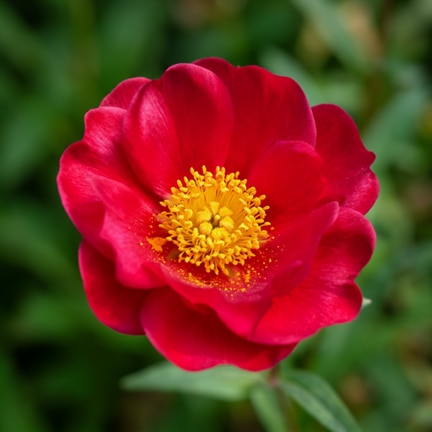
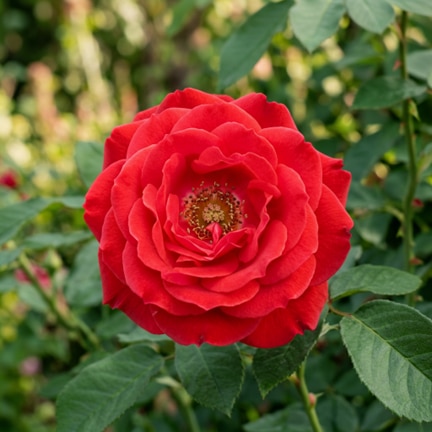
All three prompts successfully generated 1024×1024 images. The Prompt Enhancer automatically expanded each input into a detailed Chinese description for generation.
Prompt 1: "a photo of a flower with a red petal and yellow center"
Revised prompt (generated by PE): “一张高清微距摄影照片,展示了一朵盛开的鲜花。花朵位于画面中心,构图平衡,背景为深度虚化的自然绿色植被。花瓣呈现出鲜艳的深红色,质地轻薄且带有细腻的丝绸光泽...”
Prompt 2: "一朵鲜艳的玫瑰"
Prompt 3: "A photograph of the Straw Hat Pirates drawn on a glass whiteboard with a faded green marker, front view, 4K resolution."
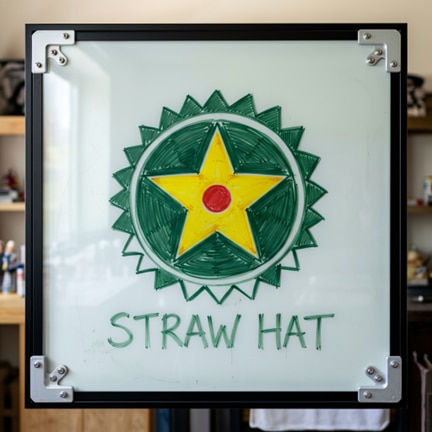
With 288 GB of HBM3e, MI355X provides ample headroom for full single-card deployment. The remaining memory leaves room for batch generation, higher resolutions, or running multiple model instances in parallel.
Technical Notes
ROCm and CUDA Compatibility
Thanks to ROCm’s HIP compatibility layer, PyTorch-based model code runs on AMD GPUs with zero modifications:
- torch.cuda.is_available() → returns True
- model.to("cuda") → correctly maps to AMD GPU
- torch.cuda.manual_seed_all() → works as expected
- torch.Generator(device="cuda") → works as expected
CUDA to ROCm Migration Reference
When migrating from NVIDIA to AMD, the following items require attention:
Item |
NVIDIA (CUDA) |
AMD (ROCm) |
Action |
CUBLAS_WORKSPACE_CONFIG |
Required |
Not applicable |
Remove |
torch.backends.cudnn.* |
cuDNN config |
Uses MIOpen |
Remove related settings |
torch.use_deterministic_algorithms |
Supported |
Partial support |
Remove if needed |
torch.cuda.* API |
Native |
HIP compatibility layer |
No changes needed |
Attention backend |
Flash Attention / cuDNN |
AOTriton |
Automatically selected |
AOTriton is the AMD Triton-based attention kernel optimized for the ROCm platform. PyTorch automatically selects it asselects the Scaled Dot-Product Attention backend during inference.
Docker Image Selection
For MI355X GPUs (gfx950), use ROCm 7.0+ PyTorch images. The rocm/pytorch repository on DockerHub provides pre-built options:
- Stable: rocm/pytorch:rocm7.2.1_ubuntu24.04_py3.12_pytorch_release_2.9.1
- Nightly: rocm/pytorch-nightly:2026-03-19-rocm7.2
The stable release is recommended for reliability.
R9700 Adaptation: Running a 29.5GB Model on a 32GB Card
This section covers the adaptation needed to run ERNIE-Image on the AMD Radeon AI PRO R9700 Series graphics card. Unlike the MI355X GPUs with its 288 GB of HBM3e, the R9700 has 32 GB of GDDR6, which requires a memory-aware deployment strategy.
VRAM Analysis
The full ERNIE-Image model in bfloat16 occupies approximately 29.5 GB. Loading each component onto the R9700 shows the following cumulative VRAM usage:
Load Order |
Component |
Incremental |
Cumulative |
Remaining |
1 |
Text Encoder |
7.18 GiB |
7.18 GiB |
22.68 GiB |
2 |
Prompt Enhancer |
6.38 GiB |
13.56 GiB |
16.30 GiB |
3 |
VAE |
0.17 GiB |
13.73 GiB |
16.13 GiB |
4 |
Transformer |
14.96 GiB |
28.69 GiB |
1.17 GiB |
Although all model parameters fit in VRAM, the remaining ~1.17 GiB is not enough to hold the intermediate tensors required during inference (attention computation, activations, etc.). A direct pipe.to("cuda") call results in an out-of-memory error during the transformer’s forward pass.
Solution:enable_model_cpu_offload()
Diffusers’ enable_model_cpu_offload() mechanism allows the pipeline components to time-share a single GPU:
- Prompt Enhancer loads to GPU → enhances the prompt → offloads back to CPU
- Text Encoder loads to GPU → encodes the text → offloads back to CPU
- Transformer loads to GPU → runs 50 denoising steps → offloads back to CPU
- VAE loads to GPU → decodes the image → offloads back to CPU
Since each inference stage runs sequentially, peak VRAM usage only needs to accommodate the single largest component (the Transformer at 14.96 GiB) plus intermediate tensors. This keeps peak VRAM well within the card’s 32 GB capacity.
R9700 Container Setup
The R9700 container setup is similar to MI355X GPUs, with a few differences:
		docker run -d --name ernie-image-radeon \
  --device=/dev/kfd --device=/dev/dri \
  --group-add video --group-add render \
  --cap-add=SYS_PTRACE --security-opt seccomp=unconfined \
  --shm-size=16G \
  -v /path/to/model:/workspace/ERNIE-Image \
  rocm/pytorch:rocm7.2_ubuntu24.04_py3.12_pytorch_release_2.9.1 \
  sleep infinity
Notable differences from the MI355X setup:
- --cap-add=SYS_PTRACE --security-opt seccomp=unconfined: Required for RDNA 4 debugging and profiling support
- --shm-size=16G: Reduced from 64G (sufficient for single-card workstation use)
- Docker image uses rocm7.2 (matching the R9700 host ROCm version)
Install dependencies the same way:
		docker exec ernie-image-radeon bash -c "
  git clone https://github.com/HsiaWinter/diffusers /workspace/diffusers-ernie
  cd /workspace/diffusers-ernie && git checkout add-ernie-image
  pip install -e .
  pip install accelerate Pillow transformers
"
R9700 Inference Script
The only difference from the MI355X script is replacing pipe.to("cuda") with pipe.enable_model_cpu_offload():
		import os
import random

import numpy as np
import torch
from diffusers import ErnieImagePipeline

seed = random.randint(0, 100000)
print(f"seed: {seed}")
random.seed(seed)
np.random.seed(seed)
torch.manual_seed(seed)
torch.cuda.manual_seed_all(seed)

# Load pipeline
pipe = ErnieImagePipeline.from_pretrained(
    "/workspace/ERNIE-Image",
    torch_dtype=torch.bfloat16,
)

# R9700 adaptation: use CPU offload for time-sharing a single card
pipe.enable_model_cpu_offload()

pipe.transformer.eval()
pipe.vae.eval()
pipe.text_encoder.eval()
pipe.pe.eval()

# Generate images
generator = torch.Generator(device="cpu").manual_seed(seed)

prompt_list = [
    "a photo of a flower with a red petal and yellow center",
    "一朵鲜艳的玫瑰",
    "A photograph of the Straw Hat Pirates drawn on a glass whiteboard "
    "with a faded green marker, front view, 4K resolution."
]

for idx, prompt in enumerate(prompt_list):
    output = pipe(
        prompt=prompt,
        height=1024,
        width=1024,
        num_inference_steps=50,
        guidance_scale=5.0,
        generator=generator,
    )
    output.images[0].save(f"ernie_output_{idx+1}.png")
    print(f"Revised prompt: {output.revised_prompts}")
Key adaptation detail: When using enable_model_cpu_offload(), the torch.Generator must be set to device="cpu" (not "cuda"), because the offload mechanism automatically manages device migration.
Results
All three prompts successfully generated 1024×1024 images on the R9700 series graphics card, with the Prompt Enhancer functioning correctly to produce detailed Chinese-language enhanced prompts.
This confirms that a professional 32 GB AMD card can run ERNIE-Image successfully without model surgery, quantization, or multi-GPU sharding — only a one-line change to the loading strategy.
Conclusion
This validation demonstrates that:
- ERNIE-Image runs on AMD Instinct MI355X GPUs with no core code changes. The standard Diffusers pipeline works through ROCm’s HIP compatibility layer.
- ERNIE-Image also runs on AMD Radeon AI PRO R9700 series graphics, requiring only a switch from pipe.to("cuda") to pipe.enable_model_cpu_offload() to fit within the 32 GB VRAM constraint.
- The HuggingFace Diffusers framework is well supported on ROCm software, with pipeline loading, model inference, and image generation all working smoothly across both CDNA 4 and RDNA 4 architectures.
- MI355X’s 288 GB HBM3e provides ample room for single-card deployment, with headroom for batch generation, higher resolutions, or multi-instance serving. R9700’s 32 GB GDDR6 makes single-card inference practical through Diffusers’ built-in offload mechanism.
- Diffusers’ enable_model_cpu_offload() provides an out-of-the-box solution for memory-constrained scenarios, enabling professional and workstation-class GPUs to run large text-to-image models.
AMD GPUs — from data-center Instinct to professional Radeon, combined with the ROCm software stack offer a credible, high-compatibility inference platform for models like ERNIE-Image. For teams evaluating multi-vendor AI infrastructure, this is a practical data point: ROCm plus Diffusers works.
Footnotes
Appendix: Quick Reproduction Guide
MI355X GPU
# 1. Pull image
docker pull rocm/pytorch:rocm7.2.1_ubuntu24.04_py3.12_pytorch_release_2.9.1
# 2. Create container
docker run -d --name ernie-image \
--device=/dev/kfd --device=/dev/dri \
--group-add video --group-add render \
--shm-size=64G \
-v /path/to/workspace:/workspace \
rocm/pytorch:rocm7.2.1_ubuntu24.04_py3.12_pytorch_release_2.9.1 \
sleep infinity
# 3. Install dependencies
docker exec ernie-image bash -c "
git clone https://github.com/HsiaWinter/diffusers /workspace/diffusers-ernie
cd /workspace/diffusers-ernie && git checkout add-ernie-image
pip install -e .
pip install accelerate Pillow transformers
"
# 4. Unpack model and run inference
docker exec ernie-image bash -c "
cd /workspace && tar xf ERNIE-Image.tar
python3 test_ernie_image.py
"
Radeon AI PRO R9700
# 1. Pull image
docker pull rocm/pytorch:rocm7.2_ubuntu24.04_py3.12_pytorch_release_2.9.1
# 2. Create container
docker run -d --name ernie-image-radeon \
--device=/dev/kfd --device=/dev/dri \
--group-add video --group-add render \
--cap-add=SYS_PTRACE --security-opt seccomp=unconfined \
--shm-size=16G \
-v /path/to/workspace:/workspace \
rocm/pytorch:rocm7.2_ubuntu24.04_py3.12_pytorch_release_2.9.1 \
sleep infinity
# 3. Install dependencies
docker exec ernie-image-radeon bash -c "
git clone https://github.com/HsiaWinter/diffusers /workspace/diffusers-ernie
cd /workspace/diffusers-ernie && git checkout add-ernie-image
pip install -e .
pip install accelerate Pillow transformers
"
# 4. Unpack model and run inference (script uses enable_model_cpu_offload)
docker exec ernie-image-radeon bash -c "
cd /workspace && tar xf ERNIE-Image.tar
python3 test_ernie_image_radeon.py
"
Key difference: The R9700 inference script uses pipe.enable_model_cpu_offload() instead of pipe.to("cuda"), and torch.Generator uses device="cpu".
Footnotes
Appendix: Quick Reproduction Guide
MI355X GPU
# 1. Pull image
docker pull rocm/pytorch:rocm7.2.1_ubuntu24.04_py3.12_pytorch_release_2.9.1
# 2. Create container
docker run -d --name ernie-image \
--device=/dev/kfd --device=/dev/dri \
--group-add video --group-add render \
--shm-size=64G \
-v /path/to/workspace:/workspace \
rocm/pytorch:rocm7.2.1_ubuntu24.04_py3.12_pytorch_release_2.9.1 \
sleep infinity
# 3. Install dependencies
docker exec ernie-image bash -c "
git clone https://github.com/HsiaWinter/diffusers /workspace/diffusers-ernie
cd /workspace/diffusers-ernie && git checkout add-ernie-image
pip install -e .
pip install accelerate Pillow transformers
"
# 4. Unpack model and run inference
docker exec ernie-image bash -c "
cd /workspace && tar xf ERNIE-Image.tar
python3 test_ernie_image.py
"
Radeon AI PRO R9700
# 1. Pull image
docker pull rocm/pytorch:rocm7.2_ubuntu24.04_py3.12_pytorch_release_2.9.1
# 2. Create container
docker run -d --name ernie-image-radeon \
--device=/dev/kfd --device=/dev/dri \
--group-add video --group-add render \
--cap-add=SYS_PTRACE --security-opt seccomp=unconfined \
--shm-size=16G \
-v /path/to/workspace:/workspace \
rocm/pytorch:rocm7.2_ubuntu24.04_py3.12_pytorch_release_2.9.1 \
sleep infinity
# 3. Install dependencies
docker exec ernie-image-radeon bash -c "
git clone https://github.com/HsiaWinter/diffusers /workspace/diffusers-ernie
cd /workspace/diffusers-ernie && git checkout add-ernie-image
pip install -e .
pip install accelerate Pillow transformers
"
# 4. Unpack model and run inference (script uses enable_model_cpu_offload)
docker exec ernie-image-radeon bash -c "
cd /workspace && tar xf ERNIE-Image.tar
python3 test_ernie_image_radeon.py
"
Key difference: The R9700 inference script uses pipe.enable_model_cpu_offload() instead of pipe.to("cuda"), and torch.Generator uses device="cpu".


Related Blogs
-
AI Across Industries: How AMD Technologies Are Powering the Next Wave of Enterprise Transformation
AI is reshaping every industry. Explore how leading enterprises are using AMD-powered AI infrastructure to accelerate innovation, improve efficiency, and drive business transformation.
June 18, 2026
-
Comparative Analysis of Scale-Out RoCE Network Traffic Patterns and Loads in Training Large Language Models — ROCm Blogs
Compares RoCE network traffic patterns and loads across GPT-4, Llama 3, DeepSeek-V2, and Grok 4.0 LLM training to guide AI infrastructure design.
June 17, 2026
-
Building and Deploying Custom hipBLASLt Libraries on AMD Instinct GPUs — ROCm Blogs
Learn how to manage hipBLASLt environments with custom source builds, RPM/DEB packaging, and version switching on AMD Instinct GPUs.
June 17, 2026
-
Efficient and Portable 3D Explorable World Generation on AMD GPUs — ROCm Blogs
Learn how to run Matrix3D world generation on AMD GPUs more smoothly and efficiently.
June 17, 2026
-
HandBrake 1.11.0 Improves AMD Ryzen™ Threadripper™ and Threadripper™ PRO Scaling
AMD-contributed HandBrake 1.11.0 fixes improve thread management and transcoding performance on high-core-count Threadripper systems.
June 17, 2026
-
Scaling Foundation Models for Pharma Research with Bayer
Bayer deploys large-scale foundation models for histopathology on AMD Instinct™ GPUs and delivers improved training throughput at scale.
June 17, 2026
-
Utilizing AMD Schola and UnrealRoboticsLab with AMD ROCm™ Software to Train a Robotic Arm — ROCm Blogs
Learn how to combine MuJoCo physics, Unreal Engine, and Schola to train a 6-DOF robot arm with reinforcement learning on AMD hardware.
June 16, 2026
-
AMD Delivers Breakthrough MLPerf Training 6.0 Results
See how AMD Instinct GPUs deliver MLPerf Training 6.0 results across LLM workloads, multi-node FLUX.1 scale and partner validation.
June 16, 2026