Migrating to AMD-Powered EC2 Instances: A Practical Guide
Jan 16, 2026

So you've decided to make the move to AMD-powered AWS EC2 instances. Maybe you're doing it because of the performance and cost benefits, or the successful testing, or the recommendations you've gotten from AMD and its cloud partners. Whatever the reason, you're ready to switch, but what's next? Let's lay out a clear framework and note some helpful best practices to assist you in planning and executing your migration with confidence.
Why Migration Is Simpler Than You Think
If your workloads are already running on AWS EC2, moving to AMD-powered instances is one of the simplest migrations you'll ever do. You're not changing clouds, architectures, or operating systems; you're just switching the instance type.
At a high level, the process looks like this:
- Validate that you can migrate the instance to an AMD-based EC2 type.
- Back up the instance.
- Stop the instance (don't terminate it!).
- Change the instance type to an AMD-powered option.
- Start the instance and check that it's working normally.
Let's walk through each step in more detail.
Step 1: Validate That Your Instance Can Migrate
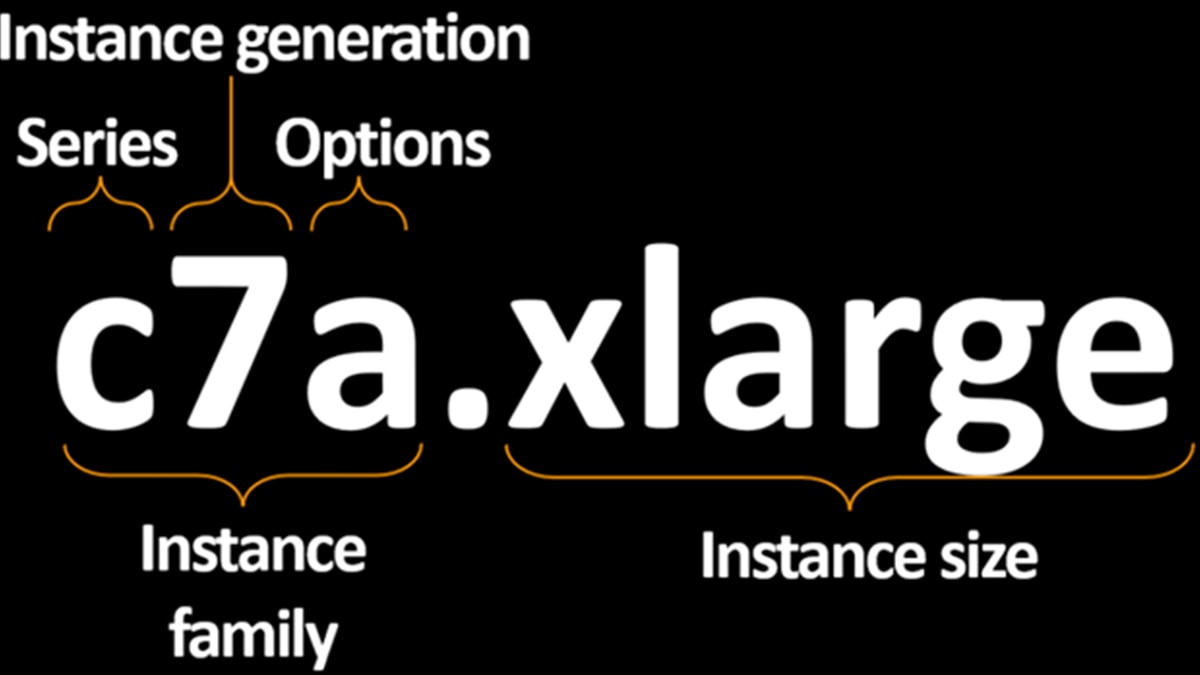
AWS instance names provide clues about their hardware. For example, take c7a.xlarge:
- c = Compute-optimized
- 7 = 7th generation
- a = AMD processor
- xlarge = Instance size (vCPU and RAM)
If you see types like g, m1ultra, m2, or m2pro, these typically refer to ARM-based (Graviton) instances, which use a completely different CPU architecture. Migrating from ARM to AMD (or Intel) requires application recompilation and deeper changes, not just a quick instance switch.
Most of today's software runs well on both AMD and Intel CPUs. But just in case, double-check vendor documentation for any Intel-only requirements and watch out for software that uses Intel-specific instruction sets (which is rare). This is especially important in regulated environments or for legacy software.
Some instance options, like "d" for instance store volumes, need attention. If your current instance uses instance store volumes, either make sure your AMD-powered target supports them or switch to EBS.
Step 2: Back Up the Instance
Backing up before any significant change is just common sense, and it's critical in production environments. Here are your options:
- EBS Snapshot: Quick, easy backup of volumes.
- AMI: Great for capturing both data and configuration.
- Third-party tools: If you're already using a backup tool, just take a new recovery point.
Pro tip: Even if you already do nightly backups, create a fresh one right before migration. That way, rollback is painless if something goes wrong.
Step 3: Stop the Instance
Stopping an instance is easy. Just remember not to terminate it. Terminating the instance will destroy it and potentially remove attached volumes, especially if "Delete on Termination" is set. Once the instance is stopped, you're safe to modify it.
Step 4: Change the Instance Type
This is the actual migration step. You can do this using:
AWS Console
- Ideal for small migrations or test/dev environments.
- Manual, so it's more error-prone for production use.
AWS CLI/PowerShell/Boto3
- Best for repeated tasks or larger environments.
- Scriptable, so faster, and helping to reduce human error.
AWS SSM Documents
- Offers automation and integration with AWS Systems Manager.
- More complex to set up, but scalable for enterprise use.
Choose the tool you're most comfortable with. I prefer PowerShell because it lets me build logic, add validation, and reuse objects, but if you're a CLI or Python shop, go with what your team knows.
Step 5: Start the Instance and Validate
Once the new AMD-powered instance starts:
- Wait for EC2 health checks to pass.
- Test your applications or services: log in, check logs, run health probes.
- Monitor performance to verify things are working as expected. If everything looks good, you're done!
What If Something Breaks?
In rare cases, something might not work after switching instance types. Here are your two recovery options:
Option 1. Revert to the Original Instance Type
This is usually the fastest fix:
- Stop the instance again.
- Change it back to the previous type.
- Start it and validate.
This process often resolves any startup or compatibility issues.
Option 2. Restore from Backup
If reverting doesn't work, fall back to your EBS Snapshot or AMI:
- Launch a new instance from the AMI.
- Or restore volumes from the EBS snapshot.
Restoring from an AMI creates a new instance, so if you want to keep the original instance, you'll need to attach restored volumes manually.
Migration Can Become Routine
Switching your EC2 workloads to AMD-powered instances is one of the lowest-effort optimizations you can make in the cloud:
- It's easy to validate.
- It's easy to back up.
- It's easy to switch.
- You get immediate cost and performance gains.
Even better, the process can be automated. Think of it as a reboot with benefits. Some workloads, such as Microsoft SQL Server, may need more time to shut down smoothly due to memory flushes, but you can plan for such issues during maintenance windows or patch cycles.
Migrating to AMD-powered EC2 instances isn't just a smart technical move; it's often a smart financial one, too. With modern chip architecture, strong security features, and competitive pricing, AMD EPYC™ processors on AWS are built to help you do more, faster, for less. If you're already on AWS, there's no better time to switch. And if you're thinking about optimizing your cloud spend or boosting application performance, AMD-powered EC2 instances are a great place to start.
Don't Go It Alone
Whether you're modernizing, downsizing, or simply looking for cost efficiency, AMD offers tools and expertise to guide the way. The AMD EPYC Advisory Suite can help you identify the right EC2 instance for your workload, and AMD works closely with AWS partners to deliver tailored solutions. Many organizations combine several strategies across different workloads for maximum ROI. If you need help deciding what fits your architecture best, AMD and its partners are ready to assist. To offer feedback on this post or to suggest future topics, feel free to reach out at AWS@AMD.com.

Related Blogs
-
EPYC CPUs Deliver for Every Layer of the Agentic AI Stack
Agentic systems combine multiple CPU roles into a workflow. The latest AMD EPYC CPU generation lets customers optimize for each task.
September 18, 2026
-
Building Infrastructure for an AI World in Motion
The biggest risk is not choosing the wrong technology today. It is building infrastructure that cannot adapt tomorrow.
September 17, 2026
-
Advancing AI 2026: From Gigawatt Data Centers to Agentic PCs
Explore how AMD connects data center, cloud, and local AI to enable secure, cost-aware agentic workflows across enterprise PCs.
September 16, 2026
-
From LEAP 2026: Advancing AI Across the Middle East
At LEAP 2026, AMD’s role helping build open AI infrastructure and turn investments into measurable business and economic value was on display.
September 09, 2026
-
Optimize SQL Server Costs with AMD on AWS
Optimize SQL Server licensing costs on AWS with AMD-powered Amazon EC2 and Amazon RDS instances while maintaining performance.
September 03, 2026
-
The Data Center Math has Changed
Run more work on fewer servers to reduce power, space and licensing costs while creating capacity for what comes next.
September 02, 2026
-
Optimizing ATOM and vLLM-ATOM for High-Interactivity Inference — ROCm Blogs
Cut per-token latency on AMD Instinct MI355X GPUs: see how ATOM, vLLM-ATOM, and AITER strip fixed costs out of the LLM decode path.
August 31, 2026
-
Modern Security from Silicon to OS: Why SMBs Should Move Beyond Windows Server 2016
Windows Server 2016 support is ending. Modernize SMB and ROBO security with Windows Server 2025 and AMD EPYC 4005 CPUs.
August 17, 2026