Windows Local AI: AI model deployment using Windows ML on AMD NPU
Apr 20, 2026

The rise of on-device AI has transformed how we build intelligent applications. With Windows ML and the AMD Ryzen™ AI NPU, developers can now deploy high-performance AI models directly on Windows devices, enabling faster inference, enhanced privacy, and reduced latency. This blog explores how to leverage Windows ML to deploy ONNX models on AMD NPU, covering everything from setup to execution.
What is Windows ML?
Windows ML is part of Microsoft's Windows AI platform, which includes three key components:
Windows Foundry |
Description |
| Windows AI APIs | Provides access to pre-trained AI models for common tasks like OCR, object detection, image segmentation, and language detection |
| Foundry Local | An on-device AI runtime for LLMs that automatically detects available hardware (CPU, GPU, NPU) and downloads compatible models |
| Windows ML | A shared runtime that manages ONNX Runtime execution providers across CPU, GPU, and NPU |
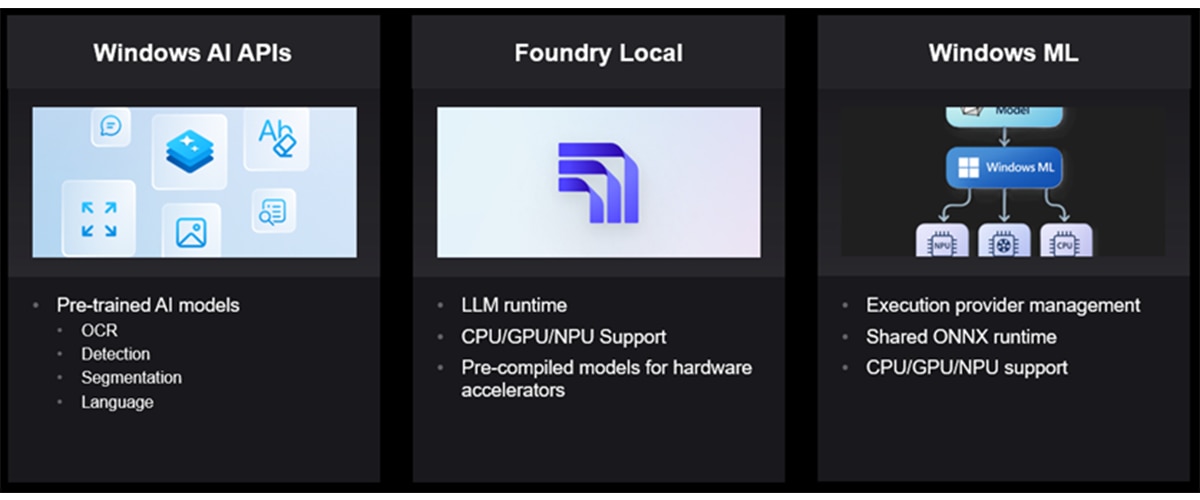
Windows ML enables developers to run ONNX models locally using C++, C# or Python, with automatic execution provider (EP) management across different hardware accelerators. It supports models from popular frameworks like PyTorch, TensorFlow, TFLite, and scikit-learn after conversion to ONNX format.
Key Features of Windows ML
- Automatic EP management: Windows ML automatically downloads the latest execution providers based on available hardware
- Shared ONNX Runtime: A Windows-wide shared ONNX Runtime reduces application size
- Broad Hardware Support: Seamless support for CPUs, GPUs, and NPUs through ONNX Runtime
- Flexible Deployment: Support for multiple programming languages and model types
Why Windows ML for Application Developers?
Simplified AI Integration
Windows ML removes the complexity of manual hardware configuration and framework integration. The platform automatically detects and uses the best available hardware (NPU, GPU, or CPU) without requiring developers to write device-specific code. Execution providers are downloaded and registered automatically, eliminating setup headaches. Additionally, Windows ML works seamlessly with models from PyTorch, TensorFlow, TFLite, and scikit-learn via ONNX conversion, giving you flexibility in your model development workflow.
Reduced Development Complexity
The platform significantly reduces development complexity by providing a Windows-wide shared ONNX Runtime that minimizes your application size. Developers benefit from flexible multi-language support, allowing them to deploy solutions using C#, C++, or Python based on their preferences and project requirements. Additionally, the consistent API design ensures that the same code works seamlessly across different hardware accelerators, eliminating the need to rewrite implementations for various platforms.
Enhanced User Experience
The solution delivers enhanced user experience through on-device inference that provides low latency by eliminating network round-trips, ensuring faster response times. Privacy is prioritized as sensitive data never leaves the device, giving users complete control over their information. The offline capability means AI features remain fully functional without internet connectivity, making the application reliable in any environment. Additionally, the approach is cost-effective by removing cloud API costs and usage limits, allowing unlimited AI operations without ongoing expenses.
Production-Ready Performance
The platform offers production-ready performance by leveraging AMD Ryzen™ AI processors for efficient AI processing, delivering powerful acceleration for your AI workloads. Models are automatically optimized for the target hardware, eliminating manual tuning and ensuring peak performance without additional development effort. The system includes flexible fallback capabilities that automatically switch to GPU or CPU if the NPU is unavailable, guaranteeing consistent functionality across different hardware configurations and ensuring your application runs reliably on any device.
AMD NPU Execution Providers
Windows ML automatically registers several execution providers for AMD hardware:
- VitisAIExecutionProvider` for AMD Ryzen AI processors
- MIGraphXExecutionProvider` for AMD GPU acceleration using ROCm™ software
- CPUExecutionProvider` for running on default CPU
Prerequisites
Before getting started, ensure you have:
- Operating System: Windows 11 24H2 (build 26100 or later)
- Development Tools: Visual Studio 2022 (latest), VS Code with AI Toolkit
- Programming Languages: C++20+ or Python 3.10-3.12
- Drivers: Latest AMD NPU drivers installed
- SDK: Windows App SDK 1.8.5 or later (includes Windows ML)
Model Deployment Workflow
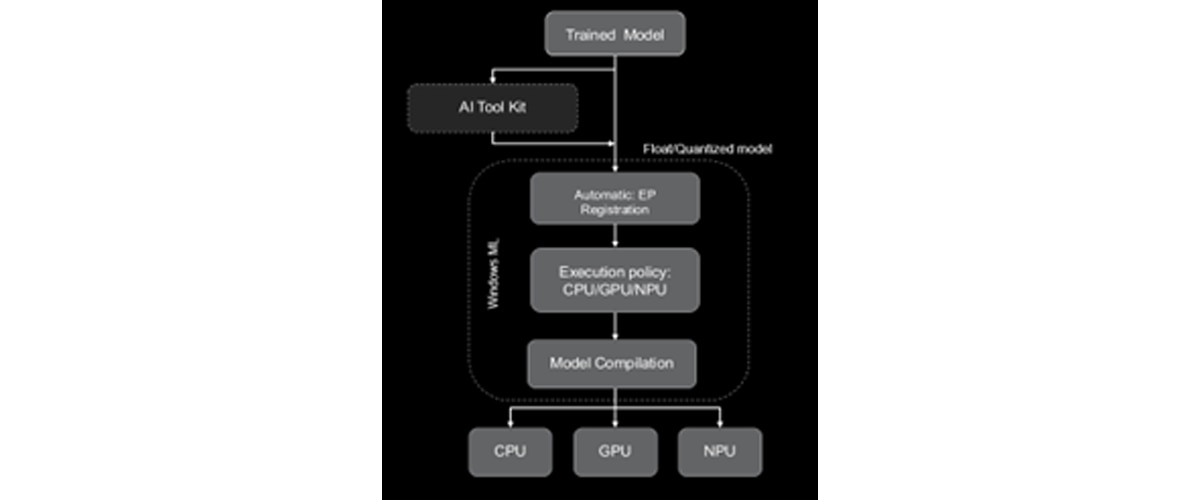
Step 1: Model Preparation
Start with an FP32 ONNX model exported from PyTorch, TensorFlow, or other frameworks. You have two options:
- When using the original FP32 model, Windows ML will automatically convert it to BF16 for NPU execution
- Quantize the model: Use VS Code AI Toolkit for better performance
- A8W8 quantization for CNN models
- A16W8 quantization for Transformer models
Step 2: Automatic EP management
Windows ML automatically discovers, downloads, and registers the latest execution providers. No manual configuration is required.
Step 3: Set Execution Policy
Configure your session to prefer NPU execution with automatic fallback to CPU if needed.
Available execution policies:
- PREFER_CPU: Uses CPUExecutionProvider
- PREFER_GPU: Uses DmlExecutionProvider / MLGraphXExecutionProvider
- PREFER_NPU: Uses VitisAIExecutionProvider
Step 4: Model Compilation
Windows ML performs a one-time compilation for the target execution provider:
- Float models: Automatic BF16 conversion using VAIML compiler
- Quantized models: Compiled with X2/X1 compiler
Step 5: Run Inference
Execute your model with the configured execution provider and enjoy accelerated inference on AMD NPU.
For step-by-step instructions refer to the examples:
- ResNet: https://github.com/amd/RyzenAI-SW/tree/main/WinML/CNN/ResNet
- OpenAI CLIP on AMD NPU: https://github.com/amd/RyzenAI-SW/tree/main/WinML/Transformers/clip-vit-base-patch16
Running Language Models on AMD NPU
Language Models (LLMs/SLMs) are enabled on AMD NPU through two primary pathways on Windows: Foundry Local and Windows ML APIs with ONNX Runtime GenAI (OGA).
Foundry Local provides a streamlined, high-level interface that abstracts the complexity of NPU deployment. It automatically detects available AMD hardware, downloads pre-optimized models, and configures the runtime environment without requiring manual intervention. This approach leverages Windows ML under the hood while providing a simplified developer experience, making it ideal for rapid prototyping and applications where ease of deployment is prioritized.
Windows ML APIs with OGA offer a more granular approach for developers who need direct control over the inference pipeline. Windows ML API handles the automatic execution provider management. Through the ONNX runtime GenAI APIs, developers can load custom or pre-quantized ONNX models, configure execution providers to target the NPU, and fine-tune inference parameters such as batch size, sequence length, and memory allocation. This pathway supports both AMD's pre-optimized models and custom models that have been quantized and converted to ONNX format, enabling maximum flexibility for performance optimization and integration into existing applications.
Both approaches leverage the same underlying NPU acceleration capabilities, with the choice between them depending on the level of control and customization required for your specific use case.
System Requirements
To run LM, your system must have Windows 10 or Windows 11 installed. The minimum requirements include 8GB of RAM and 3GB of available disk space, though for optimal performance, 16GB of RAM and 15GB of disk space are recommended. The application is designed to take advantage of AMD NPU acceleration, enabling efficient AI processing on compatible AMD Ryzen AI processors.
For Language Models, here a list of different deployment options to run on AMD NPU:
Foundry Local with Pre-Optimized Models
This deployment option provides minimal control but is ideal for developers who want to get started quickly without deep ML expertise. It requires minimal AI/ML knowledge and only a basic understanding of model inference, making it perfect for quick prototyping and testing with minimal setup.
Run the model supported in Foundry local using the following command:
		cd <RyzenAI-SW>\WinML\LLM
winget install Microsoft.FoundryLocal
foundry model run phi-4-mini
Sample Output:
		Downloading phi-4-mini-instruct-vitis-npu:2...
[####################################] 100.00 % [Time remaining: about 0s]       53.7 MB/s
Unloading existing models. Use --retain true to keep additional models loaded.
🕘 Loading model...
🟢 Model phi-4-mini-instruct-vitis-npu:2 loaded successfully
Interactive Chat. Enter /? or /help for help.
Press Ctrl+C to cancel generation. Type /exit to leave the chat.
Interactive mode, please enter your prompt
> What is an AI accelerator?
🧠 Thinking...
🤖 An AI accelerator is specialized hardware designed to enhance the training and inference tasks of AI and machine learning models. Just as GPUs (Graphics Processing Units) are specialized hardware used to improve the training and execution of deep learning tasks, AI accelerators are similarly specialized and optimized hardware designed to provide faster and more energy-efficient training and inference operations for AI tasks.
For step-by-step instructions refer to the example:
https://github.com/amd/RyzenAI-SW/tree/main/WinML/LLM#running-llm-using-foundry-local
Custom LM via Windows ML and OGA APIs
This option offers maximum control over your deployment and is designed for advanced users who need full control over model architecture, custom optimizations, and fine-tuning for specific use cases. It requires advanced AI/ML expertise, including a deep understanding of model architecture, quantization, and optimization techniques.
Use the following command to set up the python environment and install dependencies:
		conda create -n winml_olive python=3.10
conda activate winml_olive
cd <RyzenAI-SW>\WinML\LLM
pip install --force-reinstall -r requirements_olive.txt
pip install torch==2.7.1 torchvision==0.22.1 torchaudio==2.7.1 --index-url https://download.pytorch.org/whl/cu128
For `Phi-4-mini-Instruct` model, download and quantize / optimize the model using olive recipe.
olive run --config Phi-4-mini-instruct_quark_vitisai_llm.json
Then use the generated ONNX model with `run_genai_llm.py` inference script to run on AMD NPU/CPU
		cd <RyzenAI-SW>\WinML\LLM
conda create -n winml_llm --clone python=3.11
conda activate winml_llm
pip install -r .\requirements.txt
		python run_genai_llm.py --model models\phi-4-mini-instruct-vai-npu --interactive
============================================================
Registering Execution Providers
============================================================
[INFO] Initializing WinAppSDK 2.0-experimental5...
[INFO] WinAppSDK 2.0-experimental5 initialized
[INFO] Available Execution Providers in WinML catalog:
       (Note: CPU EP is built-in to ONNX Runtime and not shown here)
  1. VitisAIExecutionProvider (Status: NOT_READY)
[INFO] Ensuring VitisAIExecutionProvider (state: 1)...
[INFO] VitisAIExecutionProvider is ready
[INFO] Registered VitisAIExecutionProvider to ONNX GenAI
[INFO] Library path: C:\Program Files\WindowsApps\MicrosoftCorporationII.WinML.AMD.NPU.EP.1.8_1.8.51.0_x64__8wekyb3d8bbwe\ExecutionProvider\onnxruntime_providers_vitisai.dll
C:\Users\dwchenna\github\dwchenna\RyzenAI-SW\WinML\LLM\run_genai_llm.py:347: RuntimeWarning: Shutdown object was not called before being garbage collected.
  if not register_vitisai_ep():
============================================================
Loading model from: models\Phi-4-mini-instruct-vai-npu
============================================================
[INFO] Using VitisAI Execution Provider (configured in genai_config.json)
[INFO] Loading model (this may take a minute)...
[INFO] ✓ Model loaded successfully
[INFO] Creating tokenizer...
[INFO] ✓ Tokenizer created
============================================================
Interactive Mode
============================================================
Type your prompt and press Enter
Type 'quit', 'exit', or 'q' to exit
Press Enter without text for default prompt
============================================================
Prompt: What is AI accelerator?
Response:  An AI accelerator is specialized hardware designed to enhance the efficiency and speed of training and deploying AI and deep learning models.
For step-by-step instruction, refer to GitHub exampe: https://github.com/amd/RyzenAI-SW/tree/main/WinML/LLM#run-custom-llm-model-using-windows-ml-apis
Summary of different deployment options for LLM on AMD NPU:
| Deployment Option | Control | Expertise required | Best use case |
Foundry Local with pre-optimized models |
Minimal |
Minimal AI/ML knowledge; basic understanding of model inference |
Quick prototyping and testing with minimal setup; ideal for developers who want to get started quickly without deep ML expertise |
Custom LM via Windows ML and OGA APIs |
Maximum |
Advanced AI/ML expertise; deep understanding of model architecture, quantization, and optimization techniques |
Advanced users who need full control over model architecture, custom optimizations, and fine-tuning for specific use cases |
Table 2. Summary of different deployment options for LLMs on AMD NPU
Additional Examples
Explore more advanced examples in the RyzenAI-SW repository:
- ResNet: https://github.com/amd/RyzenAI-SW/tree/main/WinML/CNN/ResNet
- GoogleBERT Transformer: https://github.com/amd/RyzenAI-SW/tree/main/WinML/Transformers/GoogleBert
- OpenAI CLIP on AMD NPU: https://github.com/amd/RyzenAI-SW/tree/main/WinML/Transformers/clip-vit-base-patch16
- LLMs on AMD NPU: https://github.com/amd/RyzenAI-SW/tree/main/WinML/LLM
Conclusion
AMD provides multiple deployment pathways to accommodate different developer needs and expertise levels. Whether you're looking for quick deployment with Foundry Local or need maximum control with custom models via Windows ML and OGA APIs, there's an option that fits your requirements. The pre-optimized AMD models offer an excellent balance between performance and ease of use.
References
- AMD Ryzen AI Documentation, WinML: Ryzen AI Software — Ryzen AI Software 1.7.0 documentation
- AMD Ryzen AI-SW GitHub Repository, WinML examples: https://github.com/amd/RyzenAI-SW/tree/main/WinML
- Windows ML documentation: Microsoft Foundry on Windows | Microsoft Developer
- ONNX runtime GenAI (OGA) documentation: microsoft/onnxruntime-genai: Generative AI extensions for onnxruntime

Related Blogs
-
EAGLE 4 on AMD Instinct GPUs
Discover how EAGLE-4 runs on AMD Instinct™ MI355X GPUs from day one with SGLang and ATOM.
October 20, 2026
-
RL inside World Models
Explore how failure-aware world model fine-tuning and improved PPO recipes make reinforcement learning more reliable, reproducible, and robust for robotic manipulation.
October 20, 2026
-
Introducing rocOpt: GPU-Accelerated Decision Optimization on AMD ROCm — ROCm Blogs
Run large-scale MILP, LP, QP, and vehicle routing problems on AMD Instinct GPUs - introducing rocopt, optimization built for ROCm.
October 19, 2026
-
Build a Private Cloud with AMD Ryzen AI Max
Enable GPU-accelerated VMs with AMD GPU passthrough, Proxmox VE and ROCm Software
October 19, 2026
-
FP16 GEMM Optimization on AMD RDNA™ 3 and RDNA™ 4 Architectures — ROCm Blogs
Learn how to build an FP16 GEMM kernel with WMMA on AMD RDNA 3 and RDNA 4, one optimization at a time, and approach hipBLASLt performance.
October 15, 2026
-
Day 0 Support for Muse Spark Open on AMD
AMD is excited to announce Day-0 support for Meta’s latest Muse Spark Open model family on AMD Instinct™ MI350X and MI355X GPUs
October 15, 2026
-
Introducing FastFlow SDK
Explore AMD FastFlow-SDK for local AI development on AMD Ryzen™ AI NPUs, from running models to customizing inference and optimizing operators with FastFlow, IRON, and HRX.
October 15, 2026
-
MiniCPM Day 0 Support Across AMD Hardware
Explore Day 0 support for MiniCPM-V 4.7 on AMD Radeon™ GPUs, Ryzen™ AI Max processors, and Ryzen™ AI NPUs for on-device AI inference.
October 14, 2026