Article Number: RSX2-INSTALL
Last Updated: February 9th, 2026
Overview
This article provides information on how to install AMD Software: Adrenalin Edition for Windows® and is organized into the following sections:
- Requirements
- Download Software and Drivers
- Setup and Install
- Potential Errors and Solutions
Requirements
AMD Software: Adrenalin Edition is supported on systems running compatible AMD Radeon™ Series Graphics and these operating systems:
- Windows® 11 version 21H2 and later
- Windows® 10 64-bit version 1809 and later
These requirements may change as new products and features are introduced. For more information, please check the latest AMD Software: Adrenalin Edition release notes.
Note: The steps outlined below are based on AMD Software: Adrenalin Edition 26.1.1 (Default Install) with an AMD Radeon™ RX 9070, and the screenshots used are for illustrative purposes only. Depending on your system configuration, some options and settings may not be available to you or exactly as shown in the examples provided.
Download Software and Drivers
AMD Software: Adrenalin Edition is available on the AMD Drivers and Support site and offers the following tools to help you find and download your drivers:
- Get Drivers with AMD Auto-Detect and Install Tool - Runs AMD Software Installer to check your system for compatible AMD products and gets the latest supporting drivers. To learn more, refer to article: Get Drivers with AMD Auto-Detect and Install Tool
- Product Selector - Manually find drivers using product search and menus. To learn more, refer to article: How to Find Drivers for AMD Graphics Products
Setup and Install
These steps are based on AMD Software: Adrenalin Edition and screenshots used are for illustrative purposes only. Depending on your system configuration some options and settings may not be available to you, or exactly as shown in the examples provided. For instructions on unattended installation using the command line interface refer to: Radeon™ Software Command Line Installation User Guide
Note: Consider closing all open applications and temporarily disable anti-virus, firewall, remote access, and streaming services, before running setup to avoid potential conflicts.
To setup and install AMD Software: Adrenalin Edition, follow these steps:
- After the download is complete, open the save folder and double-click the file to begin setup.
- Click Yes to unpack the setup files. Note: It is recommended to use the default location.
- AMD Software Installer should automatically launch and check the system for driver and software compatibility.
- Review the End Under License Agreement , AI Acceptable Use Policy and the AI Bundle End-User License Agreement(s). If you agree to the EULA terms and conditions continue with the installation.
- Click Accept & Express Install to use default settings for standard installation.
- Software Type:
- Default - Provides all AMD Software features and controls for gaming, recording, streaming, and tweaking your performance on your graphics hardware.
- Minimal - Provides only the basic controls for AMD Software features and does not include advanced features such as performance tweaking or recording and capturing content.
- Driver Only - Provides no user interface for AMD Software features.
- Install Location - For changing the default install location. Note: It is recommended to use the default location (C:\Program Files\AMD) for installation.
- Factory Reset (Optional) - Removes all prior versions of the AMD Software Package and temporarily pauses Windows Updates on your system. The AMD Software Installer will restart the system after removing all the existing versions and will automatically continue the installation upon reboot. Note: You will not be able to roll back to the previously installed drivers.
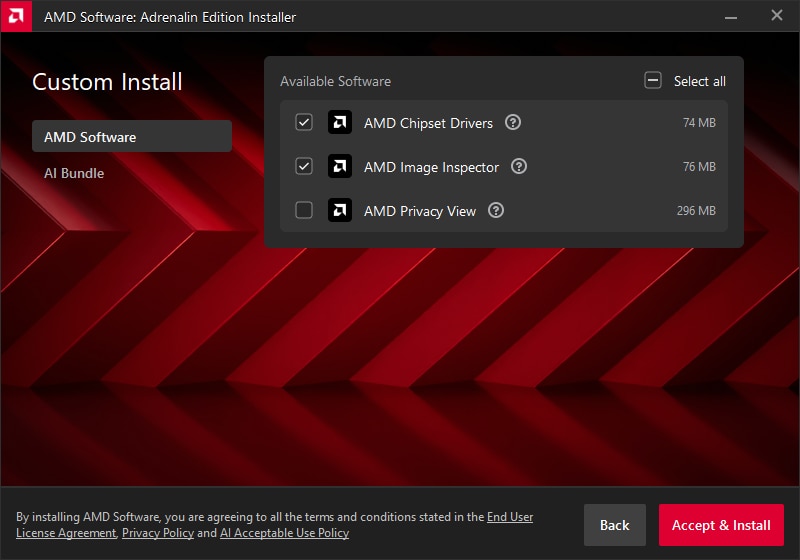
- Custom Install – Allows users to choose available components / features as shown in the examples below:
AMD Software
AI Bundle
- Upon choosing Accept & Express Install or Accept & Install (for custom features) the installation should begin. It is normal for the display to flicker momentarily while changes are being applied.
- Click Close to complete the Installation.
Note: To automatically launch AMD Radeon Software: Adrenalin Edition after installation, check the box for "Launch AMD Software: Adrenalin Edition". Also, you can choose to enable or disable the option for automatic updates if you want to keep the AMD software current.
- Click Manage Downloads to launch the AMD Install Manager.
Note this option is only available when Custom Install - AMD Software is selected as shown below
- Click the Install button for each component you want to install or update.
Potential Errors and Solutions
When the AMD Software Installer encounters a problem during setup an error message for the issue will be displayed. See below for a list of potential install errors with links to articles containing recommended solutions:
- Error 1604 - AMD Software Installer cannot proceed as some previous AMD Software applications failed to correctly uninstall
- Error 1603 - A general error has occurred during the installation of the AMD Software Package.
- Error 213 - AMD Software Installer cannot update USB-C power delivery firmware.
- Error 212 - AMD Software Installer cannot proceed as your system has a mapped network drive which cannot be accessed.
- Error 211 - AMD Software Installer cannot proceed as the specified directory for installation has access restrictions.
- Error 207 – AMD Software installation completed successfully but Windows detected a potential issue with your graphics device.
- Error 206 - AMD Software Installer cannot proceed due to a pending Windows install or update. Please restart Windows before running AMD Software Installer.
- Error 205 - AMD Software installation completed successfully but Windows Update may have reverted your driver version during the process.
- Error 202 - AMD Software Installer cannot proceed as a Windows Update is currently in progress.
- Error 196 - AMD Software Installer cannot continue because it is unable to download the driver package.
- Error 195 - AMD Software Installer cannot continue because it is unable to access the required web resources.
- Error 194 - AMD Software Installer cannot continue because it was unable to load the required files.
- Error 193 - AMD Software Installer cannot continue because required files are missing or corrupted.
- Error 192 - AMD Software Installer cannot continue due to an Operating System issue.
- Error 186 - AMD Software Installer cannot continue due to missing or corrupted manifest files.
- Error 184 - AMD Software Installer cannot continue due to an unsupported Operating System.
- Error 183 - AMD Software Installer cannot continue due to third party graphics drivers installed.
- Error 182 – AMD Software Installer detected AMD graphics hardware in your system configuration that is not supported.
- Error 176 - AMD Software Installer cannot continue due to insufficient disk space.
- Error 175 - AMD Software Installer cannot continue due to unsupported AMD graphics hardware.
- Error 174 - AMD Software Installer cannot continue due to an unsupported AMD graphics hardware configuration.
- Error 173 – AMD Software Installer cannot proceed as no AMD graphics hardware has been detected in your system.
- Error 99 - AMD Software Installer cannot continue because the driver being installed has not been digitally signed.
- Error 98 - AMD Software Installer cannot continue because driver files are missing.
© 2026 Advanced Micro Devices, Inc. The information contained herein is for informational purposes only and is subject to change without notice. While every precaution has been taken in the preparation of this document, it may contain technical inaccuracies, omissions and typographical errors, and AMD is under no obligation to update or otherwise correct this information. Advanced Micro Devices, Inc. makes no representations or warranties with respect to the accuracy or completeness of the contents of this document and assumes no liability of any kind, including the implied warranties of non-infringement, merchantability or fitness for particular purposes, with respect to the operation or use of AMD hardware, software or other products described herein. No license, including implied or arising by estoppel, to any intellectual property rights is granted by this document. Terms and limitations applicable to the purchase or use of AMD's products are as set forth in a signed agreement between the parties.